
Codex subscription to API
Connect your own supported Codex account and use it through Chat Completions or Responses.
TOOLPROFIEL TOOLAI
Use your Codex subscription through an AI API in your apps, tools and agents.
 Volledige afbeelding bekijken
HET GROTE GEHEEL
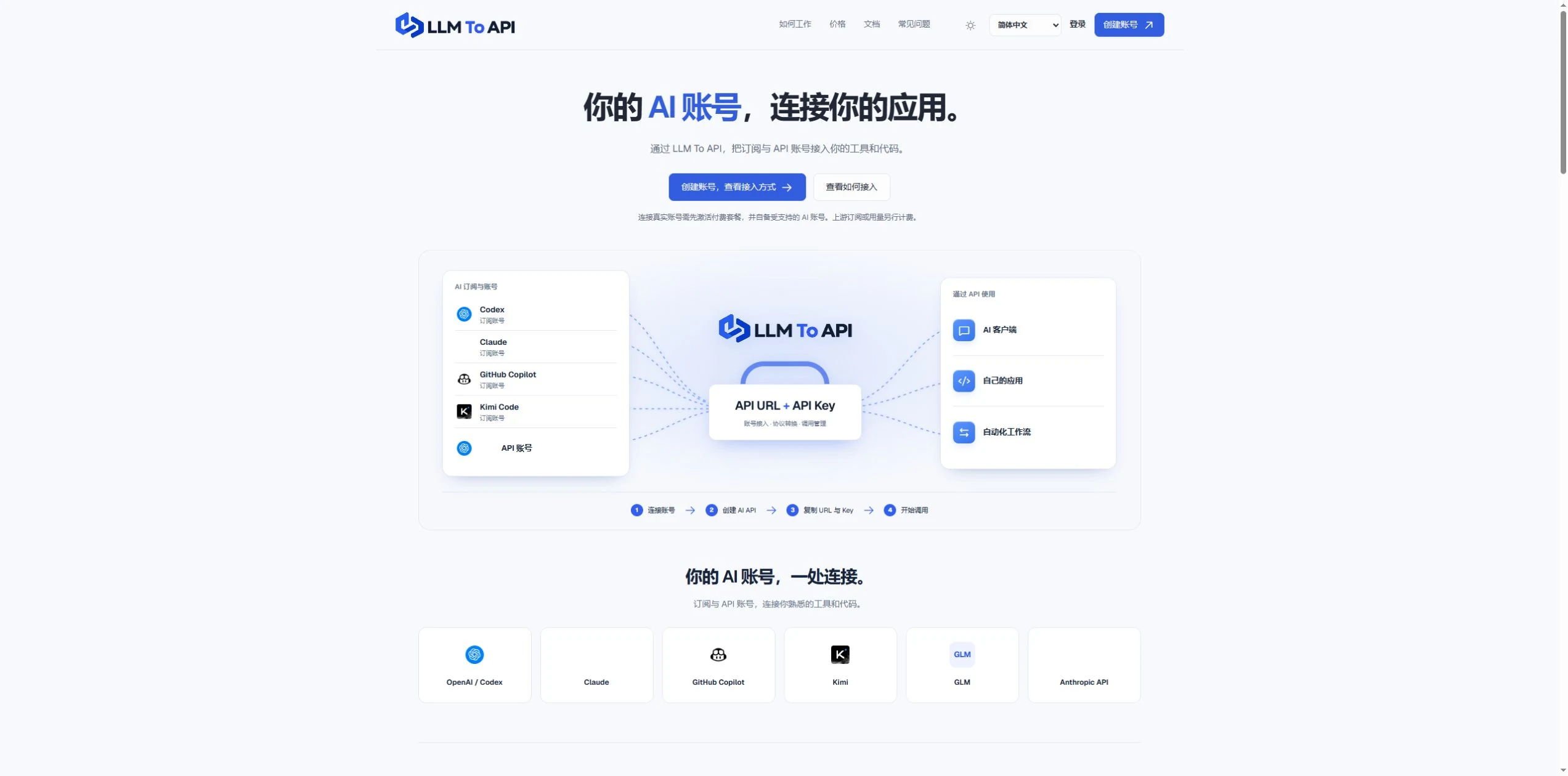
LLM To API provides a hosted connection between your supported AI accounts and the applications you use or build. Connect an account, create an API key, and copy the URL, key and model into a compatible client or your own code.
You do not need to deploy a gateway server or leave your computer running to forward requests. Separate application keys and request logs help you manage access and investigate errors in one place.
EEN NADERE BLIK
Verken productschermen en gepubliceerde voorbeelden. Open een afbeelding voor een nadere blik.
WAT JE KUNT DOEN
Ontdek de mogelijkheden. Vind je eigen manier om ze te gebruiken.
Connect your own supported Codex account and use it through Chat Completions or Responses.
Use a hosted endpoint without operating your own forwarding server.
Create keys for different apps, select models and set expiry when needed.
Inspect request status, models, timing and errors from the dashboard.
Use the provided configuration and code examples with a compatible API client or SDK.
GEMAAKT VOOR JOUW WERKWIJZE
Enter your API URL, key and model into a client that supports custom endpoints.
Add AI requests to your own website, application or agent workflow.
Give each application its own key and use request history to trace problems.
JE EERSTE STAPPEN
Register, verify your email and activate a platform plan.
Authorize a supported account or provide a supported provider API key.
Choose the source, models and optional expiry, then generate an application key.
Copy the connection settings into your tool and inspect the result in request logs.
PLAN JE VOLGENDE STAP
Starter $9.90/month; Pro $19.90/month. Provider subscriptions and API usage are separate.
Prijzen, gebruikslimieten en voorwaarden kunnen veranderen. Controleer de nieuwste gegevens op de officiële website van de tool voordat je je abonneert.
Bronnen gecontroleerd
Yes. Connect your own supported Codex account and use the available models through the API configuration shown in your dashboard.
No. The forwarding endpoint is hosted. Your client still needs internet access when making requests.
Not for clients that accept a custom API URL, key and model. Building your own application requires integration code.
No. You bring your provider account. Its model access, allowance and rate limits still apply.
Email support@llmtoapi.com.
VAN DE COMMUNITY
Log in om je ervaring te delen en anderen te helpen de juiste tool te vinden.
JE VOLGENDE ONTDEKKING

Een chatbot die vragen over belastingen beantwoordt.

AI-e-mailassistent die je helpt om snel perfecte e-mails te schrijven
MeetingCulture.ai combineert kunstmatige intelligentie (AI), grote taalmodellen en de diepgaande intelligentie van Decisions voor vergaderprocessen. Het biedt een volledig nieuwe interface om vergaderingen te plannen, uit te voeren en meer resultaten te behalen.
Moeite met het beheren van vragen aan de klantenservice? Clever Chat helpt je een aangepaste, AI-aangedreven chatbot te maken die speciaal voor je website is getraind. Probeer het nu gratis!
ZET JE VOLGENDE STAP
Bezoek de officiële website om de nieuwste functies te ontdekken en aan de slag te gaan.