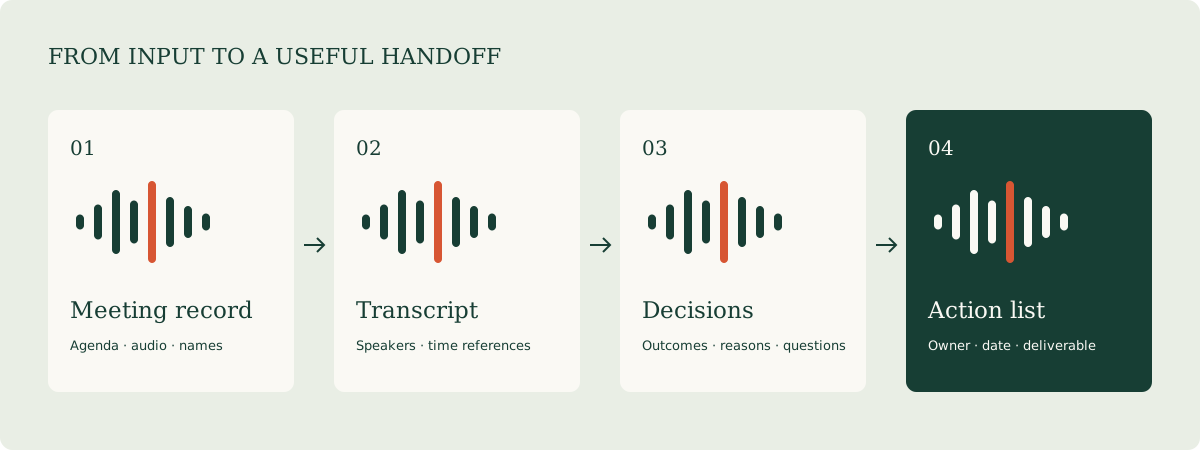
At the end of a meeting, a team needs to know what was decided, who will act, when the work is due, and which information is still needed. Transcription preserves the discussion. A useful meeting workflow turns that record into work people can follow through.
For live notes, transcript search, and personal review, explore Otter. For meetings across platforms that feed into team tools or a CRM, look closely at Fireflies. For Chinese-language meetings, check the transcription language alongside the quality of the recording.
Give the transcript, minutes, and actions separate jobs
| Deliverable | What to retain | Main reader |
|---|---|---|
| Transcript | What was said, speakers, and time locations | Someone checking a detail in the discussion |
| Meeting minutes | Topics, conclusions, decisions, disagreements, and open questions | Participants and the project lead |
| Action list | Task, owner, due date, completion criteria, and dependencies | The people carrying out the work |
A general request for a meeting summary often produces only a broad overview. A more useful sequence is to check names and figures in the transcript, organize the confirmed decisions, and extract tasks with the fields needed to follow them up.
Two tools for everyday meetings
01 / Otter: work around live transcription and returning to the discussion
Otter offers live transcription, speaker identification, playback, and meeting-oriented AI Chat. It works with Zoom, Microsoft Teams, and Google Meet and accepts uploaded audio or video. Basic includes 300 monthly transcription minutes and three lifetime file imports. Pro lists 1,200 monthly in-app recording minutes, ten monthly file imports, and meetings up to 90 minutes. Otter pricing and capacity
Those allowances describe different activities. Attending meetings through a connected workflow and uploading a collection of old recordings are different workloads. If you already have an archive of audio files, import allowance deserves as much attention as monthly minutes.
Otter currently lists English, Spanish, French, German, Japanese, and Simplified Chinese as transcription languages. Transcription and the language used to ask AI Chat a question are separate features. Set the appropriate transcription language when preparing the meeting. Official language support
A useful first session: choose an internal recurring meeting. Review the calendar connection and automatic joining settings. Prepare names, project terms, and abbreviations. Afterward, replay the parts containing important decisions before editing the summary. Use the same minutes template each week so changes in actions are easy to see.
A useful evaluation question: how quickly can you find the original statement behind a decision? That is often a better measure of a personal meeting assistant than the total volume of transcript text it produces.
02 / Fireflies: connect meeting information to the next stage of work
Fireflies combines transcription, summaries, search, and integrations. Its pricing page lists transcription in more than 100 languages and support for meeting platforms including Zoom, Google Meet, and Teams. Plans distinguish storage, integrations, team features, and AI credits. Fireflies capabilities and plans
It fits the question: “After this customer meeting, how does the right person receive the useful information?” Capture begins the process. The next steps organize topics, decisions, and tasks, then move the reviewed material into the tools the team already uses. A searchable meeting collection also helps people who work across several meeting platforms.
A useful first session: connect one calendar or upload one recording. Enable capture for the meetings that need a record. Establish a summary template. Check participants, decisions, figures, and tasks before moving the material into the next system. Try one demonstration meeting before enabling recurring CRM or task synchronization, and inspect the field mapping.
Compare plan details: capture method, storage per seat, downloads, integrations, and AI credits. Single-language transcription, switching between languages within a meeting, and producing a translated summary are separate requirements to evaluate.
Compare price and capacity together
Figures use US website prices in USD. Otter figures below are regular prices; its site also displays promotional offers.
| Product or plan | Monthly subscription | Monthly equivalent, annual billing | Practical consideration |
|---|---|---|---|
| Otter Basic | Free | Free | 300 minutes/month; three lifetime file imports |
| Otter Pro | US$16.99/user/month | US$8.33/user/month | 1,200 in-app recording minutes; ten file imports/month; 90 minutes/meeting |
| Fireflies Free | Free | Free | 400 minutes of team storage; separate summary and AI credit allowances |
| Fireflies Pro | US$18/seat/month | US$10/seat/month | 8,000 storage minutes/seat; additional export and integration features |
| Fireflies Business | US$29/seat/month | US$19/seat/month | Additional team analytics and plan features such as Multi-language Mode |
Sources: Otter and Fireflies. The annual column shows a monthly equivalent for an annual purchase.
Budget example: two 45-minute meetings per week add up to around 360 minutes over four weeks, beyond Otter Basic's 300-minute allowance. Three Fireflies Pro seats on annual billing represent US$30 per month, or US$360 per year. Count the meetings to capture and the people who need paid seats before selecting a plan.
Workflow: a project meeting into an action list
Before the meeting: prepare the context
Collect the agenda, participant names and roles, project abbreviations, and the previous action list. Tell participants how the meeting will be recorded, and apply the team's choices for recording, access, and retention. Review automatic joining rules after connecting a calendar.
During the meeting: state decisions completely
When agreement is reached, repeat it in a complete sentence: “Mei will deliver a comparison of the two document tools by September 11, covering deployment and cost.” Clear names, dates, and outputs help both participants and the later extraction process.
First pass afterward: correct the details that drive execution
Check people, products, amounts, percentages, dates, and negative statements. Replay passages about commitments, scope changes, and deadlines. For long transcripts, review by agenda section and start with information that affects the next stage of work.
Second pass: distinguish decisions from proposals
Create groups for confirmed decisions, suggestions, and information still needed. Discussing a possible direction and deciding to act on it have different consequences. Give each decision a source location and route the open questions to the appropriate person.
Third pass: create the action table
Each row needs a task, owner, date, completion criterion, dependency, and reference. If the meeting did not assign an owner, mark it “To assign.” If no date was agreed, mark it “To schedule.” The chair can then fill those gaps explicitly.
At the next meeting: begin with the action table
Review completed, in-progress, blocked, and pending work. Attach an output link to completed items. For a blocked task, record what is needed and who can help. Preserve the connection between new tasks and the original discussion. The meeting record gradually becomes a useful project memory.
An action table ready to use
The following example comes from the fictional project kickoff transcript supplied with this guide.
| Task | Owner | Target date | Completion criterion | Dependency | Reference |
|---|---|---|---|---|---|
| Compare two document-processing tools | Mei | 2026-09-11 | Table covers prices, file types, and collaboration | Vendor plan pages | 00:42 |
| Prepare a shareable sample order file | Alex | 2026-09-10 | CSV includes a data dictionary and refund example | Project field list | 01:18 |
| Confirm the pilot participant list | Chair to assign | To schedule | Names, tasks, and feedback method agreed | Team confirmation | 02:05 |
The third row preserves what the discussion left open. The chair can complete those fields without turning an early suggestion into a commitment on someone else's behalf.
Download the action list CSV · Download the sample transcript
Three prompts to copy and adapt
Organize minutes around their working purpose
Create project meeting minutes from this transcript.
Start with three sentences describing the meeting's goal and main results.
Organize the rest by agenda topic.

Within each topic, separate confirmed decisions, supporting reasons,
suggestions awaiting confirmation, and information still needed.

Preserve names, dates, amounts, and units.
Attach a timestamp or source passage to each important decision.
Mark information that was not established as “To confirm.”
Extract actions with usable fields
Extract an action list from these reviewed meeting minutes:
Task | Owner | Target date | Completion criterion | Dependency | Reference | Status.

Use a concrete verb and name the deliverable for each task.
Use only owners and dates explicitly established in the discussion.
Write “To assign” for a missing owner and “To schedule” for a missing date.
Place suggestions for consideration in a separate pending-decisions list.
Finish with the fields the meeting chair needs to complete.
Prepare a bilingual follow-up email
Write separate English and Chinese follow-up emails from the confirmed action table.
Use this structure: meeting outcome, action table, questions needing a response,
and the next review time.

Preserve names, product names, dates, and links to deliverables.
Provide a clear subject line in each language.
Keep the tone concise and friendly.
Clearly list items still awaiting an owner or a date.
Evaluate the fit with your own team
Try three meeting formats: a recurring status meeting, a multi-person discussion, and an interview. Track five things: edits to key names and figures, time needed to locate an original statement, time spent finishing the minutes, actions missing required fields, and information that must be entered again after export.
If transcription is useful but tasks still need manual re-entry, improve the template and integration. If summaries miss decisions, improve the spoken recap and extraction prompt. If overlapping voices create extensive editing, improve recording conditions and turn-taking. These changes directly affect everyday usability.
For meeting attachments and a shared background brief, return to the Documents & Translation guide. For numbers discussed in the meeting, use the sample workflow in the Spreadsheets & Data Analysis guide.