
도구 프로필 TOOLAI
LiveLingo - Voice Translator
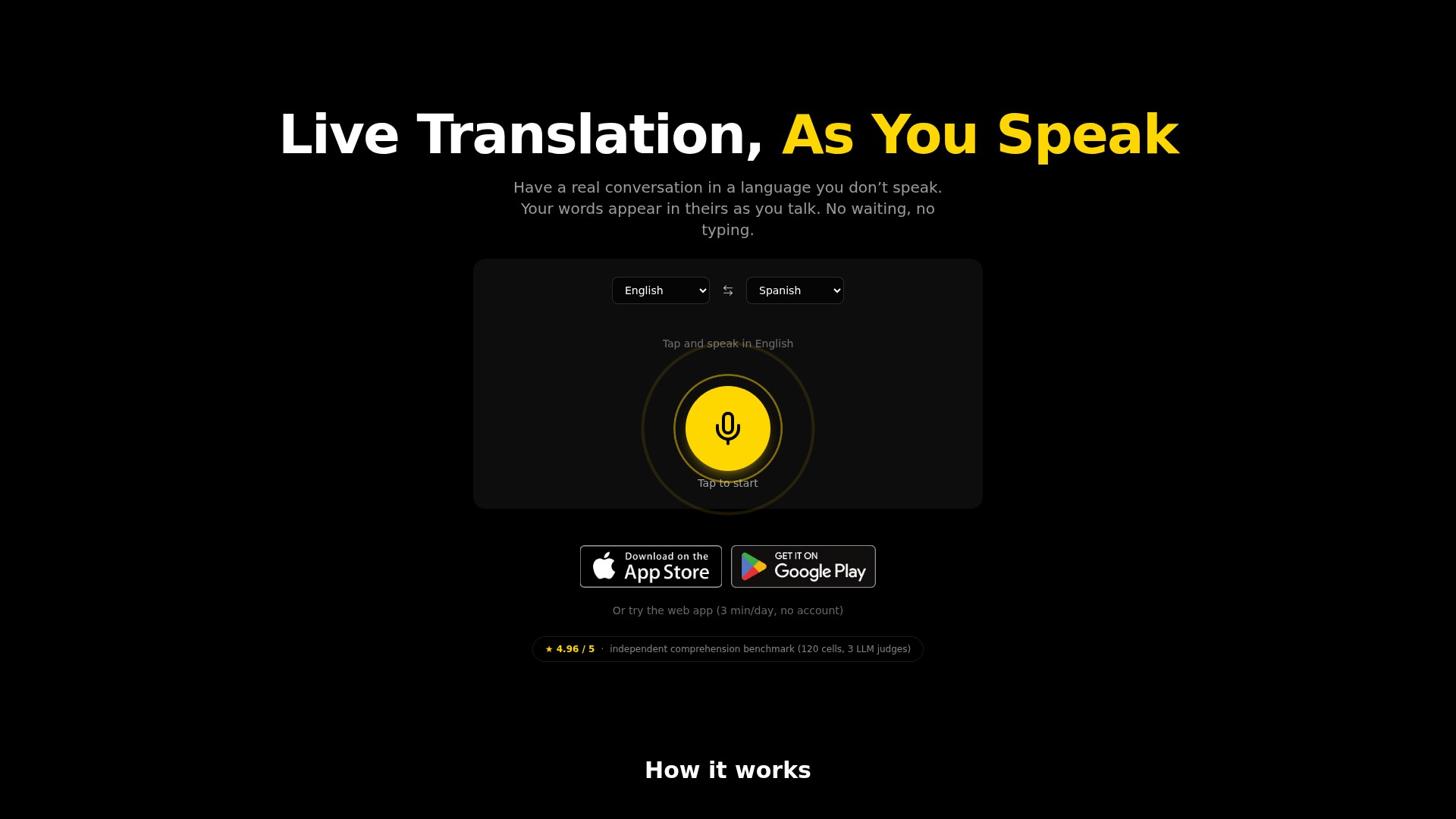
LiveLingo is a real-time voice translation tool supporting 35 languages, streaming written and spoken translations as users speak.
전체 이미지 보기
전체 개요
LiveLingo - Voice Translator 정보
Product and core capabilities
- LiveLingo enables conversations between people who do not share a language, streaming translated text and speech while users talk rather than waiting for an entire recording to finish.
- It advertises speech input and output in 35 languages, with translation between any supported pair. Examples include English, Spanish, Chinese, Japanese, Korean, French, German, Portuguese, Russian, Arabic, Hindi, Thai, and Vietnamese. The FAQ explicitly mentions Mandarin and Cantonese.
- Session transcripts can be saved and exported as PDF. Paid plans include AI meeting memos that capture discussion points, decisions, and action items.
Real-time translation features
- Users select their spoken and target languages, then speak at a natural pace without holding a button. Translations appear progressively during speech.
- LiveLingo emphasizes committed text that is not retracted, reducing the distraction of repeatedly revised live captions.
- It supports speaker changes, rapid exchanges, and interruptions. Reliability decreases when many people speak very quickly over one another.
- It handles code-switching within a sentence, such as Spanish words inside English or English technical vocabulary inside another language, without requiring repeated manual language changes.
- The service is tuned to preserve names, proper nouns, numbers, and domain terminology for supplier calls and technical discussions.
- According to the provider, recognition is optimized for background noise, far-field microphones, telephone audio, and accented speech. Noise still reduces accuracy; keeping the phone within arm’s reach of the speaker is recommended.
Pro+ translated phone calls
- Users can dial mobile or landline numbers worldwide from the app. Recipients answer a normal phone call without installing LiveLingo.
- Recipients first hear a short greeting in their language explaining that the call is translated. They then hear the caller’s real voice followed by a separate interpreter voice. Replies are translated back in the same way.
- LiveLingo does not clone the user’s voice; spoken translations use a clearly distinct synthetic interpreter voice.
- An AI memo is generated after each call, supporting international sourcing, supplier negotiations, multilingual sales, and business communication.
Platforms and workflow
- The web app runs in modern browsers, with no download or account required for the daily free allowance.
- iOS and Android apps are available. The provider presents the native apps as an entry point for translated calls, AI meeting memos, and longer sessions.
- LiveLingo can run in a browser alongside Zoom, Microsoft Teams, or Google Meet. The provider states that no meeting-app plugin is required and other participants do not need to install anything.
- The LiveLingo - Voice Translator Chrome extension uses the current tab’s audio to display live translated captions for videos, webinars, and browser-based meetings. It offers 3 free minutes daily; signed-in users consume their plan’s minutes.
- One phone running LiveLingo can handle both translation directions in an in-person conversation.
Offline operation and session data
- On iPhone, a subset of supported languages can run fully offline using Apple’s on-device translation models.
- Other languages, all translated phone calls, and meeting memos require an internet connection. Cloud speech recognition is used for the relevant languages.
- Free demo sessions are not stored on the provider’s servers and end when the tab closes. Voice audio is processed in memory and is not retained after a session ends.
- Storage descriptions are not fully consistent: the feature section says transcripts stay on the device, while the FAQ says Pro users have saved session history in their accounts.
Pricing
- Free: $0, 3 minutes of translation a day on the web, no account needed.
- Pro: $19.99 per month or $99.99 per year. 300 minutes a month, AI meeting memos, PDF export, saved session history and one 3-minute trial call. 3-day free trial in the iOS and Android apps.
- Pro+: $29.99 per month or $149.99 per year. Everything in Pro, 500 minutes a month and translated phone calls to 100+ countries (up to 90 call minutes a month to common destinations).
- Max: $49.99 per month or $249.99 per year. Everything in Pro+ and 1,000 minutes a month; sold on the web only. Prices are in USD for web checkout; App Store and Google Play prices vary by country.
Who it is for
- Travellers: ordering food, asking directions and bargaining without a phrasebook.
- Business users and small teams: overseas supplier calls, sourcing, multilingual sales calls and cross-language team meetings.
- Multilingual families: talking with partners, in-laws and grandparents who speak another language.
- People living abroad: landlords, school meetings, everyday errands and general clinic visits.
- Viewers and meeting participants: following foreign-language videos, webinars and online meetings through the web app or Chrome extension.
Performance claims and limits
- LiveLingo’s published test report gives a median final-transcript latency of about 1.5 seconds after the speaker stops (95% bootstrap interval 1.1–1.9 s, 27 utterances from VOA conversation audio). That is low latency, not zero latency.
- The same report claims zero normalized erasures (displayed text is not rewritten) and a comprehension score of 4.96/5 across 120 test units judged by three LLMs, compared against Whisper-large + GPT-4o-mini, Azure Speech Translation, Google Cloud Speech-to-Text v2 + Translation v3 and Gemini 3.5 Live Translate. These are vendor results, not independent tests.
- Reliability drops with heavy regional dialects and fast overlapping speech. For legal proceedings, medical consent and other high-stakes situations, use a certified human interpreter.
Similar tools
Google Translate, Microsoft Translator, DeepL Voice, iTranslate, Timekettle.
| 도구 이름 | LiveLingo - Voice Translator |
|---|---|
| 카테고리 | 번역 , 음성-텍스트 , 문장 읽어주기 |
| 요금제 | Free / from $19.99 per month |
| 등록일 | 2026-11-10 |
| 주요 대안 도구 | myGPTReader , SaneBox iOS 앱 , ChatGPT AI 이메일 작성기 |
자세히 살펴보기
실제 사용 모습 보기
제품 화면과 게시된 예시를 살펴보세요. 이미지를 열어 자세히 확인할 수 있습니다.
다음 단계 계획하기
업무 방식에 맞는 계획
Free / from $19.99 per month
가격, 사용 한도 및 약관은 변경될 수 있습니다. 구독하기 전에 도구 공식 웹사이트에서 최신 세부 정보를 확인하세요.
커뮤니티에서
사용해 보신 경험은 어떠셨나요?
이 도구를 사용해 보셨나요?
로그인하여 경험을 공유하고 다른 사람들이 적합한 도구를 찾도록 도와주세요.
FEATURED BADGE
Embed "Featured on ToolAI.io" Badge

다음 발견
탐색할 도구 더 보기

myGPTReader
GitHub에서 3k+ 스타를 받은 오픈 소스 Slack 봇 myGPTReader를 소개합니다. 음성 커뮤니케이션으로 웹페이지, 전자책 또는 YouTube 동영상을 요약하세요. 4000명 이상의 사용자가 활동하는 Slack 커뮤니티에서 지식을 공유하고 협업할 수 있습니다.
SaneBox iOS 앱
손안에서 모든 이메일을 몇 분 만에 관리하세요. 몇 번만 빠르게 탭하면 SaneBox iOS 앱이 받은편지함을 정리하고 이메일 관리 시간을 일주일에 2시간 30분 이상 절약해 줍니다.

ChatGPT AI 이메일 작성기
Gmail용 ChatGPT가 이메일 본문과 제목을 제안하고, 입력했을 수 있는 오타도 수정하며 이메일 작성을 도와줍니다.
Barrs AI
Barrs는 OpenAI의 기술을 활용해 음악 제작 과정을 혁신하는 앱입니다.
다음 단계로 나아가기
LiveLingo - Voice Translator을(를) 탐색할 준비가 되셨나요?
공식 웹사이트에서 최신 기능을 살펴보고 시작해 보세요.