What TTSMaker is useful for
TTSMaker turns written text into downloadable speech. A useful first project is a short tutorial, a product explanation, or an audio version of your own study notes. Start with a script that already makes sense when read aloud: voice generation cannot repair a confusing explanation on its own.
The official TTSMaker page provides the editor and voice selection. Its current free allowance is 20,000 characters per week, with some voices exempt from that quota. An unlimited label on a voice should not be read as a promise that every voice, setting, or workflow is unlimited. Check the counter and the selected voice before a long job.
A repeatable script-to-audio workflow
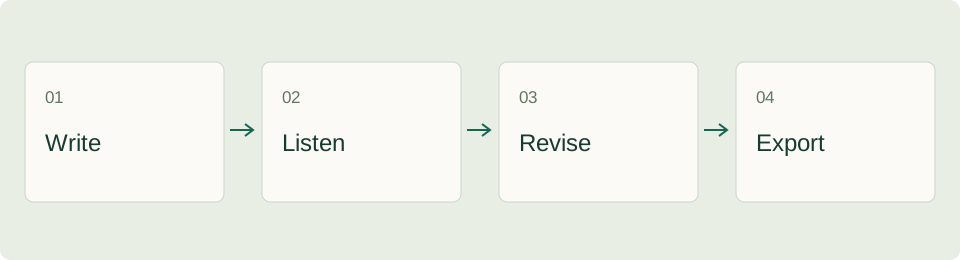
- Write for the listener. Put the purpose in the first sentence. Replace a long list of features with the one action the listener should take next.
- Prepare difficult words. Make a small pronunciation list containing product names, abbreviations, dates, units, and foreign words. Test these before spending time on the full script.
- Choose language and voice. Match the spoken language to your script. A voice that works for a calm explanation may not suit a lively introduction.
- Generate a short sample. Use two or three representative sentences, including one difficult name and one number. Listen at the volume and speed your audience will use.
- Revise the writing. Add sentence breaks where the delivery feels rushed. Write ambiguous abbreviations out in full. Change one setting at a time so you know what improved the result.
- Export and check the actual file. Listen to the beginning, one middle passage, and the ending. Save both the audio and its final script together.
Example: explain a feature in under a minute
Suppose you are recording instructions for uploading an invoice. Write the visual steps in one column and the spoken explanation in another. This catches a common problem: narration that describes a button before the viewer can see it.
| Screen moment | Example narration | Check before generating |
|---|---|---|
| Upload area appears | Choose the invoice you want to add. | Does the label match your interface? |
| File preview appears | Check the supplier name and invoice date. | Are the two fields visible long enough? |
| Confirmation button appears | When the details look right, save the invoice. | Is the final action unambiguous? |
This is an editorial example, not a claim about a TTSMaker feature or a measured generation result. Adapt the words to your own product and use a stopwatch on the exported audio rather than assuming a particular speaking duration.
Understand quotas before producing a series
Character limits and the number of files you plan to make are different quantities. Ten versions of the same paragraph can consume more quota than one finished lesson. Keep a small production sheet with the script length, chosen voice, number of revisions, and final filename.
The official plan comparison distinguishes the free weekly allowance from paid monthly quotas and other plan features. Before purchasing, check billing frequency, per-conversion capacity, and whether the feature you need belongs to the selected plan. A larger monthly balance does not automatically solve a per-conversion limit.
For a longer document, split at natural section boundaries. Keep one introduction per section and avoid cutting a sentence in half. Generate a short sample after each significant voice or pronunciation change. Save a successful configuration in your project notes so later chapters sound consistent.
Make the voiceover easier to understand
| Symptom | First adjustment | What to listen for |
|---|---|---|
| The recording feels rushed | Shorten sentences before reducing speed | Clear separation between ideas |
| A name sounds wrong | Test a phonetic spelling in a short sample | Recognition without an unnatural rhythm |
| Numbers are ambiguous | Spell out the intended spoken form | Correct dates, decimals, and units |
| Chapters sound inconsistent | Reuse the same script conventions and voice settings | Similar pacing at section boundaries |
| Music hides the narration | Reduce background volume in your editing workflow | Speech remains clear on a phone speaker |
Do not solve every issue with slower playback. A sentence containing several conditions may need to become two sentences. Listen without reading the script: if you cannot follow the instruction by ear, the audience may have the same problem.
Download, handoff and reuse
TTSMaker's editor currently warns that generated audio is removed after a short retention period. Download the file promptly; a browser history entry is not a backup. Use names such as invoice-upload-en-v03 and keep a simple record of which script produced which file.
The provider says generated speech can be used commercially. That statement concerns the generated audio; separately check that you have permission to use the script, any accompanying music, and other source material. Keep the source and license notes with the delivered files.
Questions people ask
Is every TTSMaker voice unlimited?
No. The site distinguishes its standard quota from selected unlimited voices. Read the allowance attached to the voice and the current plan instead of applying one label to the entire service.
Why does the audio sound different from what I expected?
Listen to a short sample containing your actual vocabulary. Punctuation, abbreviations, and sentence length can matter as much as the chosen voice. Compare one change at a time.
Where should I go next?
Open the TTSMaker tool profile for the directory entry. If the script starts with a lecture or interview, the NoteGPT video summary guide explains how to build source-based notes before writing narration.
ToolAI Editorial · AI-assisted writing, checked against the linked sources. Workflow examples and diagrams are original editorial suggestions; no hands-on performance benchmark is claimed.