Find PolyTrack and understand the task
PolyTrack is a racing game by Kodub. Its developer describes a low-poly game built around speed, jumps, loops, and improving track times, with an editor for creating and sharing tracks. Use the developer's game page or Kodub's itch.io listing when you want to identify the original project.
This is a game guide in ToolAI's broader directory. PolyTrack is not being presented here as an AI model or an AI productivity tool. The practical goal is to learn the controls, finish a track consistently, and make deliberate changes to your driving.
Learn the controls before chasing a faster time
The developer's instructions list WASD or the arrow keys for driving, and R or Enter to restart a track. Check the current game's control settings if you change a binding or use a different input device.
| First session task | What to do | What you learn |
|---|---|---|
| Confirm input | Try a short section at a manageable pace | Which keys control the car in your setup |
| Finish one track | Prioritize completing the route | Where the difficult sections are |
| Repeat the same track | Keep your approach similar | Which mistakes repeat |
| Change one section | Try a different entry or correction | Whether that change actually helps |
Avoid changing tracks after every crash. A familiar route gives you something to compare. Once you can finish it, choose one bend, jump, or landing to work on rather than trying to optimize the entire run at once.
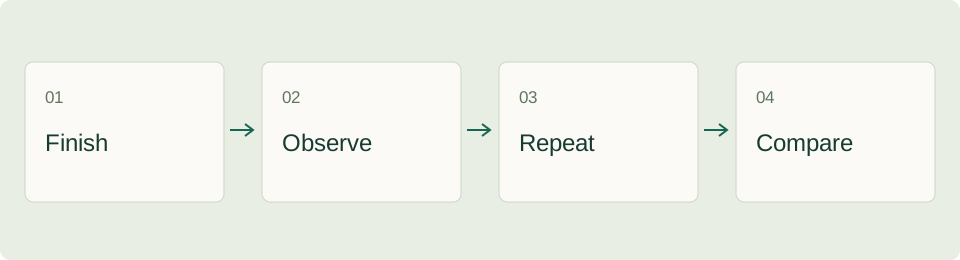
An original twenty-minute practice plan
Spend the first few minutes exploring the route and finding the finish. Then make a small set of runs focused on consistency. Write down the section that caused each restart: the first turn, a narrow platform, the approach to a jump, or a landing.
Next, choose the most frequent problem and change only the approach to that section. Keep the rest of the route as similar as possible. In the final part of the session, try a complete run using the approach that felt most repeatable.
This is a suggested practice method, not a tested promise that your time will improve by a certain amount. Your controls, track choice, and familiarity will affect what you can learn in one session. A cleaner completed run is a useful result even if it is not your fastest run.
Use a small run log
| Run | Main change | Result | Next decision |
|---|---|---|---|
| A | Establish a baseline | Record whether you finish | Pick one problem section |
| B | Adjust the approach to that section | Note the difference you observe | Keep or revert the change |
| C | Repeat the useful approach | Check whether it is repeatable | Try a full run |
Keep observations concrete. “I landed facing away from the next turn” gives you a clearer next step than “the car felt wrong.” If the game provides comparison features in your version, use them alongside your own notes rather than relying on memory alone.
Build a track that teaches one idea
PolyTrack's editor can be used to create and share tracks. The developer lists mouse controls for building and moving the editor view, with R rotating the selected part. Consult the current editor instructions before starting, because editor controls and driving controls serve different purposes.
For a first design, build a short route with one main challenge. Make the start and intended direction easy to understand, then test whether a new player can see what comes next. A dramatic jump is less useful if the landing provides no readable continuation.
Before sharing, drive the full route yourself. Check for accidental gaps, confusing turns, and sections that work only when approached in an unusually specific way. Give the track a useful description: tell players what kind of challenge to expect instead of only saying that it is difficult.
Browser and loading problems
Start by reopening the developer's page in an updated browser. Check whether the issue affects the whole page, the game area, or only keyboard input. If the keyboard does not control the game, click or focus the game area and consult its settings before changing unrelated browser preferences.
| Symptom | Reasonable first check |
|---|---|
| Blank game area | Reload the original page and allow it time to finish loading |
| Input does not respond | Focus the game area and inspect the current control settings |
| Performance is inconsistent | Close unnecessary heavy tabs and compare a simple route |
| A shared route seems broken | Confirm that the shared data and game version match the creator's instructions |
These are general troubleshooting steps, not confirmed diagnoses for every device. On a managed school or work network, follow the network's rules. An “unblocked” label on an unrelated website does not establish that it is an official or permitted access route.
Frequently asked questions
Where is the official PolyTrack project?
Start with Kodub's game page and its developer-controlled itch.io listing. The ToolAI PolyTrack profile is a directory entry, not the developer's website.
Is PolyTrack an AI tool?
It is a racing game. This guide focuses on controls, practice, and the track editor rather than attributing unverified AI features to it.
How do I improve without endless restarts?
Finish a route, identify the section that causes most trouble, and repeat one deliberate change. Record what happens so that the next run has a clear purpose.
For other browser-game terminology, see the Unblocked Games directory entry. Japanese readers can also use our guide to what Unblocked Games means.
ToolAI Editorial · AI-assisted writing, checked against the linked sources. Workflow examples and diagrams are original editorial suggestions; no hands-on performance benchmark is claimed.