도구 프로필 TOOLAI

VideoInPrompt

VideoInPrompt is an online tool that converts videos or images into descriptive AI prompts and structured JSON, analyzing subjects, motion, lighting, and cinematography with model-specific prompt optimization and API workflow integration.
videoinprompt.com제품 미리보기
VideoInPrompt — 제품 미리보기 전체 이미지 보기
인터페이스 및 결과 미리보기이미지: 1

전체 개요

VideoInPrompt 정보

Product overview

VideoInPrompt centers on Video to Prompt AI, translating video visuals into natural-language prompts, structured text, and JSON metadata for generative AI creation, content repurposing, and automation. The platform also offers image-to-prompt, image-to-video, text-to-video, and text-to-image tools.

Main capabilities

  • Video prompt extraction: analyzes subjects, actions, environments, lighting, camera angles, and camera movement to create detailed prompts from reference footage.
  • Image prompt extraction: reverse-engineers prompts from existing images and accepts direct image links.
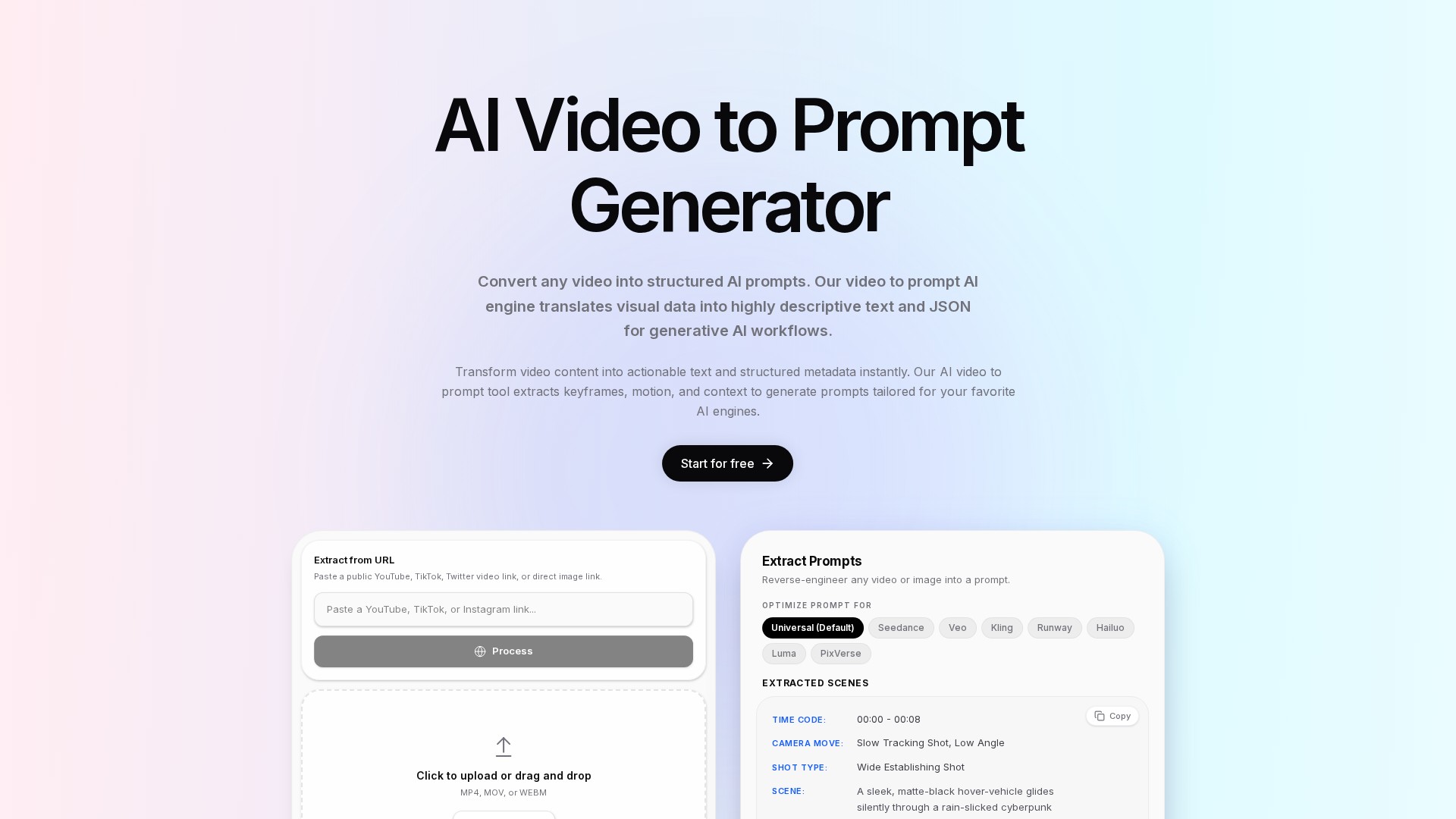
  • Scene-level results: includes time codes, camera moves, shot types, and scene descriptions. The demonstration shows a 00:00–00:08 segment with a slow, low-angle tracking shot and a wide establishing shot.
  • Structured output: supports natural language, structured text, JSON schemas, and timestamped JSON timelines for programmatic processing.
  • Model-specific optimization: offers Universal, Seedance, Veo, Kling, Runway, Hailuo, Luma, and PixVerse options.
  • URL ingestion: supports public YouTube, TikTok, Twitter, and Vimeo video links, plus S3 links and local uploads.
  • File uploads: accepts MP4, MOV, and WEBM through file selection or drag and drop.
  • Developer integration: a REST API enables SaaS integration, automated tagging, categorization, and downstream generative AI tasks. The FAQ specifically assigns full REST API access to the Enterprise tier.

How it works

  1. Paste a public media URL or upload a local video or image.
  2. Choose universal output or optimize prompts for a target generation model.
  3. The system intelligently samples keyframes to capture important moments and motion while reducing redundant processing.
  4. Vision models perform semantic scene analysis, identifying objects, actions, lighting, and environmental context.
  5. Results are synthesized into descriptive prompts, scene information, or structured JSON.
  6. Copy prompts into generation tools or connect the output to automated workflows through the API.

Features and advantages

  • Focuses on visual and cinematographic information rather than audio transcription alone.
  • Uses custom fine-tuned vision models described as understanding cinematography, aiming to standardize descriptions and reduce manual prompt-writing effort.
  • Timestamped structured output supports media annotation, data pipelines, and application integration.
  • Claims a distributed architecture that processes videos into text prompts in seconds.
  • Claims zero data retention, with videos automatically deleted after prompt generation finishes.
  • Accuracy, speed, and cinematographic reconstruction statements are vendor claims; independent test results are not provided.

Intended users

  • Creators extracting narrative structure, visual pacing, and style for cross-platform content repurposing.
  • Marketers analyzing successful advertising creatives and generating prompts for new variants.
  • Developers building video-to-prompt applications and automated media pipelines.
  • AI builders extracting structured JSON data for custom models and related data workflows.

Typical use cases

  • Social content repurposing: analyze YouTube, TikTok, and Instagram videos to support new scripts, social posts, and summaries.
  • Advertising analysis: extract visual elements and pacing from competitor creatives to guide new generated assets.
  • E-commerce: turn product demonstrations into SEO-oriented product descriptions and structured metadata.
  • Cinematic creation: describe futuristic skylines, neon lighting, aerial motion, volumetric lighting, and atmosphere.
  • Influencer content: capture vertical handheld footage, natural daylight, fast jump cuts, and shallow depth of field.
  • Product advertising: identify macro close-ups, push-ins, lifestyle scenes, and premium lighting in wireless-earbud showcases.
  • Real estate: extract exterior drone shots, stabilized interior tracking shots, slow pans, and natur

할 수 있는 작업

탐색해 볼 만한 도구 모음

기능을 알아보고 나만의 활용법을 찾아보세요.

Video prompt extraction

analyzes subjects, actions, environments, lighting, camera angles, and camera movement to create detailed prompts from reference footage.

Image prompt extraction

reverse-engineers prompts from existing images and accepts direct image links.

Scene-level results

includes time codes, camera moves, shot types, and scene descriptions. The demonstration shows a 00:00–00:08 segment with a slow, low-angle tracking shot and a wide establishing shot.

Structured output

supports natural language, structured text, JSON schemas, and timestamped JSON timelines for programmatic processing.

Model-specific optimization

offers Universal, Seedance, Veo, Kling, Runway, Hailuo, Luma, and PixVerse options.

URL ingestion

supports public YouTube, TikTok, Twitter, and Vimeo video links, plus S3 links and local uploads.

File uploads

accepts MP4, MOV, and WEBM through file selection or drag and drop.

Developer integration

a REST API enables SaaS integration, automated tagging, categorization, and downstream generative AI tasks. The FAQ specifically assigns full REST API access to the Enterprise tier.

업무 흐름에 맞게

일상 속 활용 방법

사용 사례 01

Social content repurposing

analyze YouTube, TikTok, and Instagram videos to support new scripts, social posts, and summaries.

사용 사례 02

Advertising analysis

extract visual elements and pacing from competitor creatives to guide new generated assets.

사용 사례 03

E-commerce

turn product demonstrations into SEO-oriented product descriptions and structured metadata.

사용 사례 04

Cinematic creation

describe futuristic skylines, neon lighting, aerial motion, volumetric lighting, and atmosphere.

사용 사례 05

Influencer content

capture vertical handheld footage, natural daylight, fast jump cuts, and shallow depth of field.

사용 사례 06

Product advertising

identify macro close-ups, push-ins, lifestyle scenes, and premium lighting in wireless-earbud showcases.

사용 사례 07

Real estate

extract exterior drone shots, stabilized interior tracking shots, slow pans, and natur

커뮤니티에서

사용해 보신 경험은 어떠셨나요?

다음 발견

탐색할 도구 더 보기

모든 도구 탐색

다음 단계로 나아가기

VideoInPrompt을(를) 탐색할 준비가 되셨나요?

공식 웹사이트에서 최신 기능을 살펴보고 시작해 보세요.

공식 웹사이트 방문
VideoInPromptvideoinprompt.com
웹사이트 방문

갤러리

공유하기

VideoInPrompt 공유