Vente
Éditeur d’annonces PPC
Un outil de génération de textes publicitaires pour les campagnes PPC.
À propos de cet outil
Fonctionnalités principales
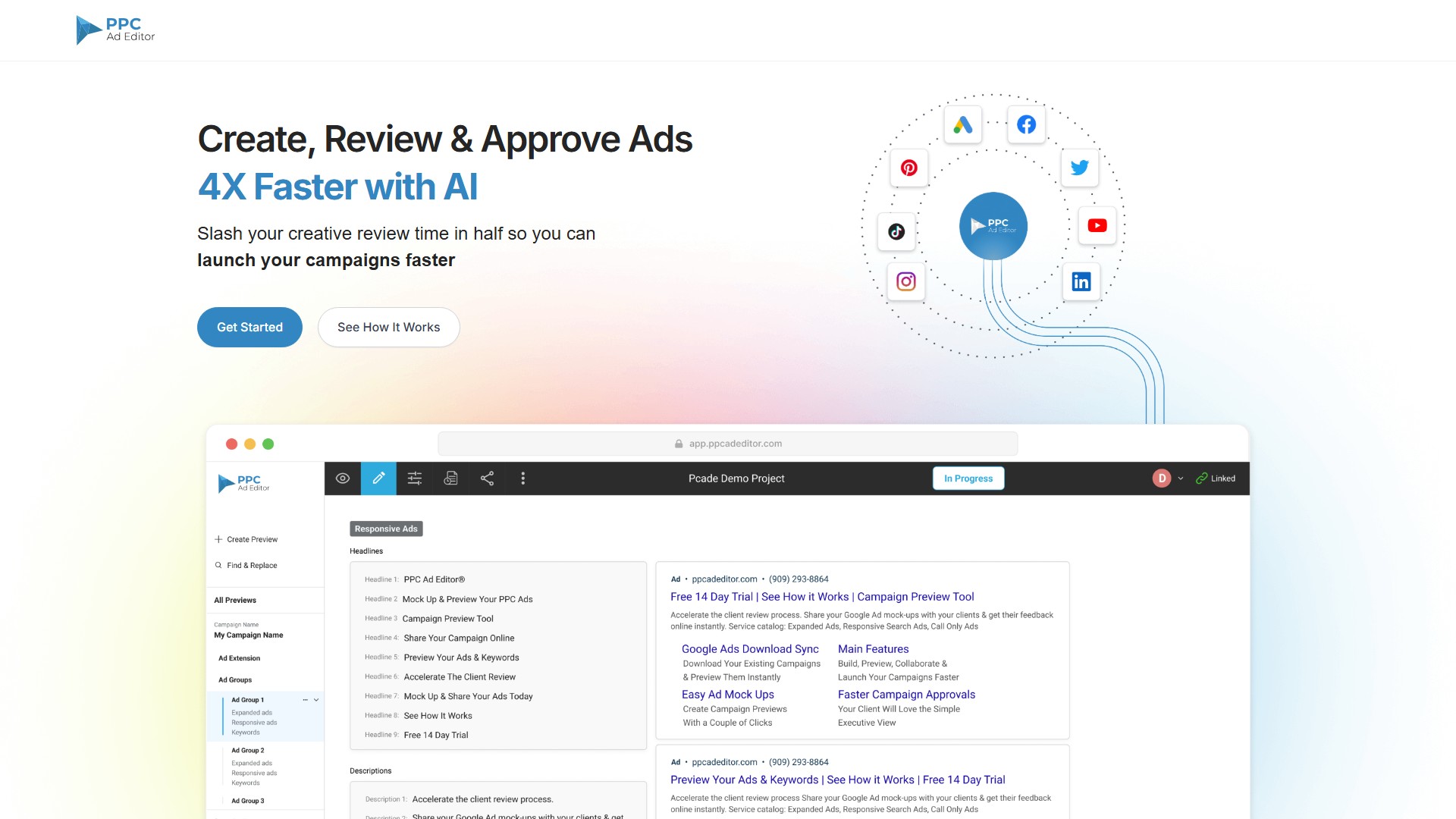
- Validation accélérée : permet aux clients d’examiner et d’approuver plus rapidement les maquettes d’annonces et les mots-clés.
- Retours simplifiés : facilite les commentaires des clients et l’approbation des campagnes.
- Génération de textes publicitaires par IA : générez des idées de textes pour Google Search Ads 10 fois plus rapidement avec adCelerator AI Ad Copy Generator.
- Réduction du travail manuel : exportez directement les annonces Search Google Ads et les campagnes approuvées vers Google Ads Editor afin de réduire les opérations de copier-coller, les erreurs humaines et le temps consacré au contrôle qualité.
- Collaboration d’équipe facilitée : les équipes et les clients peuvent ajouter ou modifier directement les textes publicitaires et les mots-clés, avec des mises à jour en temps réel.
- Vue unifiée des annonces : partagez jusqu’à 5 prévisualisations sur différents canaux avec un seul lien, modifiez-les au même endroit et ajoutez des commentaires à toutes les prévisualisations du groupe.
- Suivi automatique des mots-clés : améliorez le score de pertinence des annonces Google en suivant les mots-clés utilisés dans les Google Responsive Search Ads (RSA).
- Compteur de caractères intégré : rédigez vos annonces avec un éditeur visuel indiquant le nombre de caractères.
- Prise en charge des principaux canaux publicitaires : Google Responsive Search Ads, Google Responsive Display Ads, Google Performance Max Ads, Facebook Ads, YouTube Ads, LinkedIn Ads, Twitter Ads, Pinterest Ads, TikTok Ads et HTML5 Ads.
- Ressources supplémentaires : extensions Chrome AdMinerX et AdScanner, RSA Ad Keyword Tracker, Dynamic Keyword Insertion (DKI) Mock Up Generator Tool, etc.
Workflow
- Créer : construisez rapidement des campagnes avec l’éditeur visuel intégré, importez une feuille de données groupée ou un fichier Google Ads Editor, ou téléchargez des campagnes existantes directement depuis Google Ads.
- Prévisualiser et partager : générez des maquettes d’annonces, de mots-clés et d’extensions, puis partagez l’ensemble de votre campagne PPC depuis un navigateur à l’aide d’un lien.
- Collaborer et recueillir les retours : ajoutez des commentaires, examinez les retours et approuvez ou refusez les demandes grâce aux notifications en temps réel.
- Lancer : après validation, exportez les campagnes complètes vers Google Ads Editor afin d’éviter les erreurs de transcription.
Utilisateurs ciblés
- Rédacteurs : bénéficient d’un accès en modification et peuvent participer facilement à la rédaction via un lien partageable.
- Responsables de comptes : expliquent clairement aux clients les textes publicitaires, la stratégie et la structure des campagnes grâce aux fonctions de présentation visuelle.
- Agences : se démarquent de leurs concurrents en présentant les dernières tendances du marketing numérique plutôt que des modèles Excel classiques.
- Responsables PPC : construisent visuellement des campagnes, actualisent des campagnes existantes ou travaillent à partir d’une feuille de données groupée.
- Équipes réglementaires : simplifient l’examen et l’approbation des campagnes par les équipes réglementaires et de conformité.
Avantages clés
4 fois plus rapide avec l’IA ; réduisez de moitié le temps consacré à la validation créative ; dites adieu aux feuilles de calcul ; consacrez moins de temps à expliquer l’apparence des annonces PPC sur Google ; améliorez la clarté visuelle pour limiter les malentendus ; regroupez toutes les annonces au même endroit.
Tarification
Une option Get Started for Free est proposée. L’export des prévisualisations au format PDF est disponible dans la version payante. Pour connaître les tarifs précis, consultez la page Pricing ou contactez l’équipe commerciale.
Analyse du trafic
Signaux de trafic, de classement et d’engagement pour cet outil.
Tendance des visites
Aucune donnée de tendance
Engagement
- Taux de rebond--
- Pages par visite--
- Durée moyenne--
Sources de trafic
Aucune donnée sur les sources
Principaux pays
Aucune donnée par pays
Aperçu de l’interface