

Large character library
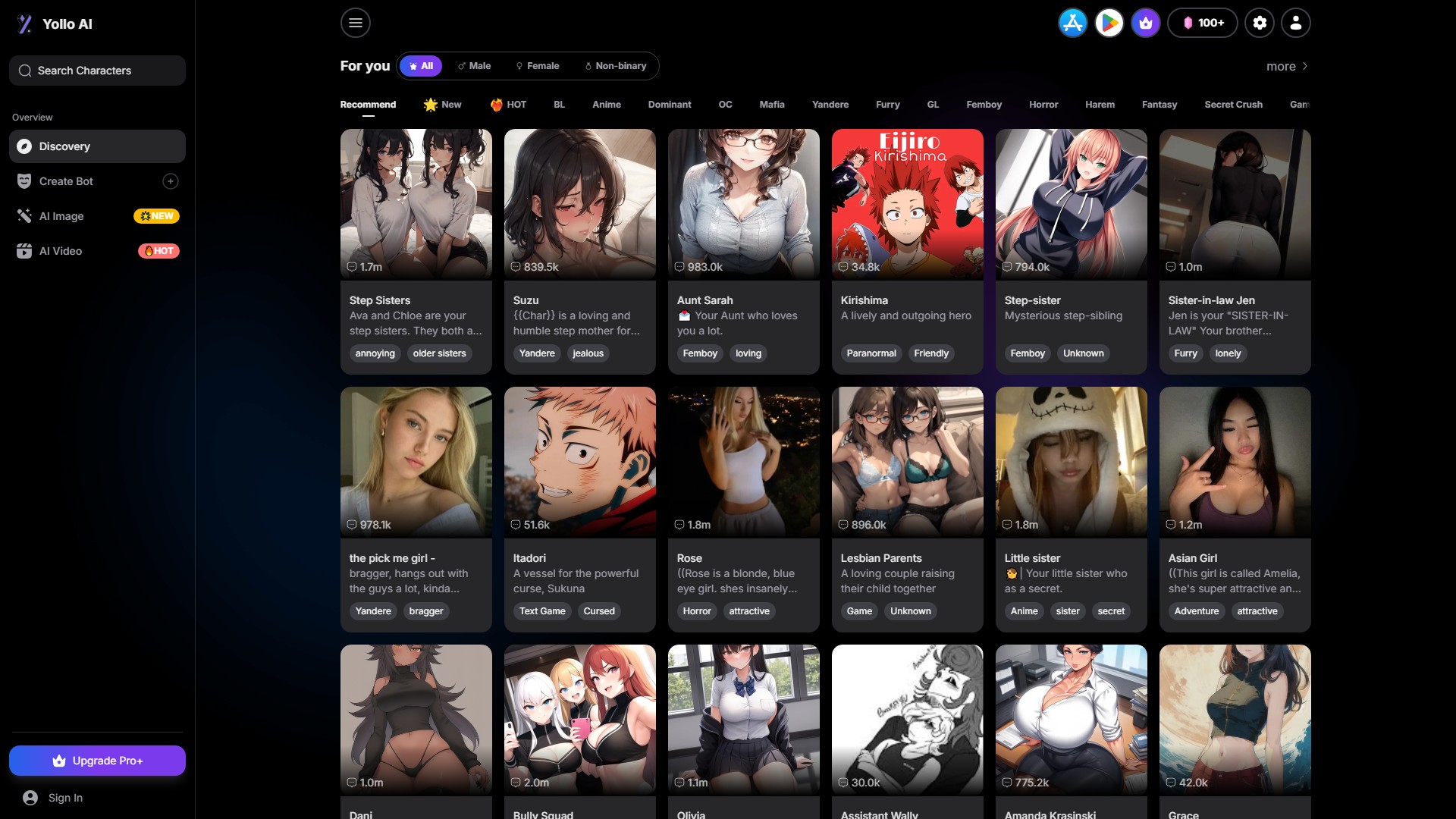
The platform hosts a library of over 200,000 AI characters across genres such as fantasy, romance, mystery, anime and text games. Each character card includes a backstory and an opening scenario to start the roleplay.
TOOL PROFILE TOOLAI
Uncensored AI roleplay chat, image and video generation with no sign-up required
 View full image
THE BIG PICTURE
Yollo AI is a browser-based creative platform that combines AI character roleplay chat with AI image and video generation. According to its official pages, the platform hosts a library of more than 200,000 characters spanning genres such as fantasy, romance, mystery, anime and text games. Users can start chatting immediately without creating an account or logging in, and the site states that core chat, image and video features are free to use with a generous amount of usage.
The chat experience is built around character cards that include a backstory and an opening scenario. Yollo AI describes a Persona feature that lets users define their own name, gender and personality so the AI character responds consistently to them, plus long-term memory that retains key details within an ongoing conversation. The platform also states that users can switch between more than ten AI models to change the tone, creativity and instruction-following style of a character's replies.
Beyond text, Yollo AI offers an image generator with text-to-image and image-to-image modes, and a video generator that produces short clips. The official pages describe creative templates such as headshot, Ghibli and Pixar styles, an aging filter, a baby generator, old-photo animation, gender swap, and kiss or dance video templates. The site presents itself as uncensored and unrestricted, while its FAQ page also states that the platform is not designed for explicit NSFW chat, which is a notable internal inconsistency in the official messaging.
A CLOSER LOOK
Explore product screens and published examples. Open any image for a closer look.
WHAT YOU CAN DO
Get to know the capabilities. Find your own way to use them.
The platform hosts a library of over 200,000 AI characters across genres such as fantasy, romance, mystery, anime and text games. Each character card includes a backstory and an opening scenario to start the roleplay.
Users can define their own character details, including name, gender and personality, so the AI character interacts with them consistently throughout the conversation.
Yollo AI states that chats are powered by more than ten AI models. Users can switch between models to change a character's tone, creativity and instruction-following style.
The platform states that its AI remembers important details during an ongoing conversation to maintain narrative continuity. Because no login is required, chat history is not saved between sessions.
Users enter a descriptive prompt, optionally add a negative prompt, choose an aspect ratio and art model, and generate an image. Output can be produced at high resolution described as 2K and 4K.
Users upload a base image and provide a transformation prompt, then adjust a strength slider to control how closely the result resembles the original before generating a new image.
The video generator produces short clips described as 1080p. Official pages mention templates such as old-photo animation, gender swap, kiss video and dance video.
The platform provides tools to create custom AI characters, including AI girlfriend, boyfriend or other character types, tailored to user specifications.
MADE FOR YOUR WORKFLOW
Users can pick a character from the library or create their own and engage in text-based roleplay across genres such as fantasy quests, mysteries, romance or casual conversation.
The image generator can be used to create portraits or scene art of characters from chats, including styles such as headshot, Ghibli or Pixar-inspired templates.
The video generator can animate a static image or create short scenes, with templates such as old-photo animation or gender swap for creative storytelling.
Users can experiment with prompts, styles and templates for personal projects such as wallpapers, profile pictures or concept art without creating an account.
YOUR FIRST STEPS
Visit the Yollo AI website in a browser. No sign-up or login is required to access the tools.
Browse the character library or use the character creation tools to define a new AI character with a backstory and personality.
Activate the Persona feature to define your own name, gender and personality so the AI character responds consistently to you.
Send messages to start the roleplay. You can switch between AI models to change the response style, and regenerate or edit AI replies to guide the story.
Use the image generator by entering a prompt or uploading a base image for image-to-image, or use the video generator with a template to create a short clip.
PLAN YOUR NEXT STEP
The provider advertises free core chat, image and video tools, with daily image-generation credits. A Pro+ upgrade is also available in the navigation; check the site for its current price and terms.
Prices, usage limits and terms can change. Confirm the latest details on the tool's official website before subscribing.
Free usage and daily credit allowances are advertised. Confirm current Pro+ prices, included features and billing periods on the official site before upgrading.
Sources checked
The provider advertises free core chat, image and video features and a daily allowance of image-generation credits. Check the current limits and the terms of the optional Pro+ upgrade on the official site.
No. The platform states that no sign-up or login is required, and that chats are anonymous. Because there is no login, chat history is not saved between sessions.
Persona lets you define your own character details, such as name, gender and personality. The AI then interacts with you consistently based on those details throughout the conversation.
Yollo AI offers more than ten AI models. Some are described as more creative for storytelling, while others may follow instructions more precisely. You can switch between them at any time to change the chat style.
Yes. The platform provides tools to create custom AI characters, including AI girlfriend, boyfriend or other character types, tailored to your specifications.
For images, official pages mention headshot, Ghibli, Pixar, aging filter and baby generator styles. For videos, they mention old-photo animation, gender swap, kiss video and dance video templates.
The main site and image generator pages describe Yollo AI as uncensored and unrestricted, supporting NSFW content. However, the FAQ page states that the platform is not designed for explicit NSFW AI chat. This is an inconsistency in the official messaging.
FROM THE COMMUNITY
Sign in to share your experience and help others find the right tool.
YOUR NEXT DISCOVERY
Superchat, the ultimate AI-powered chat app that connects you with experts, historical figures, and even fictional characters. Talk to an AI-powered lawyer for legal advice, learn from masters of the past, or engage with your favorite fictional characters.
EbSynth is a free software app that allows you to animate existing footage using just a few styled keyframes. It is perfect for hand-drawn animations that typically would take a long time to animate.

ImageFX is a professional AI image generation platform offering text-to-image, image-to-image, realistic AI images, anime AI images, image resizing, inpainting, outpainting, background removal, text-to-video, and image-to-video functions, supporting multiple advanced AI models for various creators.

GoCrazyAI is an all-in-one web-based AI creative studio combining Veo 3.1, Sora 2, Seedance 2, Kling 2.6 and WAN 2.7 for video, image, anime avatar, music and voice generation, with editing, podcast and photo-to-3D tools. Plans start at $25/month.
MAKE YOUR NEXT MOVE
Visit the official website to explore the latest features and get started.