}

도구 프로필 TOOLAI

PixVideo

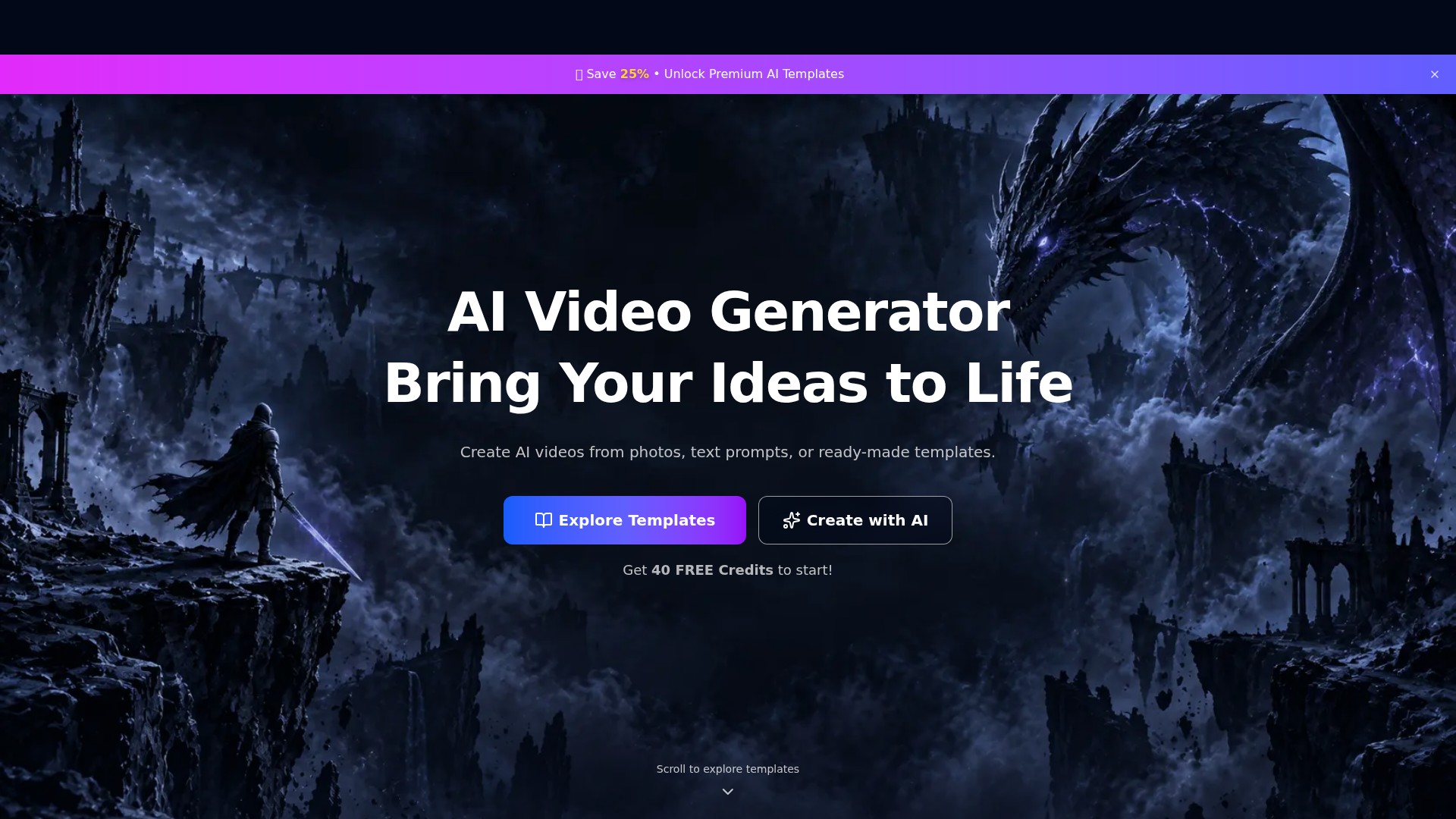
PixVideo is an AI video generation website that creates videos from photos, text prompts, or ready-made templates. It offers portrait, fashion, anime, and science-fiction styles, with 40 free credits to get started.

pixvideo.net제품 미리보기
PixVideo — 제품 미리보기 전체 이미지 보기
인터페이스 및 결과 미리보기이미지: 1

전체 개요

PixVideo 정보

Overview

PixVideo presents itself as an “AI Video Generator” designed to “Bring Your Ideas to Life.” It creates AI videos from photos, text prompts, or ready-made templates.

Main Features

  • Photo-to-video creation: Use photos as the starting input for AI-generated videos.
  • Text-to-video creation: Describe an idea with a text prompt and create a video with AI.
  • Template-based creation: Choose a ready-made AI video template, pick a style, and make it your own.
  • Varied visual themes: Explore templates covering character looks, manga portraits, mechanical armor, fashion, natural atmospheres, and fantasy settings.

Templates and Themes

  • Cartoon and character styles: Dark Supergirl, Manga style cartoon portrait, Cartoon modeling, The me in the painting, and Hand-drawn reality.
  • Science fiction and mechanical styles: Cyberpunk style, Mechanical Warrior, Mechanical armor, Sleeping mechanical warrior, and Science fiction train.
  • Fashion and portrait themes: Instagram style, Formal Dress Café, Gorgeous evening gown, Gothic vintage beauty, Retro white dress, Sports Style, The throne of fashion, and Pop Idol.
  • Settings and atmospheric themes: The atmosphere of autumn, Dream Space, Pink Cat House, Retro-style street, Post-rain Melancholy, Snow Scene in Times Square, The Healing Power of Nature, and A cold and rainy night.
  • Creative display themes: 3D figure display, 3D keychain, Dress Analysis, and Statue exhibition group photo. These are template names rather than evidence of standalone 3D modeling or clothing-analysis tools.

Usage Workflow

  1. Start with a photo, a text prompt, or a ready-made template.
  2. For template-based creation, browse the collection, choose a style, and select “Use Template.”
  3. Personalize the selected style, or enter the AI creation workflow through “Create with AI.”

Intended Users and Typical Uses

  • Users who want to turn photos or written ideas into videos.
  • Creators who prefer starting from a ready-made template to produce personalized visual content.
  • Video projects centered on manga portraits, fashion looks, cyberpunk aesthetics, mechanical warriors, or atmospheric settings.

Key Characteristics

  • Three starting points: photos, text prompts, and templates.
  • A style-first approach that encourages users to personalize an existing visual theme.
  • A broad template collection spanning everyday portraits, fashion, science fiction, fantasy, and cartoons.

Pricing and Free Credits

  • Offers 40 free credits to get started.
  • Premium AI Templates indicate paid access to advanced template offerings.
  • Specific plan prices, credit consumption rules, free-credit renewal terms, and billing periods for premium access are not disclosed.
도구 이름 PixVideo
카테고리 비디오 생성기 , 비디오로 텍스트 이동 , 맞춤형 비디오
등록일 2026-11-05
주요 대안 도구 Simone – 나만의 오라클 , Raregenie , Klap
}

할 수 있는 작업

탐색해 볼 만한 도구 모음

기능을 알아보고 나만의 활용법을 찾아보세요.

Photo-to-video creation

Use photos as the starting input for AI-generated videos.
Text-to-video creation

Describe an idea with a text prompt and create a video with AI.

Template-based creation

Choose a ready-made AI video template, pick a style, and make it your own.

Varied visual themes

Explore templates covering character looks, manga portraits, mechanical armor, fashion, natural atmospheres, and fantasy settings.

Three starting points

photos, text prompts, and templates.

커뮤니티에서

사용해 보신 경험은 어떠셨나요?

FEATURED BADGE

Embed "Featured on ToolAI.io" Badge

Featured on ToolAI.io

다음 발견

탐색할 도구 더 보기

모든 도구 탐색

다음 단계로 나아가기

PixVideo을(를) 탐색할 준비가 되셨나요?

공식 웹사이트에서 최신 기능을 살펴보고 시작해 보세요.

공식 웹사이트 방문
PixVideopixvideo.net
웹사이트 방문

갤러리

공유하기

PixVideo 공유