PERFIL DE LA HERRAMIENTA TOOLAI

MiniMind

Study language model training with a small model, from pretraining and SFT to tool use.

github.comVISTA PREVIA DEL PRODUCTO
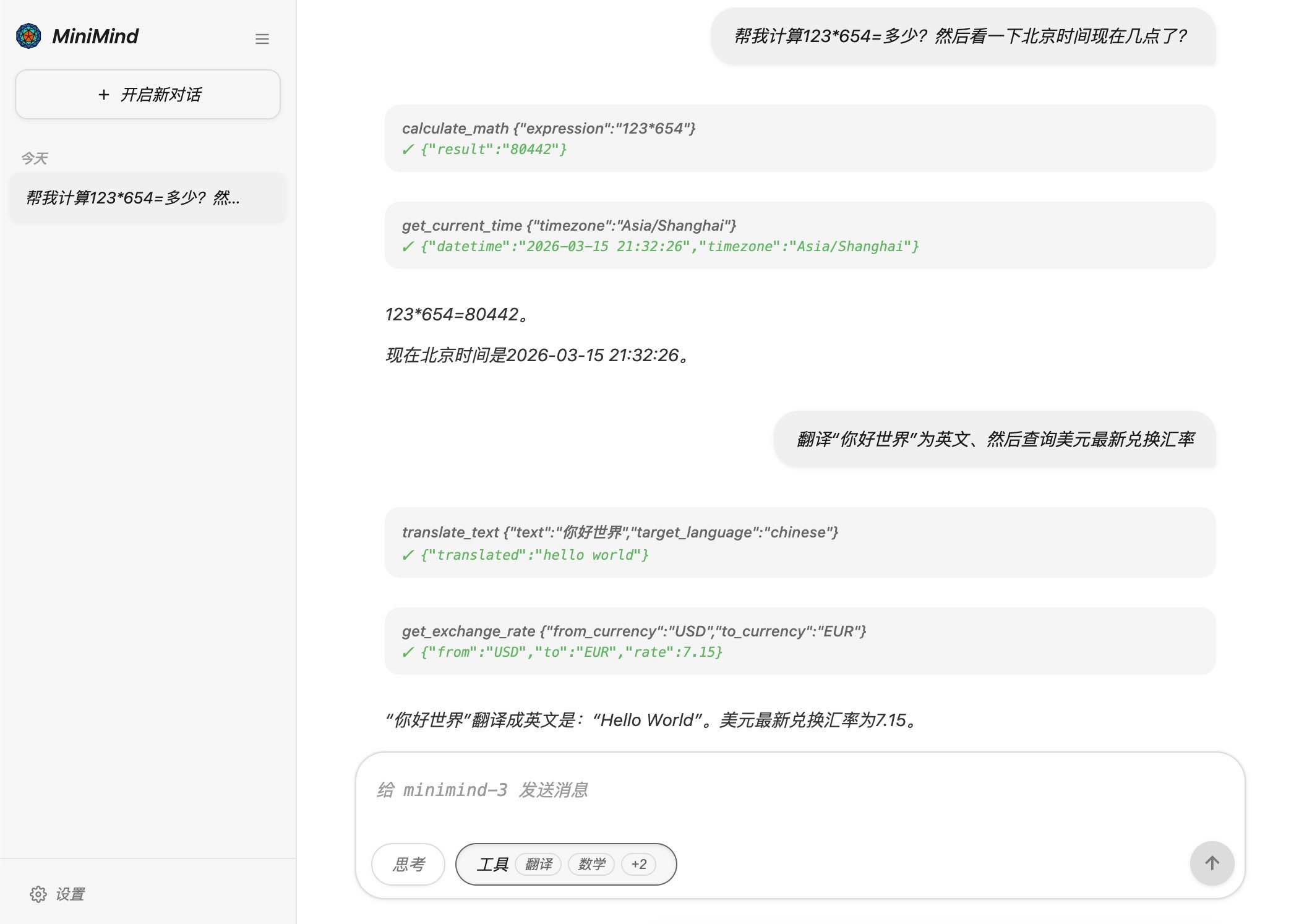
An interface example published by the author, showing multi-turn requests and results. It does not represent a test performed for this profile. Ver imagen completa
An interface example published by the author, showing multi-turn requests and results. It does not represent a test performed for this profile.Imágenes: 6

VISIÓN GENERAL

Acerca de MiniMind

MiniMind is an open-source project for learning and reproducing language model training. It publishes architecture, tokenizer, data handling, pretraining and adaptation code, making the full process easier to trace in a small model. It is suited to readers with Python and basic deep learning experience.

The current MiniMind-3 Dense model has about 64M parameters. Its MoE variant has about 198M total parameters and 64M active parameters. Historical MiniMind2-small models used 26M. The April 2026 mainline update changed architecture, tokenizer, data and inference interfaces, so older tutorials may not match newer weights.

Start with released weights to establish chat inference, then reproduce pretraining and SFT with the two mini datasets. Explore LoRA, preferences or tool-use training separately afterward. Code requires no subscription; hardware and cloud resources have their own costs. Knowledge, complex reasoning and long-context behavior remain constrained by model size and data.

LO QUE PUEDES HACER

Un kit de herramientas que vale la pena explorar

Conoce sus capacidades. Encuentra tu propia forma de usarlas.

Read the architecture

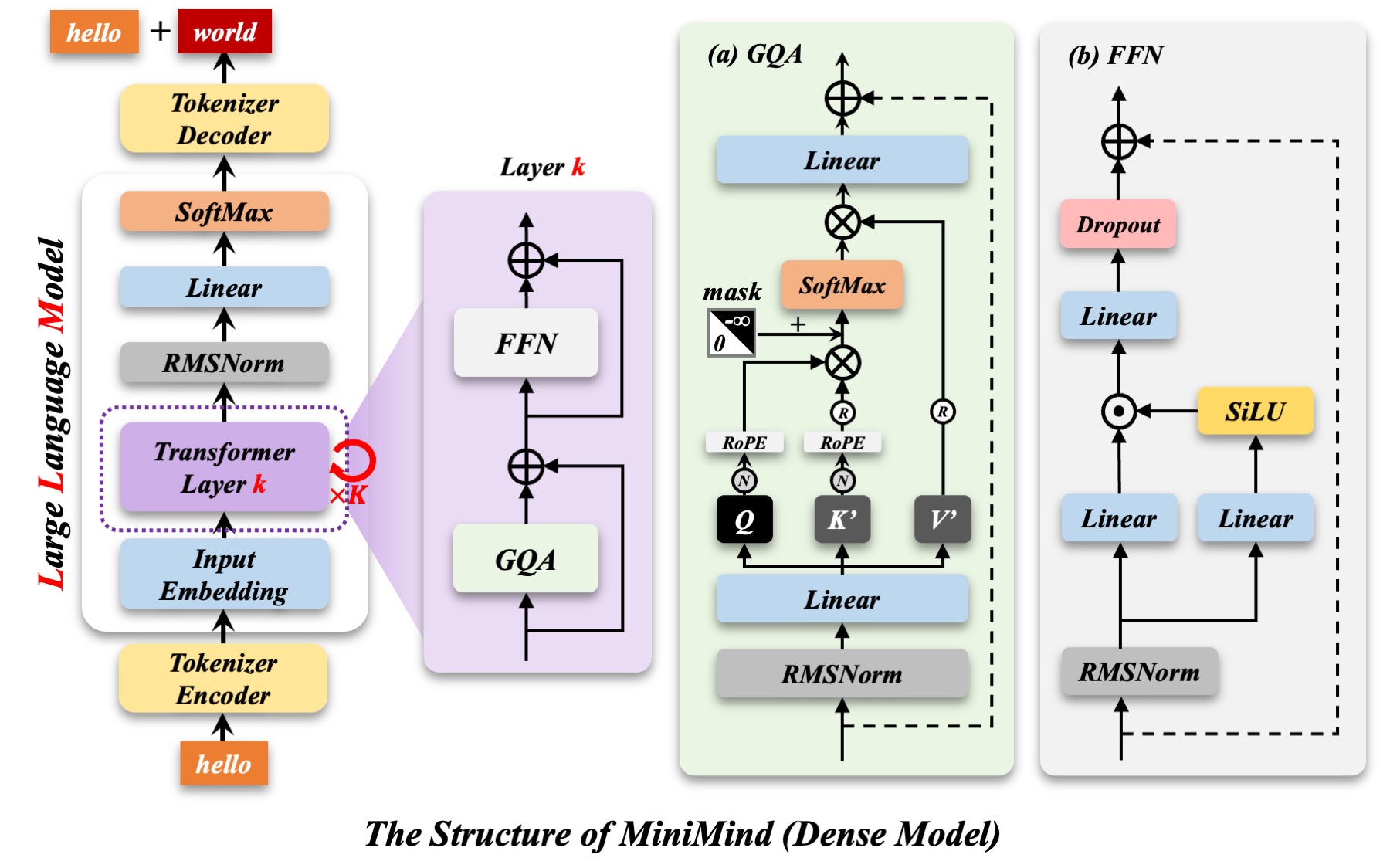
Dense and MoE implementations expose embeddings, grouped-query attention, RoPE, RMSNorm and feed-forward layers. Follow the tensor path and compare it with the architecture diagram. The current mainline aligns with the Qwen3 / Qwen3-MoE ecosystem.

Pretraining: next-token prediction

The pretraining script reads JSONL text examples, computes next-token loss and saves weights. The mini dataset is useful for an initial reproduction; a larger version supports further training. Text length, cleaning and learning rate affect the result.

SFT: conversation and instruction format

Full-parameter SFT continues from pretrained weights using conversations. Current mainline SFT data includes basic tool-call examples, and full_sft weights include corresponding basic behavior. Tokenizer and chat template must match training and inference.

LoRA adaptation and weight merging

A native LoRA implementation adjusts the model with a small set of additional trainable parameters. A merge-and-export workflow is included. Use it to study task or style changes while keeping the adapter matched to its base model.

MoE expert routing

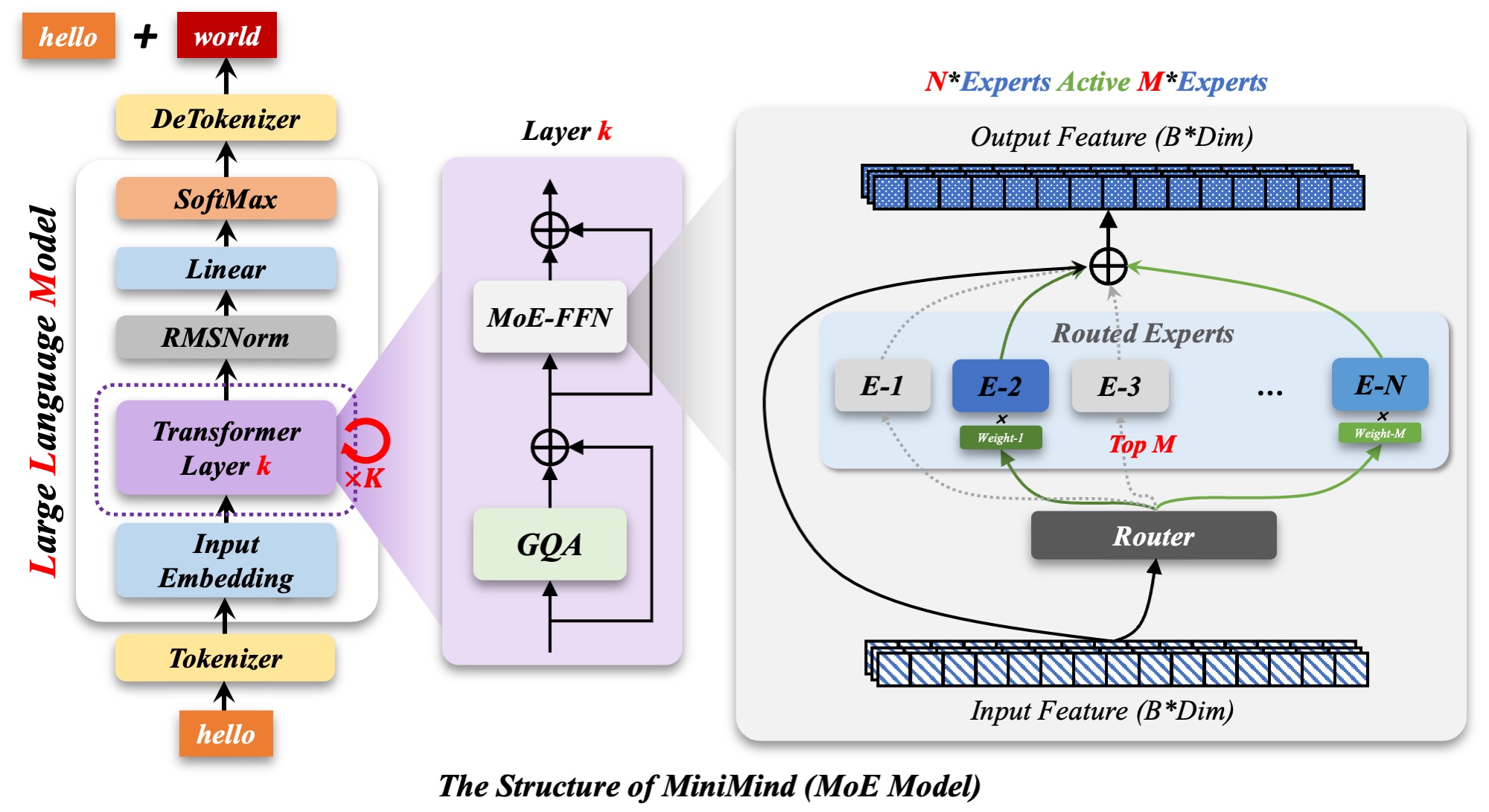
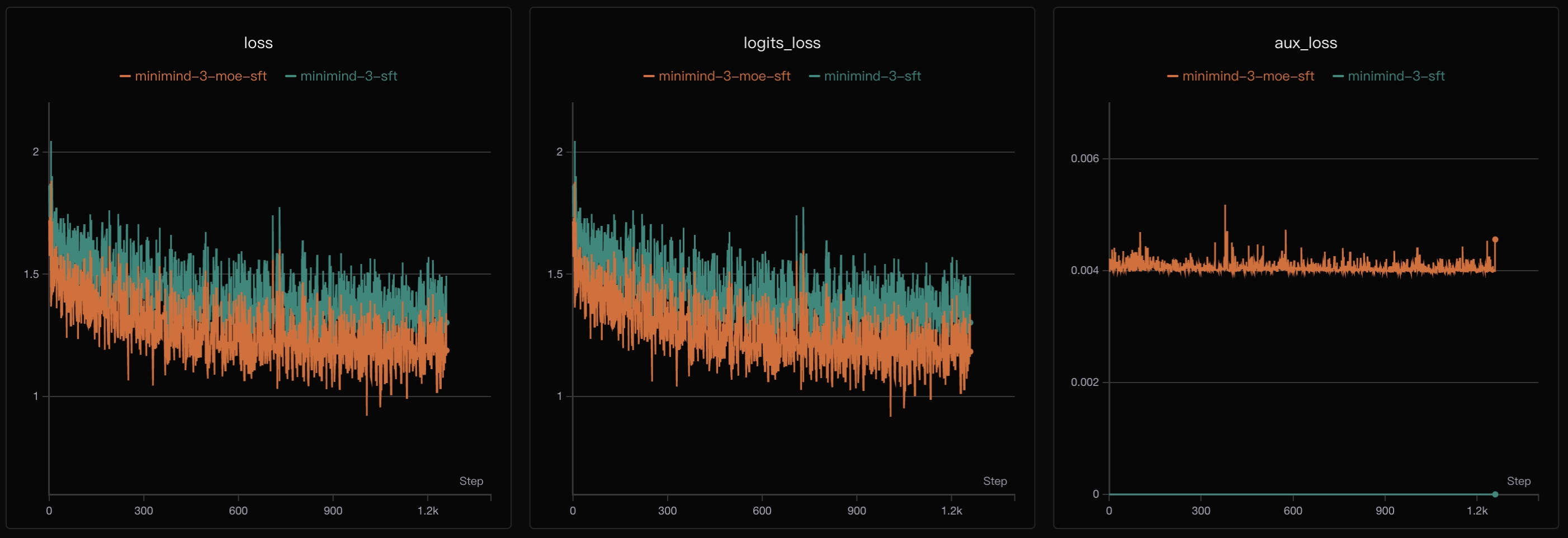
MiniMind-3-MoE has about 198 million total parameters and 64 million active parameters per token. Compare routing and auxiliary loss with Dense. Fewer active parameters do not make the full set of weights occupy the same memory or storage as a 64M Dense model.

DPO preference optimization

DPO adjusts behavior using paired preferred and rejected answers. The repository includes a script and data loading. Preference criteria shape the output; training loss alone does not establish correctness or reliability.

PPO, GRPO and CISPO experiments

These methods introduce rewards and include generation, scoring and parameter updates. Study them after the basic path works. They require extra generation compute, and poorly designed rewards can teach the model to satisfy the scorer rather than solve the task.

Multi-turn tool use and Agentic RL

train_agent.py supports GRPO / CISPO for multi-turn tool-use scenarios. Tool interaction trajectories become part of training, making it possible to study when calls are made, how results are used and what happens in later turns.

Reasoning content and chat templates

Current code uses the chat template, think markers and open_thinking to control reasoning content. It no longer follows older tutorials built around a separate train_reason.py. Displaying reasoning and producing correct answers need separate evaluation.

Distillation and data preparation

The project includes distillation, cleaning, deduplication and format preparation. Inspect how teacher outputs or training signals reach a smaller model. Teacher outputs can contain mistakes, and source data permissions need their own review.

Training charts and resuming

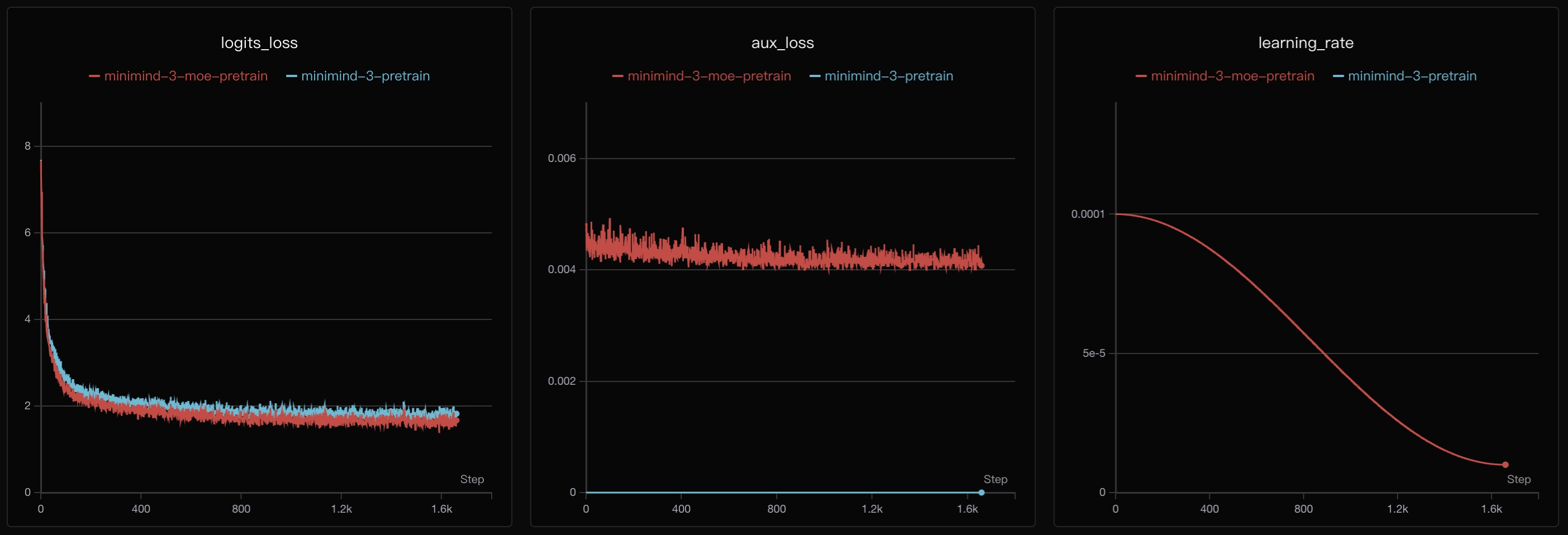
Scripts record loss, learning rate and progress, and save resume state including model and optimizer. Use --from_resume 1 to recover an existing checkpoint. A training-resume checkpoint serves a different purpose from inference-only weights.

Command line and Streamlit WebUI

Use eval_llm.py for command-line chat or the Streamlit interface. WebUI scans model subdirectories under scripts, so Transformers-format models must be placed there first. It displays reasoning, tool selection and multi-turn calls.

API serving and inference tools

A minimal OpenAI-compatible server supports reasoning_content, tool_calls and open_thinking. Documentation also describes Ollama, vLLM and llama.cpp paths. Check the model format and engine version before integration.

Evaluation, licensing and runtime costs

The project includes evaluation paths for C-Eval, C-MMLU and OpenBookQA and uses Apache 2.0 for code. Downloading code requires no subscription. GPU, storage or cloud services have their own costs. Use a separate fixed set of business prompts to check facts, refusals and repeatability.

DISEÑADO PARA TU FLUJO DE TRABAJO

Cómo encaja en tu día

CASO DE USO 01

Learn LLM training

For readers familiar with Python, tensors and basic deep learning. Trace one sample through loading, forward computation, loss and weight updates before moving to larger training systems.

CASO DE USO 02

Compare data and adaptation

Keep the model, evaluation prompts and budget fixed while changing SFT data or comparing LoRA with full fine-tuning. Record versions, settings, data volume, time and mistakes.

CASO DE USO 03

Study Dense and MoE

Inspect routing, auxiliary loss and resource use. Record total and active parameters, weight size and actual training memory separately rather than comparing architectures through a single number.

CASO DE USO 04

Build a small chat experiment

Start inference with released weights and later switch to your own model. Compare checkpoints with a fixed set of Chinese and English prompts and the same generation settings.

CASO DE USO 05

Learn tool-use training

Use tasks with checkable results, such as arithmetic or time queries, to inspect arguments, returns and final answers. The author's tool-call demo does not replace your own tests.

CASO DE USO 06

Teaching and team study

The small model and concentrated code paths can support separate sessions on pretraining, SFT and evaluation. Prepare hardware, dependencies and data in advance, and retain failures as well as successful conversations.

TUS PRIMEROS PASOS

Del primer clic al primer resultado

Pruébalo en el sitio web oficial
  1. Prepare a separate environment

    Clone the repository, install requirements.txt and separately install a matching PyTorch build. The README reference uses Python 3.10.16, Ubuntu 20.04 and CUDA 12.2. PyTorch is commented out in the requirements file.

  2. Check the GPU and revision

    For CUDA, confirm torch.cuda.is_available() returns True. Record revision, GPU model, available memory and generation settings. The author's eight-GPU workstation is a reference; a single-GPU workflow is supported.

  3. Load a released model first

    Download the Transformers-format minimind-3 under the repository root and run python eval_llm.py --load_from ./minimind-3. This first checks the model, tokenizer and inference path together.

  4. Prepare the two mini datasets

    Place pretrain_t2t_mini.jsonl and sft_t2t_mini.jsonl under dataset. Pretraining text and SFT conversations use different fields. Inspect samples before adding your own data.

  5. Run pretraining

    From trainer, run python train_pretrain.py. Current defaults include hidden size 768 and two epochs, with weights saved under the root out directory. Inspect loss, learning rate, time and memory before increasing data.

  6. Continue with SFT

    Still in trainer, run python train_full_sft.py. It defaults to loading pretrain weights and requires matching model settings. Add --from_resume 1 to the original command to recover a saved training state.

  7. Evaluate your weights

    From the root, run python eval_llm.py --load_from ./model --weight full_sft. Fix prompts and sampling settings and inspect answers, errors and speed. Training questions should not be your only evaluation set.

  8. Choose a UI or a further stage

    For WebUI, place the Transformers model directory under scripts and run streamlit run web_demo.py there. Add LoRA, DPO or Agentic RL separately and keep data, logs and weights for each experiment.

ALGUNAS COSAS MÁS

Buenas preguntas. Respuestas útiles.

Más información en el sitio web oficial

Is MiniMind a training project or a chat service?

It primarily publishes training code, models, data and tutorials. Command-line chat, WebUI and an online demo are also available. A hosted demo and your own training are different workflows; a cloned repository still needs an environment, weights or training data.

Is the model 26M or 64M parameters?

The current MiniMind-3 Dense mainline is about 64M. The 26M figure belongs to older models such as MiniMind2-small. Older tutorials and settings may not match new weights, so record a consistent code and model generation.

What does 198M-A64M mean?

The MoE model has about 198M total parameters and 64M active parameters per token. All expert weights still need storage. Active parameters are not the weight-file size and do not directly determine training memory.

How do training from scratch and fine-tuning differ?

Pretraining can begin with newly initialized weights and learn text patterns. SFT usually continues from pretrained weights using conversations. LoRA changes how parameters are adapted. Running downloaded MiniMind-3 weights is inference, not your own training run.

Does the two-hour, three-yuan example cover everything?

No. The README describes one SFT epoch on a single RTX 3090 and its corresponding GPU rental. Current pretraining and SFT scripts default to two epochs each. Setup, downloads and other stages take additional time.

Are eight RTX 3090 GPUs required?

No. Eight GPUs describe the author's reference workstation. Single- and multi-GPU paths are provided. Whether a configuration fits depends on batch size, sequence length, architecture, precision and available memory.

Can the same commands be used on CPU, Mac or Windows?

Documentation mentions CPU and MPS, with substantial speed and compatibility differences. The reference environment is Linux with CUDA. Windows can add dependency, path and data-loading differences. Establish inference with released weights before attempting training.

Why is the GPU unavailable after installing requirements?

The PyTorch entry is commented out in requirements.txt. Check that the installed build supports the intended CUDA environment, along with drivers and device access. Start with torch.cuda.is_available().

Are the two JSONL datasets interchangeable?

Not directly. Pretraining primarily loads text; SFT loads conversations. Similar names and extensions do not imply matching fields, templates or objectives. Inspect loaders, fields and truncation before supplying custom data.

How do weights differ from resume checkpoints?

Weights under out are used for inference or a subsequent stage. Resume files under checkpoints also include optimizer state and progress. Use --from_resume 1 for training recovery and the appropriate weight name for chat inference.

Why does WebUI fail to find the model?

web_demo.py scans model subdirectories containing weights under scripts. Copy a Transformers-format model there if it only exists at the root. An individual .pth file is not a complete Transformers model directory.

Does the tool-call demo establish accuracy?

No. The author's screenshot shows tool names, arguments, returns and answer layout. Arguments can be wrong and tool results need checking. Test invalid inputs, tool failures and result verification separately.

Does falling loss prove that the model improved?

It indicates a closer fit to the training objective, not necessarily factual accuracy, correct reasoning or safer behavior. Pretraining and SFT plots also represent different objectives. Use held-out prompts and record mistakes and repeated outputs.

Can it be used in a commercial project?

The code uses Apache 2.0, which generally permits commercial use with obligations including notices and license retention. Datasets, weights, teacher models and external services can have their own terms and need separate review.

Does a local run upload data?

Local training and inference can use local files. Experiment tracking such as SwanLab, hosted downloads and external tools introduce network access. Logs can include settings or text. Inspect scripts, logging options and tool configuration before processing private data.

Are vision and linear models all part of the mainline?

MiniMind-V and MiniMind-O are related projects. dLM and linear-attention directions are experimental extensions linked through project discussions. They should not be presented as default capabilities of the MiniMind-3 text mainline.

SIGUE EXPLORANDO

DE LA COMUNIDAD

¿Cuál ha sido tu experiencia?

TU PRÓXIMO DESCUBRIMIENTO

Más herramientas para explorar

Explorar todas las herramientas

DA TU SIGUIENTE PASO

¿Listo para explorar MiniMind?

Visita el sitio web oficial para explorar las funciones más recientes y comenzar.

Visitar el sitio web oficial
MiniMindgithub.com
Visitar sitio web

GALERÍA

COMPÁRTELO

Compartir MiniMind