
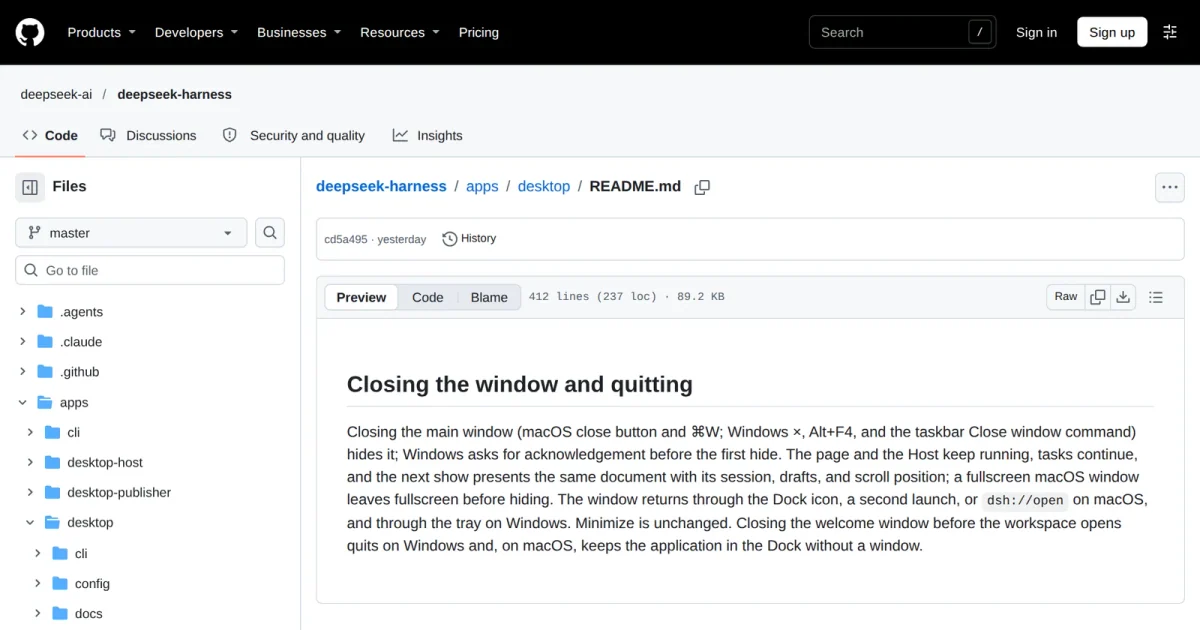
If a long DSH Desktop conversation makes typing sluggish, do not count closing and reopening the window as a restart. The official desktop documentation says closing the main window normally hides it while the page and Host backend keep running. Repeating that action may leave you testing exactly the same running state.
The new evidence is a public discussion in the official repository, dated November 9, 2026. Its author reports that restoring an oversized conversation and submitting a prompt exhausts Host memory, followed by another restoration of the same conversation and another crash. The author estimates the decompressed session at about 1GB, extrapolating from partially decoded data. That is neither an independent measurement nor a confirmed failure threshold. This is a user report, not a maintainer-confirmed diagnosis. It lacks the version, operating system and complete reproduction material needed to establish which installations are affected.
Capture the failure before quitting
An earlier discussion included a frozen interface with a reportedly healthy Host. The November report adds a different failure path: unsuccessful recovery followed by repeated crashes. Those observations do not establish a shared memory leak. Rather than deleting a conversation or reinstalling immediately, collect a small, useful comparison.
- Open About DeepSeek Harness in the application menu to record the installed version. Note the operating system, triggering action and whether a fresh conversation also becomes slow.
- Save your work and check whether running tasks can safely be interrupted. Use the application's Quit command or the Windows tray menu, not just the window's close button.
- After relaunching, check whether the failure occurs only when restoring the old conversation. If you can open developer tools using the application's Developer tools menu command, retain errors and performance records, removing credentials and private project content before sharing them.
The desktop reference documents developer-tool access and warns that quitting can interrupt tasks. This is a diagnostic sequence, not a tested repair. If restoring the conversation repeatedly crashes the app, avoid further experiments on the only copy of that session.
A terminal client still needs its engine
The dsh-TUI README lists virtualization and bounded caches. Its /update command upgrades the TUI, DSH engine and global launcher together. The documented process also restarts and resumes the current session, so it should not be treated as an oversized-session rescue button.
Our assessment: a terminal interface can help compare presentation overhead, but using its DSH backend does not bypass the engine. If loading history or assembling context is the failing operation, a different screen may not help. The most useful next report would identify the exact version, what happened after a genuine quit, and whether the failure follows the old conversation rather than every session.