Video editing

Swapface

A windows software for creating realistic face swaps.

Visit Site
Views -
Monthly visits --
Global rank ##162,489
Votes 0
IN-DEPTH GUIDE

Complete AI Face Swap Guide: Open-Source GPU vs Online Cloud Tools

Read full guide

About this tool

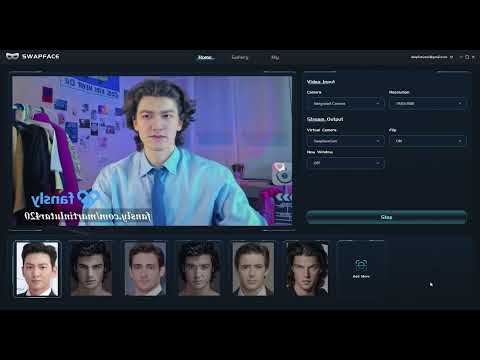
Swapface is an AI tool that allows users to create realistic face swaps in real time. It can be used for streaming, video calls, and entertainment applications. The tool is easy to use, private, cost-effective, and time-saving. It also offers a gallery of high-quality, ready-to-use faces. The program requires a mid-range graphics card and can be set up with a Windows tutorial.

Tool Name Swapface
Category Video editing
Pricing Model Free
Topic Tag Video Editing
Listed Date 2023-01-26
Top Alternatives Hirevire , Face Swap , AnyEnhancer

Traffic analysis

Traffic, ranking, and engagement signals for this tool.

Global rank ##162,489
Country rank #35,056
Monthly visits --

Visit trend

No trend data

Engagement

  • Bounce rate--
  • Pages per visit--
  • Average duration--

Traffic sources

No source data

Top countries

No country data

Interface preview

Frequently asked questions

How does Swapface work with OBS Studio, Zoom, Discord, and Twitch?

Swapface runs locally on Windows and outputs a low-latency virtual camera feed (or connects alongside OBS Virtual Camera), letting streamers and presenters appear as realistic AI characters live on camera.

What PC hardware do I need for smooth 30fps real-time Swapface streaming?

Real-time inference requires a Windows PC with a dedicated NVIDIA GeForce RTX GPU (RTX 3060 / 4060 or better strongly recommended for stable HD frame rates and minimal lip/head-turn lag).

Does Swapface also support pre-recorded video and GIF face swapping?

Yes. Beyond Stream Face Swap, the desktop client includes Video Face Swap and Image/GIF Face Swap modes with curated preset faces and custom portrait uploads.

What can Mac or mobile users use instead of Windows-only Swapface?

For Mac Apple Silicon offline video/webcam workflows, explore open-source FaceFusion (CoreML) or Deep-Live-Cam; for zero-install browser photo and clip swaps on any device, use Remaker AI or Akool.

User reviews

Embed "Featured on ToolAI.io" Badge

Copy the HTML snippet below to display your ToolAI featured badge on your website or docs.

Featured on ToolAI.io