Image editing

ai face swap

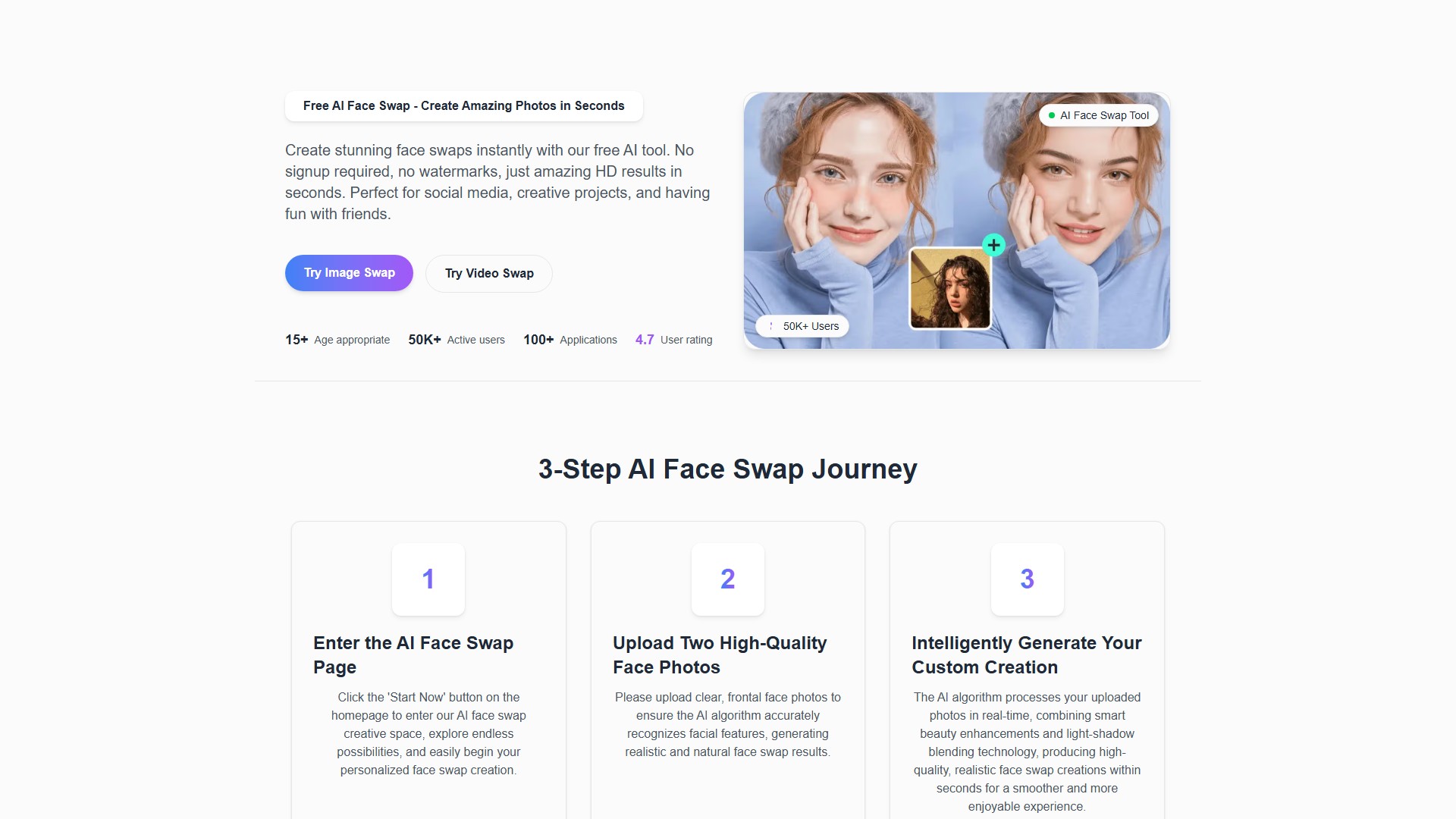
FaceSwapAI is a free online AI face swap tool for HD photos and videos. It requires no signup and adds no watermarks, delivering amazing HD results in seconds. It's perfect for social media, creative projects, and entertainment.

Visit Site
Views -
Monthly visits --
Global rank --
Votes 0
IN-DEPTH GUIDE

Complete AI Face Swap Guide: Open-Source GPU vs Online Cloud Tools

Read full guide

About this tool

Main Features

  • Image Swap: Seamlessly replace a face in a photo with another by uploading two images.
  • Video Swap: Replace the face in a source video with a target face from a photo, processing frame by frame.
  • Multiple Face Swap: Supports swapping multiple faces simultaneously in a single image or video.
  • Batch Face Swap: Efficiently process face swaps for multiple images at once.
  • GIF Face Swap: Perform face swaps on animated GIF images.
  • More Tools: Offers additional utilities like baby prediction, skin retouching, image-to-video, and NSFW text-to-video.

Core Features

  • High Efficiency: Powered by an advanced AI neural network for millisecond facial detection and blending with a simple, fast operation.
  • Intelligent Beauty Enhancements: Features built-in smart beauty and facial feature optimization, automatically adjusting skin tone and details for a professional-grade visual effect.
  • Limitless Creativity: Easily portray movie characters, anime figures, or any imagined persona, breaking dimensional barriers and bringing creative ideas to life.
  • Natural Swaps in Tough Conditions: Capable of handling complex challenges like head turns, diverse face angles, side profiles, dynamic movements (e.g., dancing), and rapid lighting changes.
  • Technology Core: An AI face swapping platform based on Generative Adversarial Networks (GANs), providing cutting-edge digital identity experiences.

How to Use

  1. Enter the Page: Click the 'Start Now' button on the homepage to enter the creative space.
  2. Upload Media: Upload two clear, frontal, high-quality face photos (or one target face photo and one source video) to ensure the AI accurately recognizes facial features.
  3. Generate Creation: The AI algorithm processes the uploads in real-time, combining smart beauty enhancements and light-shadow blending technology to produce a high-quality, realistic face swap in seconds.

Target Use Cases

  • Creating content for social media and sharing fun moments with friends.
  • Applicable for creative projects and personal artistic expression.
  • Can be integrated into the workflow of content creators and professional photographers.

Pricing Model

  • Free Tier: Provides free credits upon registration, supporting basic face swapping features with limited capabilities.
  • Paid Tiers: Users can purchase credit packages to unlock advanced features, including:
    • NSFW video generation.
    • Image-to-video features.
    • Longer video processing lengths (up to 2 minutes for premium users).
    • Higher video resolutions (up to 480P for premium users).

Limitations and Notes

  • Video Limits: Free users may have shorter video length and resolution limits depending on server load and processing requirements.
  • Best Results: Uploading clear, high-quality frontal photos is recommended for optimal face swap results.
  • Legality: Using the tool is legal as long as users respect copyright, privacy, and obtain consent. It is recommended to use your own content or ensure permission from the person whose face is being swapped.
  • Safety: FaceSwapAI uses secure cloud-based processing, and uploaded files are automatically deleted after processing to ensure user privacy and data security.
  • No Watermarks: No watermarks are added to the generated images or videos, which can be freely downloaded and used.
Tool Name ai face swap
Category Image editing , Video editing
Pricing Model Free Trial
Listed Date 2025-10-09
Top Alternatives Depix AI , Flawless AI , Pixelicious

Traffic analysis

Traffic, ranking, and engagement signals for this tool.

No analytics data yet

Interface preview

Frequently asked questions

Is FaceFusion free, and is there an official online web version without installation?

FaceFusion is a free, open-source Python & ONNX desktop/server pipeline on GitHub—there is no single subscription required when running locally. If you don't have a dedicated GPU or want instant browser face swapping without installing CUDA/FFmpeg, check cloud alternatives like Remaker AI, Akool, or Pinokio/RunPod templates in our AI Face Swap Guide.

What GPU and VRAM specs do I need to run FaceFusion 3.x smoothly?

An NVIDIA RTX GPU with at least 8 GB VRAM (RTX 3060 / 4060 or higher, 12 GB+ recommended when stacking `inswapper_128` / `hyperswap` with `gfpgan_1.4` or `codeformer` face enhancers and 1080p60 video) plus 16 GB+ system RAM delivers fast CUDA/TensorRT rendering; Apple Silicon Macs also work via CoreML.

How do I fix blurry faces or glasses/hand occlusion flickers in FaceFusion?

Enable the `face_enhancer` processor (`gfpgan_1.4` or `codeformer` at 0.65–0.80 blend), switch Face Mask Types from `box` alone to `box + occlusion` (`xseg`), and raise Face Detector Score slightly so side-profile frames stay locked cleanly.

How do ethical and legal rules apply to FaceFusion projects?

FaceFusion includes built-in content safety checks and is intended strictly for consenting talent, VFX post-production, localization dubbing (`lip_syncer`), and creative media—never for non-consensual impersonation or deceptive deepfakes.

User reviews

Embed "Featured on ToolAI.io" Badge

Copy the HTML snippet below to display your ToolAI featured badge on your website or docs.

Featured on ToolAI.io