Công cụ AI
Trình duyệt trách nhiệm Lion
Trình duyệt trách nhiệm đầu tiên được hỗ trợ bởi AI, có tính năng kiểm soát của phụ huynh.
Giới thiệu về công cụ này
Tính năng và đặc điểm chính
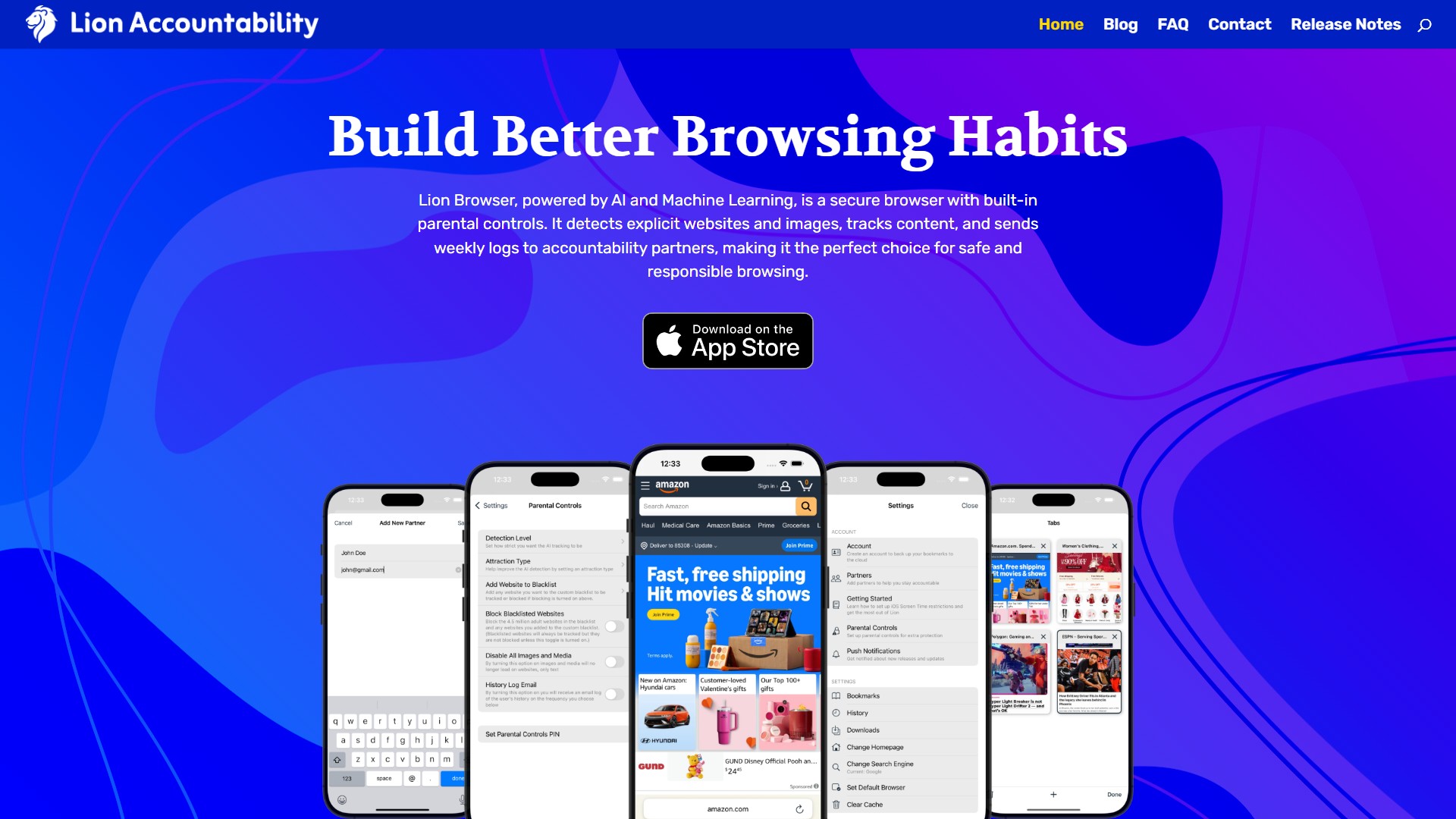
- Theo dõi và phát hiện bằng AI: tính năng phát hiện bằng AI đánh dấu các trang web và hình ảnh nhạy cảm theo thời gian thực, giúp duyệt web an toàn hơn và cho phép người dùng điều chỉnh độ nhạy phát hiện.
- Lọc nội dung: danh sách chặn bao gồm hơn 4,5 triệu trang web người lớn và được bổ sung mỗi ngày. Người dùng có thể theo dõi hoặc chặn các trang này, đồng thời tùy chỉnh danh sách để thêm bất kỳ trang web nào.
- Quyền riêng tư cục bộ: Lion Browser lưu toàn bộ nhật ký và dữ liệu duyệt web trên chính thiết bị. Không sử dụng máy chủ hay bộ nhớ đám mây, giúp đảm bảo quyền riêng tư và bảo mật.
- Kiểm soát: tính năng kiểm soát của phụ huynh tích hợp cho phép chặn trang web, điều chỉnh độ nhạy phát hiện và tắt nội dung đa phương tiện. Có thể khóa cài đặt bằng mã PIN để ngăn thay đổi trái phép.
- Báo cáo: người dùng có thể bật nhật ký hằng ngày hoặc hằng tuần để theo dõi lịch sử duyệt web và nội dung bị đánh dấu. Các báo cáo được chia sẻ an toàn với đối tác trách nhiệm.
- Tốc độ: được tối ưu cho trải nghiệm duyệt web nhanh, mượt và an toàn, tải trang nhanh trong khi bộ lọc vẫn hoạt động ở chế độ nền.
Người dùng mục tiêu
Phù hợp với những người muốn có trách nhiệm hơn khi sử dụng Internet, phụ huynh cần bảo vệ thanh thiếu niên khỏi nội dung nhạy cảm và người dùng muốn xây dựng thói quen kỹ thuật số minh bạch, có trách nhiệm.
Ưu điểm cốt lõi
Kết hợp khả năng phát hiện AI theo thời gian thực với lưu trữ cục bộ, mang đến trải nghiệm duyệt web nhanh mà không cần VPN. Lion cũng có kiểm soát của phụ huynh tích hợp và cài đặt được bảo vệ bằng mã PIN. Cơ chế chia sẻ báo cáo với đối tác trách nhiệm góp phần thúc đẩy hình thành thói quen lành mạnh.
Cách sử dụng phổ biến
- Tải Lion: vào App Store, tải Lion Browser và làm theo quy trình thiết lập để bật các tính năng chính.
- Thêm đối tác: chọn đối tác trách nhiệm sẽ nhận báo cáo duyệt web. Có thể thêm nhiều đối tác.
- Điều chỉnh kiểm soát của phụ huynh: tùy chỉnh mức độ phát hiện, bật chặn nội dung, tinh chỉnh các hạn chế và đặt mã PIN để ngăn thay đổi cài đặt trái phép.
- Tắt Safari: vào Screen Time > Content & Privacy Restrictions và tắt Safari để mọi hoạt động duyệt web đều thông qua Lion, giúp theo dõi và lọc đầy đủ.
- Hạn chế tải ứng dụng: bật “Ask to Buy” hoặc yêu cầu phê duyệt khi tải ứng dụng trong cài đặt Screen Time để ngăn việc bỏ qua hạn chế.
Thông tin giá
Trang này không cung cấp các gói giá cụ thể, nhưng đánh giá của người dùng cho biết dịch vụ “cheaper for sure” so với các lựa chọn khác, cho thấy đây là mô hình trả phí.
FAQ và phản hồi người dùng
Trang này không trình bày chi tiết phần FAQ. Tuy nhiên, các đánh giá cho biết, khác với Covenant Eyes, Lion không sử dụng VPN nên tốc độ Internet được khôi phục. Người dùng cũng đánh giá giao diện đơn giản, đẹp mắt và phù hợp với triết lý thiết kế của Apple; quy trình thiết lập dễ dàng, với chức năng duyệt web tương đương Safari. Lion nhận được năm sao về giá, chất lượng và chức năng trong nhóm ứng dụng trách nhiệm dành cho iOS.
Phân tích lưu lượng truy cập
Các chỉ số về lưu lượng truy cập, thứ hạng và mức độ tương tác của công cụ này.
Xu hướng lượt truy cập
Không có dữ liệu xu hướng
Mức độ tương tác
- Tỷ lệ thoát--
- Số trang mỗi lượt truy cập--
- Thời lượng trung bình--
Nguồn lưu lượng truy cập
Không có dữ liệu nguồn
Các quốc gia hàng đầu
Không có dữ liệu quốc gia
Bản xem trước giao diện