Business Valuation Expert

Main Features

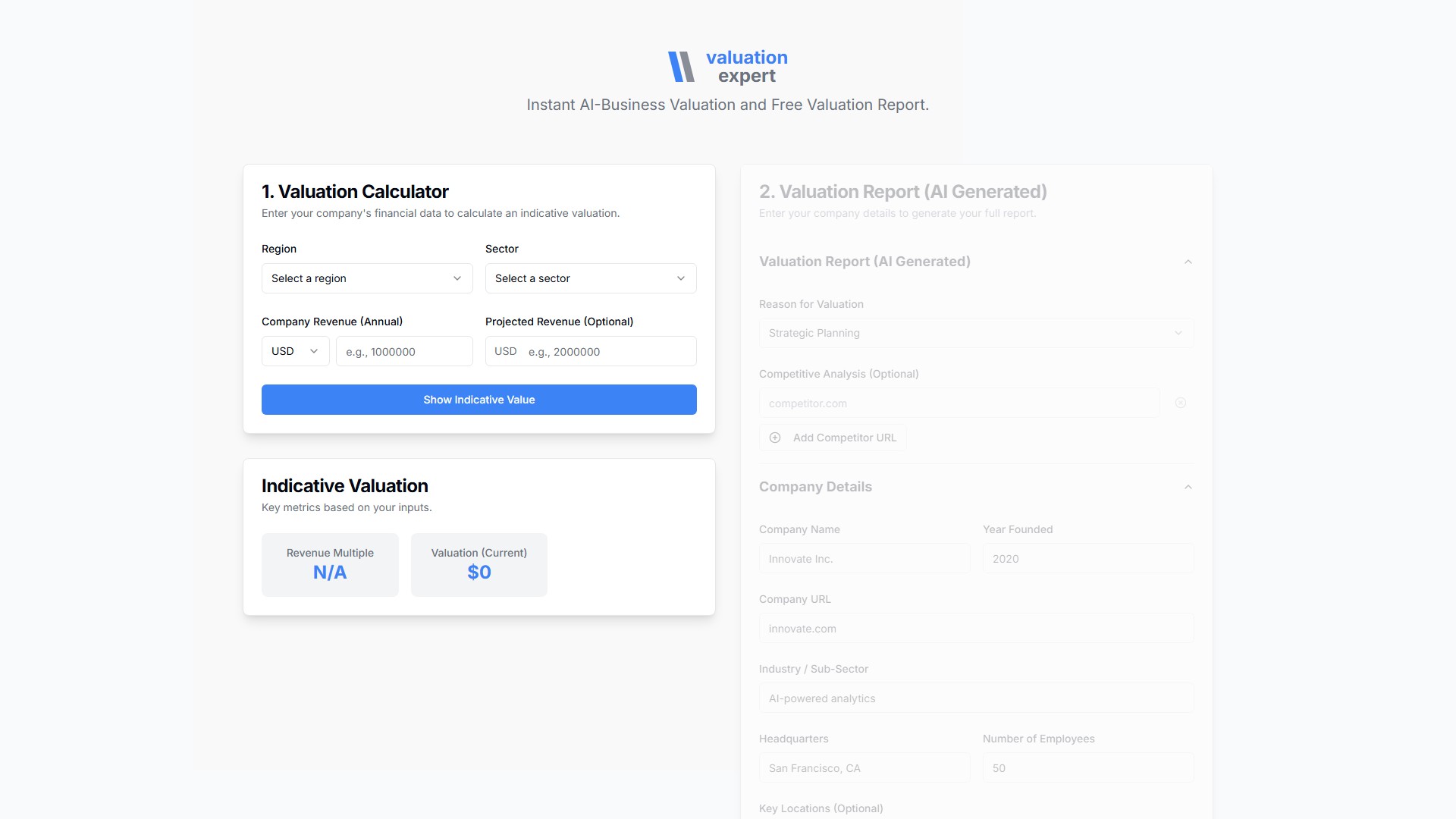
  1. Valuation Calculator: Enter your company's financial data to calculate an indicative valuation. Users need to select a region (e.g., Australia, NZ and Canada, China, Emerging Markets, Europe, Global, India, Japan, UK, USA) and a sector (covering hundreds of细分 industries like Advertising, Aerospace/Defense, Bank, Software, etc.), enter Company Revenue (Annual) (supporting currencies like USD, EUR, GBP, CAD, AUD, JPY, CNY, INR) and Projected Revenue (Optional). The system outputs the Revenue Multiple and Valuation (Current).

  2. AI Generated Valuation Report: Enter your company details to generate your full report. Reasons for valuation include: Strategic Planning, Fundraising, Acquisition (M&A), Financial Reporting, Shareholder Dispute, Other. You can add Competitor URLs for competitive analysis (Optional). Company details include: Company Name, Year Founded, Company URL, Industry / Sub-Sector, Headquarters, Number of Employees, Key Locations (Optional), Brief Description (e.g., We provide cutting-edge AI solutions for data analysis), Business Model & Revenue Streams (e.g., SaaS subscription), Customer Base & Target Segments (e.g., B2B enterprise clients), Ownership & Capital Structure (e.g., Founder-led, privately held with a Series A investment), Management Team, etc.

Core Features

  • Instant AI Valuation: Utilizes AI technology to quickly process financial and business data, providing instant indicative business value.
  • Multi-Region & Multi-Sector Support: Covers major global regions and hundreds of细分 sectors, ensuring wide applicability.
  • Multi-Currency Support: Supports input in USD, EUR, GBP, CAD, AUD, JPY, CNY, INR, and more.
  • Comprehensive Report Generation: Generates AI valuation reports incorporating deep information such as business models, teams, and competitive landscapes, beyond basic financial multiples.

Target Users

Founders, management, investors, and financial advisors seeking strategic planning, fundraising, M&A, financial reporting, or resolution of shareholder disputes.

Usage Flow

  1. Select the region and sector in the Valuation Calculator, enter annual revenue and projected revenue, and click 'Show Indicative Value' to get the indicative valuation and revenue multiple.
  2. Select the reason for valuation in the Valuation Report section, and fill in competitor URLs (optional).
  3. Complete detailed company information (name, year founded, URL, industry, headquarters, number of employees, brief description, business model, customer base, ownership structure, management team, etc.).
  4. Click 'Generate Full Report' to generate the full AI valuation report.

Pricing Information

The page explicitly states 'Free Valuation Report', offering free valuation report generation.

금융 Website

의론

로그인 After Sign In, you can make comments