소셜미디어 어시스턴트
aiCarousels.com
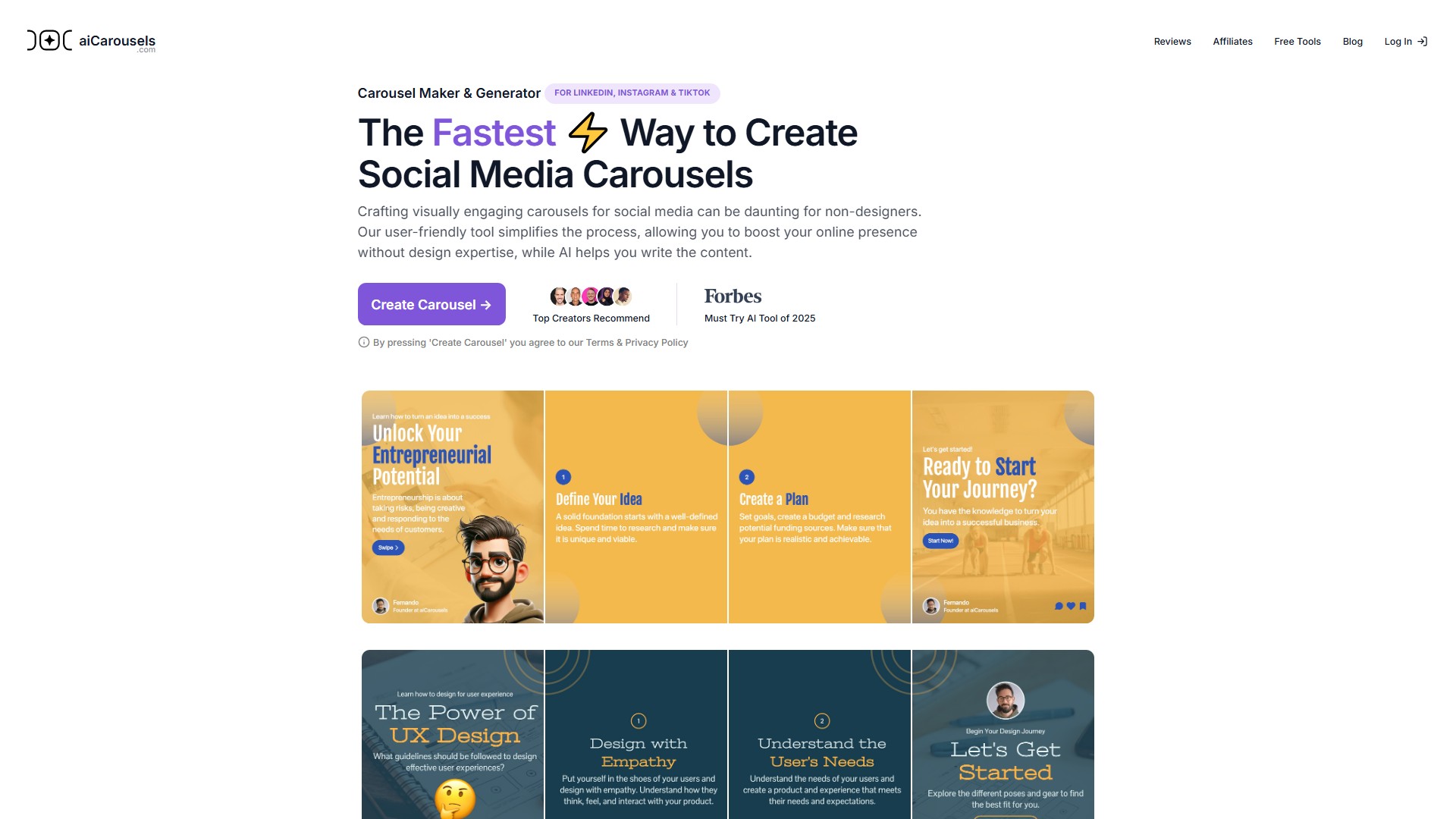
디자인 경험이 없어도 소셜 미디어용 시각적으로 매력적인 캐러셀을 쉽게 만들 수 있습니다. AI가 콘텐츠 작성을 도와 온라인 인지도를 높여 줍니다.
이 도구 정보
디자인 경험이 없는 사람에게 소셜 미디어용 캐러셀 제작은 어려울 수 있습니다. 이 사용하기 쉬운 도구는 제작 과정을 간소화하고, AI로 콘텐츠 작성을 지원해 온라인 인지도를 높일 수 있도록 합니다.
주요 기능 및 특징
- AI 글쓰기 도우미: 주제를 선택하거나 기존 콘텐츠를 입력하면 AI가 매력적인 캐러셀을 작성합니다. 필요에 따라 편집할 수 있습니다.
- 디자인 전문 지식 불필요: 사용하기 쉬운 디자인 플랫폼으로 누구나 눈길을 끄는 캐러셀을 간편하게 만들 수 있습니다.
- 스마트 자동 크기 조정: 요소가 자동으로 크기 조정되어 수동 조정 없이 적절한 배치와 읽기 쉬운 글꼴 크기를 유지합니다.
- 미리 설정된 색상 및 글꼴: 엄선된 색상 팔레트와 글꼴 조합으로 조화로운 디자인을 만들 수 있습니다.
- 완전히 맞춤 설정 가능한 템플릿: 브랜드에 맞게 템플릿을 개인화해 소셜 미디어 전반에서 일관된 시각적 정체성을 유지할 수 있습니다.
- 다중 플랫폼 지원: LinkedIn, Instagram 피드, Instagram 스토리, TikTok용 캐러셀을 만들 수 있습니다.
PRO ✧ 플랜 포함 보너스 기능
- LinkedIn 게시물 생성기: 수백 개의 맞춤 설정 가능한 바이럴 템플릿 중에서 선택하고 AI로 돋보이는 게시물을 만들 수 있습니다.
- LinkedIn 게시물 서식 도구: 굵게, 기울임꼴 등 다양한 스타일을 추가하고 게시 전에 피드에서 보이는 모습을 미리 볼 수 있습니다.
- 게시물 아이디어 생성기: 매력적인 게시물 아이디어를 즉시 생성합니다.
- 인용 카드 생성기: 콘텐츠를 보기 좋은 소셜 미디어용 인용 카드로 쉽게 바꿀 수 있습니다.
- 인포그래픽 생성기: 주제, 텍스트, URL, 동영상 또는 PDF를 LinkedIn 등에서 사용할 인포그래픽으로 변환합니다.
- 프로필 사진 생성기: 셀카를 몇 초 만에 다듬어진 프로필 사진으로 변환합니다.
사용 방법
- 캐러셀 만들기를 클릭해 편집기를 엽니다.
- AI 글쓰기 도우미로 콘텐츠를 생성하거나 직접 입력합니다.
- 미리 설정된 색상, 글꼴 및 스마트 자동 크기 조정 기능으로 디자인을 맞춤 설정합니다.
- 고품질 비주얼을 내보냅니다. LinkedIn에는 PDF 형식 등을 사용할 수 있습니다.
- 각 플랫폼의 지침에 따라 LinkedIn, Instagram 또는 TikTok에 게시합니다.
대상 사용자
디자인 비전문가, 비즈니스 사용자, 개인 브랜드 구축자, LinkedIn·Instagram·TikTok 콘텐츠 제작자 등 시각적 콘텐츠로 온라인 인지도를 높이고 싶은 사용자.
핵심 장점
디자인 전문 지식 없이도 전문적인 수준의 시각적 캐러셀을 만들 수 있어 제작 과정을 간소화합니다. AI 기반 콘텐츠 작성과 스마트 서식으로 시간을 절약할 수 있으며, PRO 플랜은 다양한 콘텐츠 제작 도구를 제공합니다.
FAQ
소셜 미디어 캐러셀이란 무엇인가요? Instagram과 LinkedIn 같은 플랫폼의 하나의 게시물 안에 여러 이미지를 보여 주는 콘텐츠 형식입니다. 여러 관련 콘텐츠를 공유하거나 더 풍부한 이야기를 전달할 수 있으며, 슬라이드를 넘기거나 클릭하도록 유도합니다.
LinkedIn에 캐러셀을 게시하려면 어떻게 하나요? 여러 페이지로 구성된 PDF를 다운로드합니다. LinkedIn 앱 또는 웹사이트를 열고 게시물 시작 또는 + 버튼을 클릭합니다. 문서 아이콘을 선택해 PDF를 업로드하고 캡션과 관련 해시태그를 추가한 뒤 게시를 클릭합니다.
Instagram에서 캐러셀을 만들려면 어떻게 하나요? Instagram 앱을 열고 +를 누른 다음 라이브러리 또는 갤러리를 누릅니다. 첫 콘텐츠를 선택하고 여러 항목 선택을 눌러 최대 20개까지 추가합니다. 다음을 눌러 편집하고 순서를 정한 뒤 캡션과 해시태그를 추가하고 공유를 누릅니다.
TikTok에서 캐러셀을 만들려면 어떻게 하나요? +를 누르고 업로드를 누릅니다. 갤러리에서 사진을 선택하고 다음을 누릅니다. 편집 화면에서 음악과 효과를 추가하고 캡션과 해시태그를 입력한 뒤 공유를 누릅니다.
aiCarousels를 캐러셀 광고에 사용할 수 있나요? 예. Facebook, LinkedIn, Instagram 및 기타 플랫폼용 캐러셀 광고를 만들 수 있습니다. 각 플랫폼이 제공하는 광고 사양과 지침을 반드시 꼼꼼히 확인하세요.
보너스 기능에는 어떻게 액세스하나요? 화면 왼쪽 상단에 있는 메뉴 그리드 아이콘을 클릭합니다.
요금제
프리미엄 모델에 따라 무료 버전을 제공합니다. LinkedIn 게시물 생성기, 인포그래픽 생성기, 인용 카드 생성기, 게시물 아이디어 생성기, 프로필 사진 생성기 등의 보너스 기능은 유료 PRO ✧ 플랜에 추가 비용 없이 포함됩니다. 구체적인 요금은 페이지에 안내되어 있지 않습니다.
트래픽 분석
이 도구의 트래픽, 순위 및 참여도 지표입니다.
방문 추이
추이 데이터 없음
참여도
- 이탈률--
- 방문당 페이지 수--
- 평균 체류 시간--
트래픽 소스
소스 데이터 없음
주요 국가
국가 데이터 없음
인터페이스 미리보기