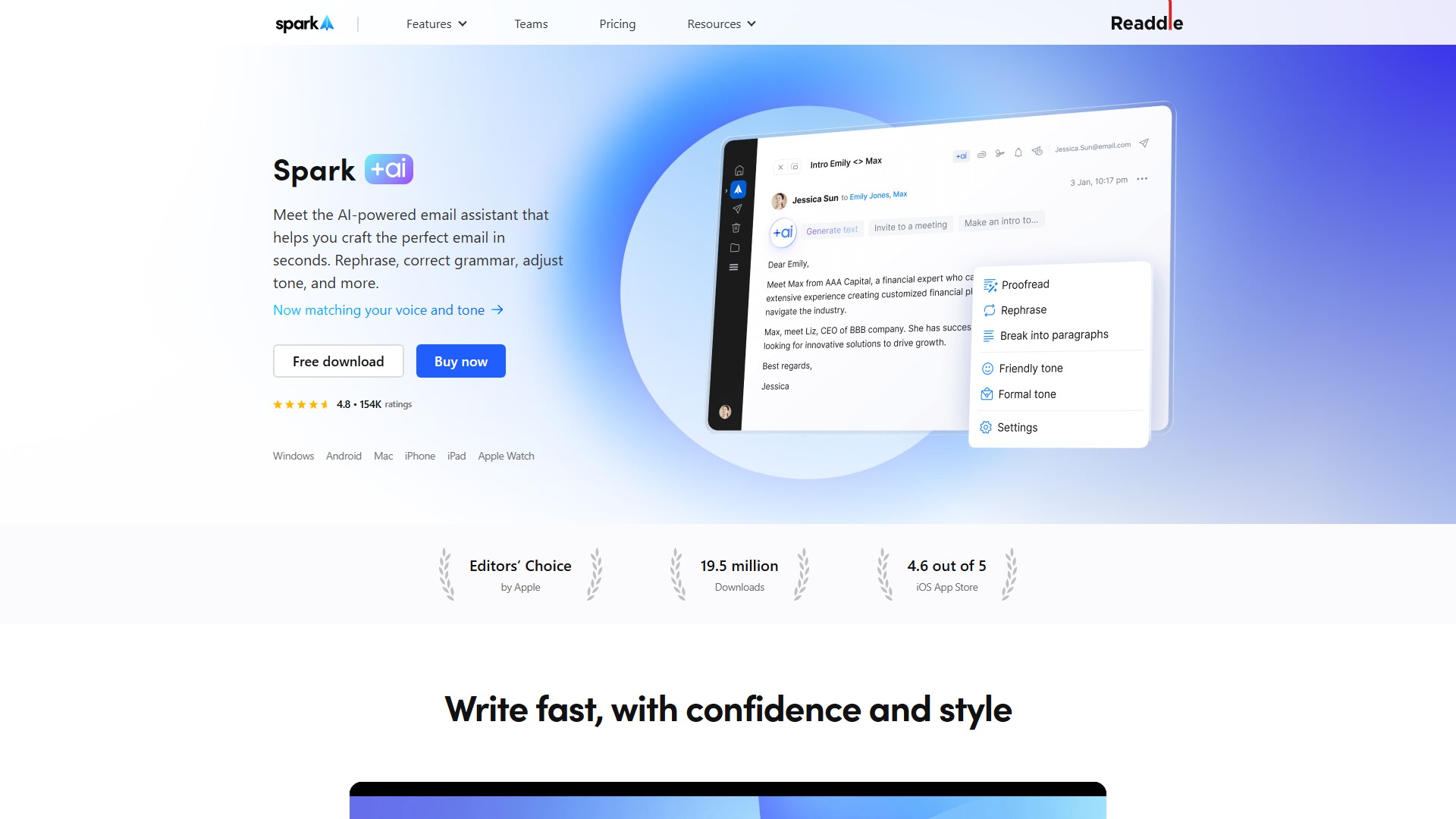
電子メールアシスタント
Spark +AI
理想的なメールをすばやく作成できるAIメールアシスタント。言い換え、校正、トーン調整などに対応します。
閲覧数
629.7K
月間訪問数
629.7K
世界ランキング
##114,745
票数
0
このツールについて
主な機能
- 作成:自分の文体やトーンに合わせて、Spark +AIにメールの下書きを作成させられます。必要な背景を伝えるだけで利用できます。
- 返信:「興味があります」「興味ありません」「ありがとう」など、+AIのクイック返信オプションで数秒で返信を生成できます。
- 編集:校正、トーンの調整、言い換え、文章の विस्तारや短縮などを行えます。
- +AI Summary:メールやスレッドの内容をすぐに把握できます。短い要約、詳細な要約、アクションポイントの要約から、目的に合うスタイルを選べます。
- +AI Translate:どの言語のメールでも簡単に理解・作成できます。受信メッセージや自分の下書きをアプリ内ですぐに翻訳でき、翻訳後もメールの書式が維持されます。受信・送信メールの翻訳に対応し、簡単に元に戻せます。
- テンプレート:AI搭載テンプレートで文章作成の行き詰まりを解消できます。一度作成したテンプレートをいつでも再利用でき、メール返信時には受信メールの内容に合うように挿入したテンプレートを+AIが調整します。
- +AI Meeting Notes:あらゆる会議プラットフォームに対応し、会議を簡単に文字起こし・要約できます。会議の1分前にポップアップで通知し、安全に文字起こしを行います。AIによる会議要約はサイドバーのフォルダーからいつでも確認できます。
主なメリット
- 文体とトーンの適応:生成するコンテンツをユーザーの文体やトーンに合わせます。
- プライバシーを重視した設計:メールの内容と+AIへのリクエストは非公開で、HTTPS暗号化によって保護され、システムやパートナーのモデルのトレーニングには使用されません。
- 主体的な確認:+AIが下書き作成を支援し、送信前にユーザーがいつでも確認・編集できます。
利用方法
メールで書きたい内容を平易な言葉で説明し、必要に応じて背景を追加してください。たとえば次のように指示できます。
- 「Bobへの紹介メールを書いて、明日の10時に電話を設定する提案をして」
- 「Robertに自己紹介するメールを書いて」
- 「会議のフォローアップメールを書いて。参加してくれた全員に感謝を伝えて」
+AIに追加の背景を伝えるだけで、適切な返信の下書きが生成されます。
対応プラットフォーム
デスクトップ、iOS、AndroidのSpark 3で利用できます。+AIの設定はデバイス間で同期されないため、スマートフォンとコンピューターで異なる機能設定を使用できます。
料金体系
+AIはSpark Premiumのサブスクリプションに含まれ、ほとんどの用途に対応できる一定の月間クォータが付与されます。+AIを使用すると月間クォータが消費されます。使い切った場合は、翌月の自動補充を待つか、アドオンを購入できます。クォータが10%まで減ると警告が表示されます。Spark Premiumには7日間の無料トライアルがあります。
テクノロジー
Sparkは+AIにAzure OpenAI GPTの統合を使用しています。Azure OpenAIはOpenAIのモデルとスムーズに連携しながら、Azureのセキュリティ機能を利用します。GPTは、人間に近い言語を理解・生成できるAI言語モデルです。
よくある質問
- +AIを無効にできますか? この機能はデフォルトで無効になっています。有効にした後も、設定からいつでも無効にできます。
- +AIをカスタマイズできますか? はい。設定でメールの希望するトーンや文章の長さを選択できます。
トラフィック分析
このツールのトラフィック、ランキング、エンゲージメントの指標。
世界ランキング
##114,745
国別ランキング
#123,238
月間訪問数
629.7K
訪問数の推移
トレンドデータなし
エンゲージメント
- 直帰率--
- 1回の訪問あたりのページ数--
- 平均滞在時間--
トラフィックソース
ソースデータなし
上位の国
国別データなし
インターフェースプレビュー