
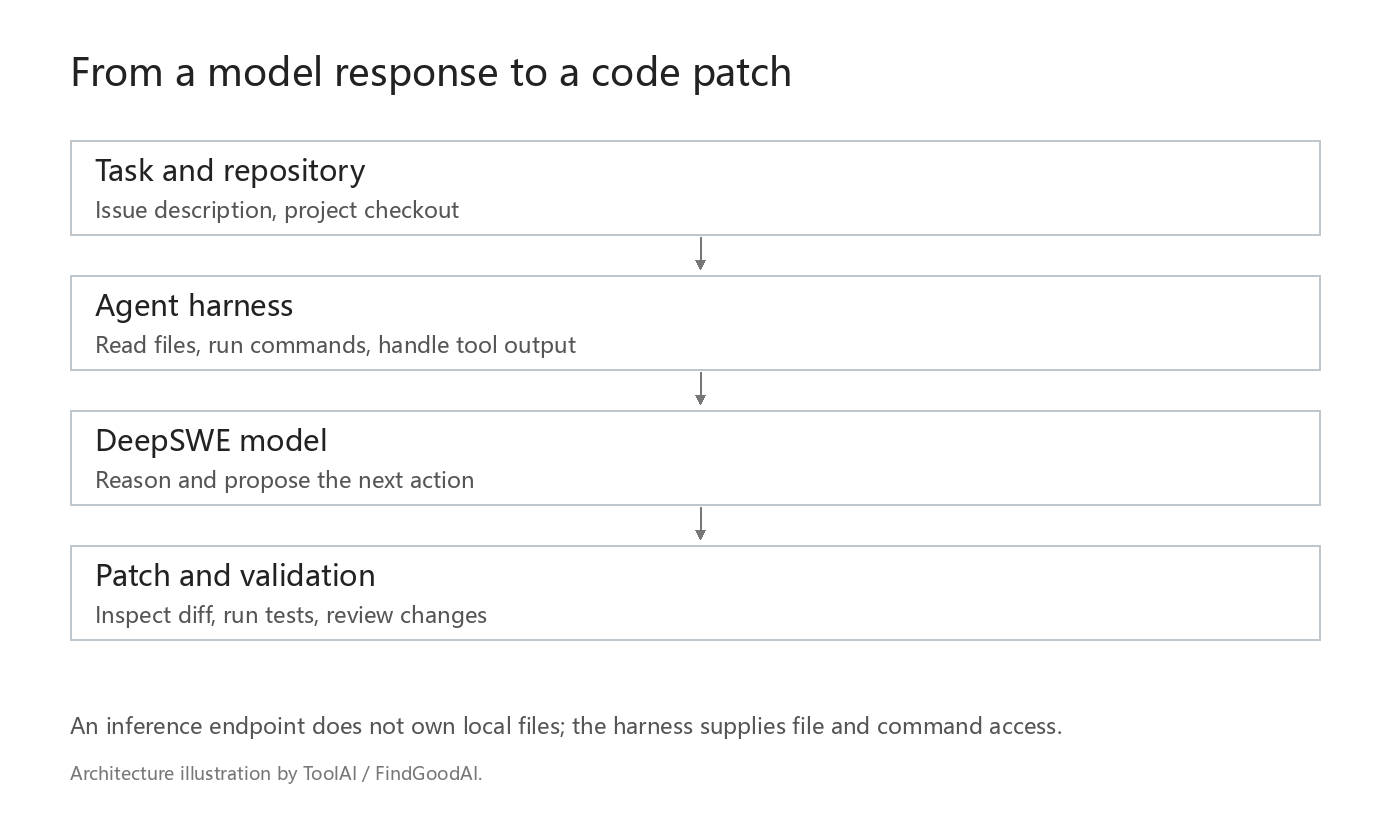
To use DeepSWE on a codebase, prepare two components: a server that runs the model and an agent environment that can read and modify a project. Start by testing the inference endpoint, then connect file and command tools. This keeps model-loading problems separate from repository-access problems.
Check the model and the machine
The official download is agentica-org/DeepSWE-Preview, a Qwen3-32B-based model. Check the exact files you plan to load. Weight precision, quantization, context cache and concurrent requests all affect memory use.
For scale, 32 billion parameters at two bytes per parameter represent roughly 64 billion bytes of raw weights. This arithmetic excludes runtime buffers and the context cache. It is not a minimum-VRAM specification. Quantization can reduce weight storage but introduces its own format, compatibility and quality questions. Measure the chosen build rather than buying hardware from the parameter count alone.
The published model configuration includes a maximum-position setting of 40,960. The research evaluation uses a different configured context budget. A long-context evaluation setting should not be copied into an unrelated runtime without checking its configuration and memory requirements.
Bring up an inference endpoint first
On a compatible, adequately provisioned machine, the model page lists a vLLM serving route. A basic starting command is:
vllm serve agentica-org/DeepSWE-Preview --host 127.0.0.1 --port 8000This is a starting configuration, not a hardware sizing recipe. Select a compatible runtime version and adjust memory and parallelism for the actual machine. The vLLM server documentation describes its compatible API. To check a local server:
curl http://127.0.0.1:8000/v1/modelsConfirm that the returned model identifier matches the client's configuration. Send a small request before trying a repository task. If loading fails, inspect the server log and available memory. If the server works but the client cannot connect, check the address from the client's own host; its localhost may refer to a different machine.
Give the agent a project environment
The model endpoint cannot browse your workstation by itself. The surrounding agent needs a project checkout, a working directory and explicit tools for reading files, making edits and running commands. An OpenAI-compatible HTTP connection alone does not establish compatible agent behavior.
For the research setup, begin with the project's software-engineering example and check its dependencies and tool conventions. For another agent framework, verify prompt formatting, action parsing and handling of failed tools before treating it as a replacement.
A small repository trial
- Make an isolated checkout without production credentials.
- Install dependencies and confirm the existing reproduction fails for the expected reason.
- Give the assistant the reproduction and ask it to locate the relevant implementation.
- Allow a narrow change, then inspect the diff before accepting further edits.
- Run the failing case and the relevant regression checks. Record time, attempts and manual intervention.
A useful instruction is: “Reproduce the error, identify the cause, make a small fix, and show the commands used to verify it.” Specify which folders may be edited and which operations need review. Keep dependency installation and access to external systems within that boundary.
Interpret performance under your budget
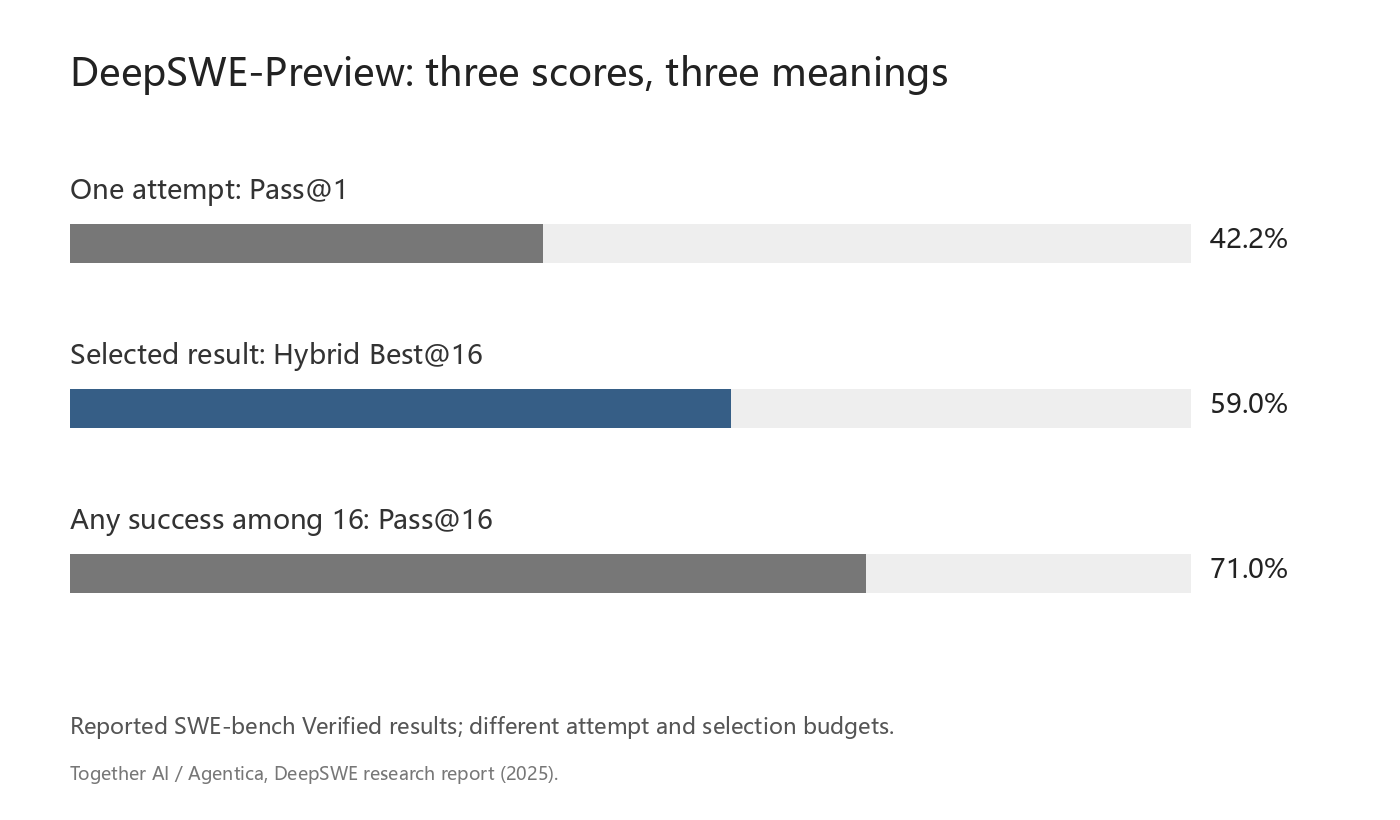
The release reports 42.2% Pass@1 and 59% after hybrid selection over 16 attempts. Treat those as historical evaluation settings. Your first comparison should use one task, one fixed environment and a declared attempt limit. A successful local API response confirms inference connectivity; a reviewed patch that passes the required checks confirms that particular coding task.