
TOOL-PROFIL TOOLAI
Plimo
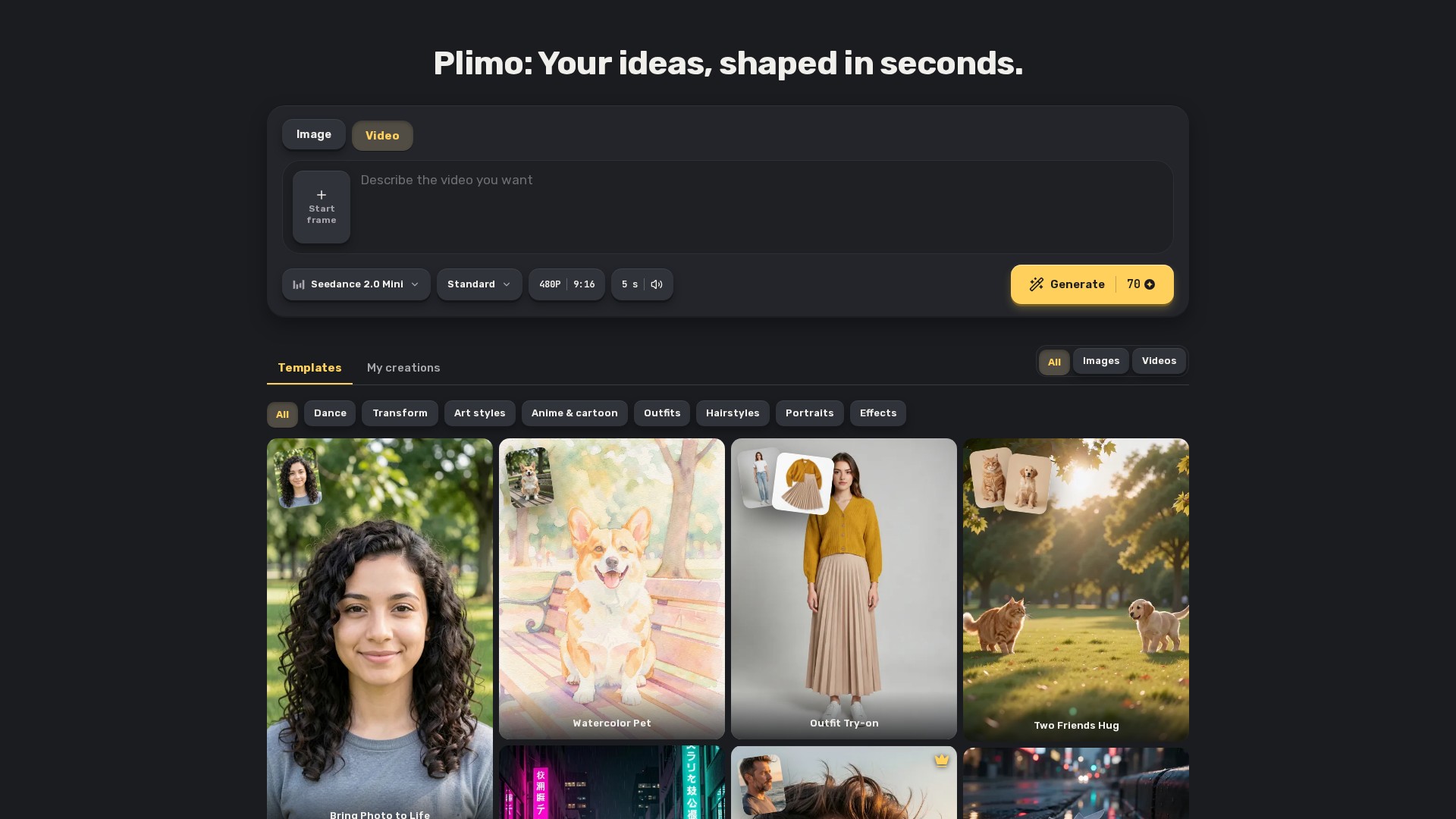
Plimo is an online creative platform combining multiple AI image and video models for image generation, photo editing, text-to-video, image-to-video, virtual outfit and hairstyle changes, and motion control. Users can create with templates or custom prompts.
Gesamtes Bild anzeigen
DAS GROSSE BILD
Über Plimo
Overview and target users
Plimo brings multiple AI image and video models into a single generator. Users can choose a trending template or describe an original idea. It serves social media creators, small-shop owners making product visuals, and individuals creating profile pictures, surprises for friends, animated family photos, or playful content.
Image tools
- AI Image Generator: Creates new images from natural-language descriptions, with optional reference photos.
- AI Photo Editor: Changes a photo's background, age, or style with a sentence.
- AI Art Generator: Turns words into drawings, paintings, and illustrations.
- AI Anime Generator: Transforms a photo or short story into anime.
- AI Clothes Changer: Tries different outfits on a user's photo.
- AI Hairstyle Changer: Previews haircuts and hair colors on a photo.
- AI Headshot Generator: Turns one selfie into a professional headshot or profile picture.
Video tools
- AI Video Generator: Produces short clips from text, photos, or both, with a choice of models.
- Image to Video: Animates still photos with subject movement and camera motion, plus sound on supported models.
- Text to Video: Creates a short clip from a written scene without requiring a photo.
- AI Dance Generator: Makes a person or pet in a photo dance.
- Motion Control AI: Uses a person photo and a reference video to make the pictured person copy the reference movements.
Models and recommended tasks
- Plimo Image 1.0: A low-credit option for everyday scenes, characters, and product shots, but not the recommended choice for lettering.
- GPT Image 2.5: Intended for readable text in posters and invitations, careful edits, and transparent PNGs.
- Nano Banana 2.1: Combines people and objects from up to six reference photos into a detailed scene.
- Seedance 2.0 Mini: A low-cost video option producing 4–15-second clips with sound from a sentence, a start frame, or multiple reference photos.
- Veo 3.1 Fast: Produces 8-second clips with sound, suited to polished, film-like shots from one photo.
- Kling 4.0: Produces 3–30-second clips with sound and can follow motion from a reference video.
Templates and key features
- Image and video models share one generator and are grouped by company, including Google, OpenAI, ByteDance, and Kuaishou.
- Templates include prepared prompts and settings, allowing users to add the requested photos and generate without writing prompts.
- Examples include photo animation, studio product shots, hairstyle and outfit try-ons, Studio Ghibli-style filters, watercolor pets, neon city posters, bullet time, boxed action figures, cinematic push-ins, yearbook portraits, hugs, and kung fu.
- The Generate button displays the credit cost before each run. Failed generations receive a full credit refund.
- Signed-in users can access their creations across devices.
Workflow
- Choose image or video mode in the generator.
- Enter a prompt or select a template and add the required photos. Typing a prompt does not require signing in, but uploading a photo does.
- Choose a model, adjust its settings, and check the displayed credit cost.
- Press Generate and sign in if prompted.
- Find the result in My creations below the generator.
Typical use cases
- Animate an old family photo so grandparents smile and give a small wave.
- Preview a haircut or color on a selfie before a salon appointment.
- Combine photos of two distant friends into a scene of them hugging in a park.
- Create a party invitation with exact wording using GPT Image 2.5.
- Turn a household photo of a candle or mug into a studio-style product image on a marble pedestal; using it for sales requires membership.
- Generate a short film with sound from a scene such as a paper boat drifting down a rainy street at dusk.
Pricing and usage limits
- New accounts receive 100 free credits once. These credits never expire and cover approximately 50 Plimo Image 1.0 pictures or one short video.
- Paid membership plans are
EIN GENAUERER BLICK
In Aktion sehen
Erkunden Sie Produktansichten und veröffentlichte Beispiele. Öffnen Sie ein beliebiges Bild für eine genauere Ansicht.
AUS DER COMMUNITY
Welche Erfahrungen haben Sie gemacht?
Dieses Tool ausprobiert?
Melden Sie sich an, um Ihre Erfahrungen zu teilen und anderen zu helfen, das richtige Tool zu finden.
IHRE NÄCHSTE ENTDECKUNG
Weitere Tools zum Entdecken

Magic Studio
Erstelle in Sekunden beeindruckende Bilder mit den KI-Bildbearbeitungstools von Magic Studio. Entferne unerwünschte Elemente, ändere Hintergründe oder vergrößere Bilder – ganz ohne Photoshop oder Illustrator.

Spicy Chat AI Girlfriend
Eine KI-Freundin-App für Chats und Spiele mit romantischen Abenteuern, Rollenspielen und „spicy“ Interaktionen mit virtuellen KI-Figuren.
Mirto AI
Mirto AI verwandelt Textbeschreibungen oder statische Bilder mithilfe von KI in hochwertige, flüssige Videos.

Wan2.2 S2V AI: S2VAI-Sprache-zu-Video-Generator
Wan2.2 S2V AI ist ein Sprache-zu-Video-Generator mit S2VAI-Technologie und 14 Milliarden Parametern, der Audio und Sprache in professionelle Videos in Kinoqualität verwandelt.
MACHEN SIE DEN NÄCHSTEN SCHRITT
Bereit, Plimo zu entdecken?
Besuchen Sie die offizielle Website, um die neuesten Funktionen zu entdecken und loszulegen.