
My conclusion from this setup was straightforward: modifying this card took more effort than I considered worthwhile.
1. Hardware compatibility and cooling
If a motherboard has no Above 4G Decoding or similarly named BIOS option, the original setup is not a good candidate for this card. Even older boards that expose the setting may still have problems. My ASUS Z97-AR had the option but reported Device Manager error code 12 when the card was installed. Also, the Tesla P4 and Tesla T4 are different cards from the P40; do not confuse their requirements.
I favored Intel 100-series or newer motherboards for this experiment. I had not followed AMD boards closely enough to recommend a particular model; the relevant BIOS option and a newer platform were useful starting points, but CPU PCIe lanes and BIOS support could still create compatibility problems.
For Stable Diffusion, I recommended at least 16GB of system memory. Loading a model with 8GB made my machine extremely sluggish. Balanced memory arrangements such as 8GB + 8GB, four 4GB modules or four 8GB modules were preferable to the mixed configurations I had tried. Uneven module arrangements and XMP settings were among the possible causes of instability or failed memory checks in that setup.
Cooling hardware changes the space requirements substantially. An angled blower arrangement brought the assembly to roughly 30cm long and 8cm thick. With the P40 in the first PCIe ×16 slot, the protruding blower blocked part of the next slot. If a separate display adapter was needed because the CPU had no integrated graphics, that adapter had to be shorter than about 16.5cm to fit my arrangement.
A straight rear duct with a fan could extend the card to around 35–40cm. The original build used the first full-bandwidth PCIe ×16 slot for the P40; on many non-HEDT boards, a second full-length slot has only ×8 or ×4 electrical connectivity. Replacing the cooler—for example with a GTX 1080 blower assembly—was another option, but added roughly CNY 100–several hundred to the original budget.
The single blower I bought let temperatures rise into the 80–90°C range. Adding a 12cm case fan to feed the blower and an external exhaust fan brought full-load temperatures down to roughly 50–60°C. The exhaust fan then obstructed the rear expansion-slot area, requiring a right-angle DisplayPort or HDMI extension for the display adapter.
2. Driver installation and configuration
With the hardware working, the P40's default official driver configuration used TCC mode for compute workloads. The card appeared in the output of nvidia-smi. For the Windows desktop and gaming experiment described here, I then worked on switching it to WDDM mode so it could participate in graphics workloads and appear in Task Manager.
The original article referred to this TCC/WDDM configuration guide. An M40 appeared able to switch with a command such as nvidia-smi -g {M40-ID} -dm 0; the P40 setup did not behave the same way. The alternatives discussed were NVIDIA vGPU, which had a paid license and a 90-day trial in the original account, or registry modifications.
The linked guide used integrated graphics. For a Quadro display card alongside a Tesla P40, I checked whether the display driver's supported-device list also included the P40. An older Quadro's final driver could include Tesla support if it was released after the P40 became available. With a compatible package installed, both cards could appear in NVIDIA Control Panel. Without a suitable driver for the display card, Windows could fall back to the Microsoft Basic Display Adapter, with flickering, limited graphics features or incorrect display resolutions.
Using a Quadro and Tesla together proved comparatively straightforward. A GTX/RTX display card plus the P40 initially seemed harder, but a video demonstrated another registry-based approach: GTX/RTX and P40 coexistence walkthrough. The following steps condense that recording and my own test.
2.1 Check whether the driver includes the Tesla device
Launching an installer such as 527.56-xxx-xxx-whql.exe first extracts the driver files. Before continuing installation, open \Display.Driver\nv_dispsig.inf inside the extracted directory and search for both the GTX/RTX card and the P40. Their presence establishes that the package lists both devices. After installing the compatible package in my test, Device Manager showed both cards.
2.2 Registry changes used in the WDDM experiment
Open Registry Editor with regedit and navigate to:
HKEY_LOCAL_MACHINE\SYSTEM\CurrentControlSet\Control\Class\{4d36e968-e325-11ce-bfc1-08002be10318}Look through the numbered subkeys, such as 0001 and 0002, and identify the one whose DriverDesc value is NVIDIA Tesla P40. In that P40 key, the original experiment used these values:
| Value | Type | Setting |
|---|---|---|
AdapterType | Existing value | 1 |
GridLicensedFeatures | DWORD (32-bit) | 7 |
EnableMsHybrid | DWORD (32-bit) | 1 |
Then locate the separate key for the GTX/RTX display adapter and create a DWORD (32-bit) named EnableMsHybrid with a value of 2. Refresh with F5 and restart Windows. In my test, the P40 then appeared in Task Manager as a WDDM graphics device.
The video used a GTX 750 driver, manually located a suitable driver for the compute card, and then edited the registry. My own test used a GeForce RTX 3060 Ti plus a P40 and the 531.41 NSD driver. The P40 driver installed directly, so that manual driver-selection step was unnecessary in my case.
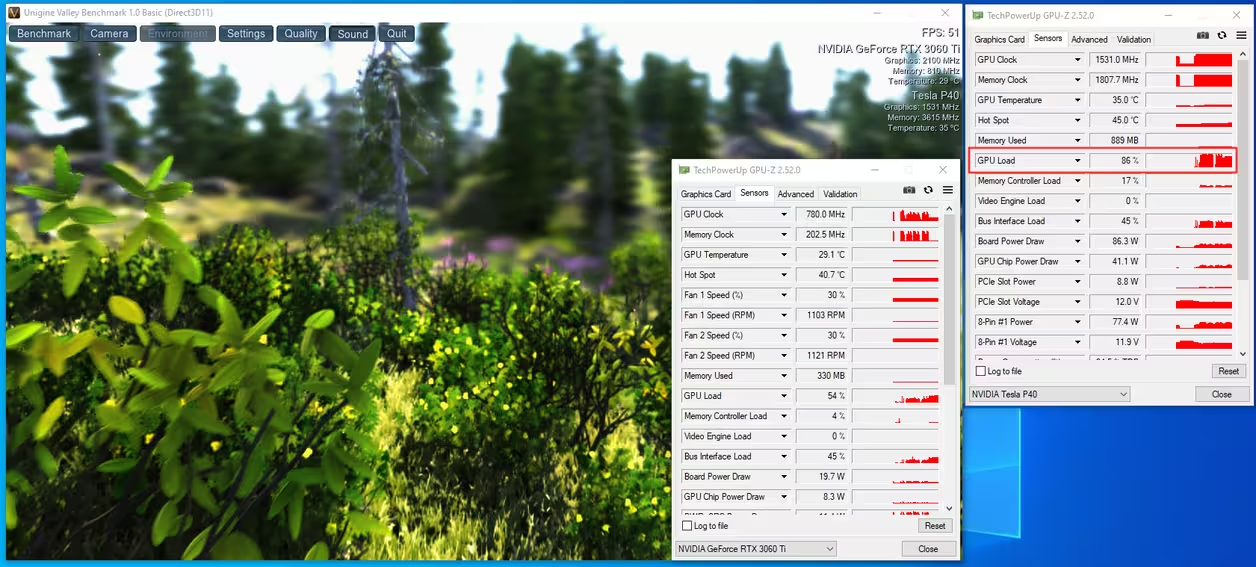
To assign an application to a particular GPU, add its executable in Windows Graphics Settings and choose the desired card. I assigned the Valley benchmark to the P40 in the example below.
3. Results and practical trade-offs
The P40's main attraction in this build was its 24GB of VRAM. At the time, the card cost roughly CNY 700–800, with cooling modifications adding tens to hundreds of yuan. Some motherboard and integrated-display arrangements introduced latency and noticeable graphics-performance losses. X79/X99/X299 systems without integrated graphics also needed a separate display adapter.
The original tests found the older Pascal architecture poorly suited to the author's FP16-heavy AI workload and noted the lack of Tensor Cores. My RTX 3080 was several times faster: under the same Stable Diffusion settings, one image took approximately four to five minutes on the P40, compared with roughly 40–50 seconds on the 3080. For people needing more VRAM but finding a 3090 or 4090 too expensive, the original article also considered a professionally modified RTX 2080 Ti with 22GB as a compromise.
Large VRAM can be tempting when Stable Diffusion reports out-of-memory errors, or when an AMD GPU makes a particular workflow difficult. But a cheap P40 can lead to additional purchases: an incompatible motherboard, a new CPU-and-board combination, a larger case or more cooling. For someone who enjoys hardware experiments, that can be part of the appeal. For a tightly budgeted AI workstation, the complete system cost and time spent troubleshooting matter as much as the card's sticker price.
The M40 was cheaper in the original comparison and appeared easier to switch between driver modes, but was slower than the P40; both were substantially behind later Turing and Ampere hardware for these workloads. I hope owners enjoy their experiments, while prospective buyers weigh the compatibility work before purchasing.
These were the findings of the original setup; the author left room for a later update.