TOOL PROFILE TOOLAI

VisualGPT: AI Image Generator & Photo Editor

Browser-based AI creative suite for image generation, editing, product photography, and video assets

visualgpt.ioPRODUCT PREVIEW
Illustration published on the official product website; see the source page for its context. View full image
Illustration published on the official product website; see the source page for its context.Images: 4

THE BIG PICTURE

About VisualGPT: AI Image Generator & Photo Editor

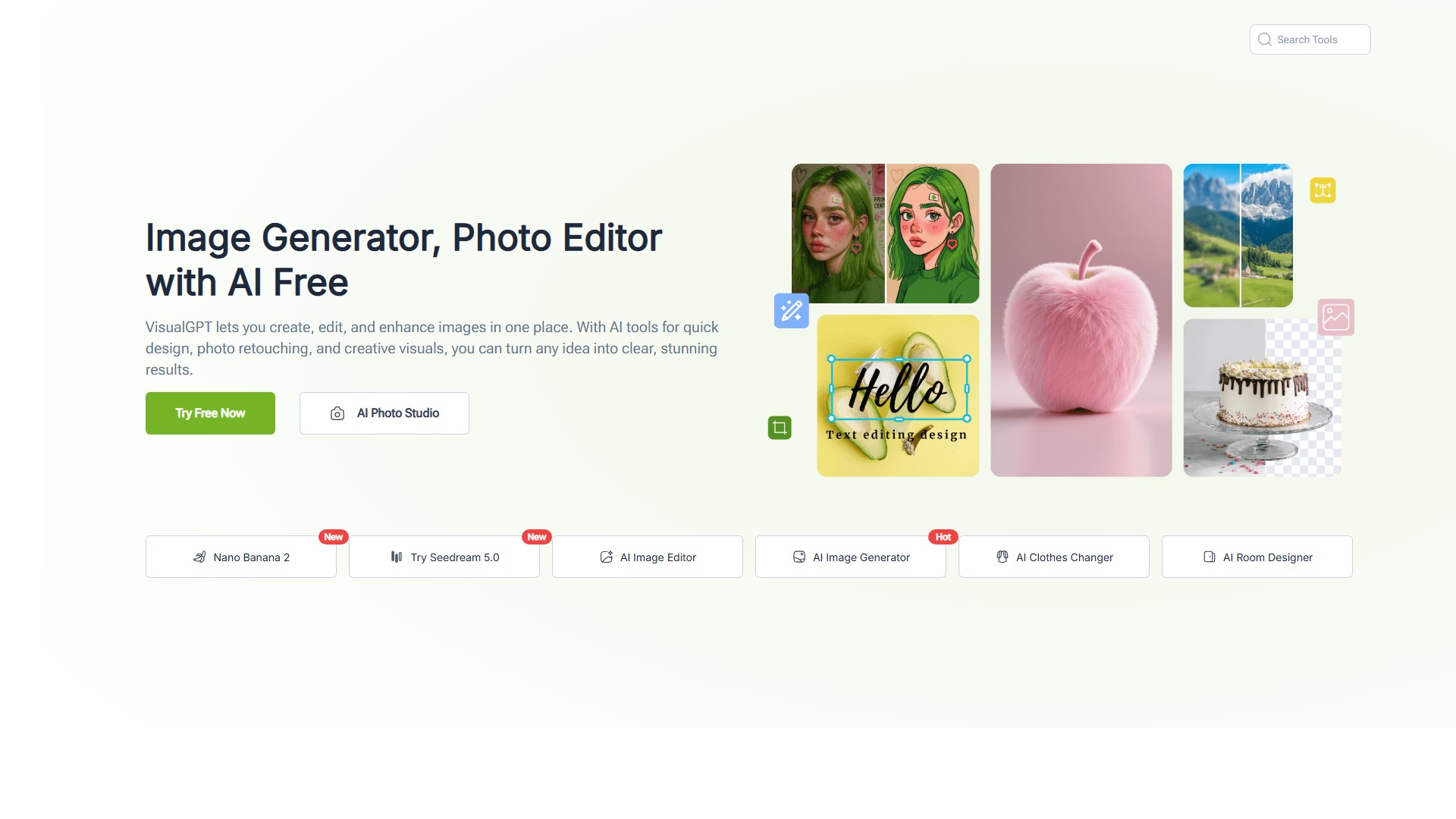
VisualGPT is a browser-based AI creative platform that brings together multiple image and video generation models in a single workspace. According to its homepage, the platform is positioned as "one creative engine behind everything" for creators, sellers, and marketers, and it states that it provides access to models such as GPT Image 2, Nano Banana Pro, Seedance, Seedream, and Kling from one place rather than requiring separate subscriptions. The site organizes its tools into categories including AI Image, AI Video, AI Models, and AI Room, with individual tools for image generation, image editing, photo-to-sketch conversion, hairstyle and clothes changing, pose generation, image blending, video generation and enhancement, and interior or landscape design.

The product is aimed at people who need production-ready visuals without a studio or photography background. The homepage emphasizes e-commerce and content creation workflows: generating product photography with AI models, creating white-background and lifestyle shots, building listing suites for marketplaces such as Amazon, Shopify, Etsy, and TikTok Shop, and producing social or advertising assets. It also describes portrait-oriented tools such as headshot generation, hairstyle previews, and sketch conversion, plus video capabilities including turning static images into video and generating lip-sync product demos.

Access is through the website, and the Help Center states there is no dedicated app but that the site is optimized for mobile use. The platform uses a credit-based system: free users receive daily credits, while paid subscriptions and one-time credit packs provide additional credits. The pricing page lists Starter, Basic, Pro, and Ultra subscription tiers, several one-time credit packs, and an Enterprise contact option. Commercial-use rights are described as available for images generated with an eligible paid subscription or Lifetime Credits, subject to the site's Terms and applicable model and source-asset restrictions, with watermark-free downloads.


WHAT YOU CAN DO

A toolkit worth exploring

Get to know the capabilities. Find your own way to use them.

Multi-model image and video generation

The homepage states that VisualGPT provides access to several AI models, including GPT Image 2, Nano Banana Pro, Seedance, Seedream, and Kling, from a single platform. Users can select a model for a given task without switching between separate subscriptions or applications.

AI image generation from text prompts

The AI Image Generator tool is described as turning text prompts into images. The Help Center notes that prompts can be written in the user's own language because the prompt window features language adaptation.

AI image editing and enhancement

An AI Image Editor tool is listed for editing, enhancing, and transforming images, alongside related tools such as AI Image Blender and Photo to Sketch for converting portraits into artistic sketches.

Product photography and listing visuals

The homepage describes generating studio-quality product photography, white-background shots, lifestyle scenes, and complete listing suites intended for marketplaces such as Amazon, Shopify, Etsy, and TikTok Shop.

AI virtual try-on for clothing

The AI Virtual Try-On page documents uploading a person photo and clothing images to generate photo and video try-on results. It supports categories such as tops, bottoms, outerwear, shoes, socks, and accessories, with optional background and pose presets including standing, walking, and 360-degree rotation.

Portrait and personalization tools

The homepage lists tools for generating professional headshots without a studio, previewing new hairstyles, generating dynamic poses, and changing clothing on AI models.

Video generation and enhancement

The platform includes an AI Video Generator, AI Video Enhancer, and an AI Clip Maker that turns long videos into short clips. The homepage also mentions turning static images into videos and generating lip-sync product demos.

Batch processing and project history

The pricing comparison indicates batch editing is available, with a limit of 10 images per task on the free tier, and paid plans enable batch generation. The Help Center describes a My Projects area for viewing, downloading, and deleting previously generated files, with history storage of 15 days on free and unlimited on paid plans.

MADE FOR YOUR WORKFLOW

Where it fits into your day

USE CASE 01

E-commerce product listings

Sellers can generate white-background product shots, lifestyle scenes, and listing suites for marketplaces such as Amazon, Shopify, Etsy, and TikTok Shop, and can batch-process multiple products in one session according to the homepage and pricing page.

USE CASE 02

Fashion and apparel previews

The AI Virtual Try-On tool can help visualize how clothing items look on a person or model, producing photo and video previews with selectable poses and backgrounds, which may be useful for fashion content or storefront previews.

USE CASE 03

Social media and advertising content

Creators and marketers can generate portraits, sketches, and short videos, and the homepage describes cloning winning ad creatives and batch-editing campaign visuals for channels such as Instagram, TikTok, and YouTube.

USE CASE 04

Interior and room design visualization

The AI Room category includes tools such as AI Room Designer, AI Landscape Design, AI Exterior Home Design, Paint Color Visualizer, and AI Kitchen Planner for generating or previewing room and design concepts.

YOUR FIRST STEPS

From first click to first result

Try it on the official website
  1. Sign in with a Google account

    The Help Center states that login is currently supported only through Google. Users click the last button in the left-hand menu bar, then choose Sign In or Sign Up and use Google one-click login.

  2. Choose a tool category

    After logging in, the left toolbar on the homepage is divided into categories such as AI Image, AI Room, and AI Visual. Users select the category and then the specific tool that matches their task.

  3. Provide input for the selected tool

    Depending on the tool, users enter a text prompt, upload a reference or product image, or upload a person photo. For AI Virtual Try-On, the page documents uploading a person photo and clothing images, with optional background and pose selections.

  4. Generate and review the result

    Users run the generation and review the output. The Help Center notes that if an image is not successfully generated it does not count as an attempt, and suggests adjusting the prompt or choosing a different model if content is not recognized.

  5. Export or manage the project

    Once a project is fully generated, an Export button appears in the top menu bar. Previously generated files can be viewed, downloaded, or deleted from the My Projects area after logging in.

PLAN YOUR NEXT STEP

A plan for the way you work

Credit-based pricing with a free tier offering daily credits, monthly and annual subscription plans (Starter, Basic, Pro, Ultra), one-time credit packs, and an Enterprise contact option. The pricing page lists annual billing amounts for subscriptions and one-time prices for credit packs.

Subscribe on the tool's website

PLAN

Starter

Subscription tier listed on the pricing page with 100 credits per month, up to 100 images per month, up to 12 videos per month, up to 20 minutes of clipping per month, premium model access, faster and more stable models, and batch generation. Annual billing is shown as $72 per year.

  • 100 credits/mo for generation
  • Up to 100 images/month
  • Up to 12 videos/month
  • Up to 20 min of clipping/month
  • Unlock premium models
  • Enable batch generation
View plan on website

PLAN

Basic

Subscription tier listed on the pricing page with 500 credits per month, up to 500 images per month, up to 65 videos per month, up to 100 minutes of clipping per month, premium model access, faster and more stable models, and batch generation. Annual billing is shown as $180 per year.

  • 500 credits/mo for generation
  • Up to 500 images/month
  • Up to 65 videos/month
  • Up to 100 min of clipping/month
  • Unlock premium models
  • Enable batch generation
View plan on website

PLAN

Pro

Marked as most popular on the pricing page, with 2,000 credits per month, up to 2,000 images per month, up to 250 videos per month, up to 400 minutes of clipping per month, premium model access, faster and more stable models, and batch generation. Annual billing is shown as $240 per year.

  • 2,000 credits/mo for generation
  • Up to 2,000 images/month
  • Up to 250 videos/month
  • Up to 400 min of clipping/month
  • Unlock premium models
  • Enable batch generation
View plan on website

PLAN

Ultra

Subscription tier listed on the pricing page with 6,000 credits per month, up to 6,000 images per month, up to 750 videos per month, up to 1,200 minutes of clipping per month, premium model access, faster and more stable models, and batch generation. Annual billing is shown as $720 per year.

  • 6,000 credits/mo for generation
  • Up to 6,000 images/month
  • Up to 750 videos/month
  • Up to 1,200 min of clipping/month
  • Unlock premium models
  • Enable batch generation
View plan on website

PLAN

Credit Packs

One-time credit packs listed on the pricing page in sizes of 200, 1,000, 2,000, 3,000, 5,000, 10,000, and 50,000 credits. The page states lifetime credits are purchased one-time, do not reset, and can be retained until used.

  • One-time purchase
  • Credits do not reset over time
  • Can be stacked with subscriptions
View plan on website

PLAN

Enterprise

The pricing page lists an Enterprise option with a Talk to Sales / Contact Us call to action for a custom plan.

  • Custom plan
  • Contact sales
View plan on website

Prices, usage limits and terms can change. Confirm the latest details on the tool's official website before subscribing.

Subscription and credit-pack prices are shown on the official pricing page; annual plans are billed as a lump sum and do not auto-renew, while monthly plans auto-renew. Confirm current amounts and eligibility on the official pricing page before purchase.

Sources checked

A FEW MORE THINGS

Good questions. Useful answers.

More on the official website

Is VisualGPT free to use?

VisualGPT advertises an ongoing free tier that uses daily credits, with no card required to begin. It includes core models and standard-resolution downloads. Subscriptions add higher usage allowances and features such as batch jobs, downloads up to 4K, and priority access to leading models.

Can I use VisualGPT images for commercial purposes?

The homepage FAQ states that commercial use is available for images generated with an eligible paid subscription or Lifetime Credits, subject to the Terms and applicable model and source-asset restrictions. Images generated on the free plan are described as personal, non-commercial use only, and commercial-use rights for qualifying outputs remain valid after cancelling a subscription.

What AI models does VisualGPT support?

The homepage states that VisualGPT provides access to models including GPT Image 2, Nano Banana Pro, Seedance, Seedream, and Kling from one platform. The site notes that each model excels at different types of output, from photorealism to artistic styles and video generation.

Do I need design or photography experience to use VisualGPT?

The homepage FAQ states that VisualGPT is designed for people who need professional visuals without design or photography skills. Users can describe what they want in plain language, upload a reference photo, or start from a template, and advanced settings allow fine-tuning of resolution and model selection.

How do credits work?

The Help Center explains that daily credits are temporary, are given after logging in, reset 24 hours after the last login, and cannot be accumulated. Purchased credits are permanent, remain until used, can be accumulated, and can be stacked with future purchases. The pricing page adds that subscription credits are issued each billing cycle and are only available during the active subscription period, while lifetime credits are one-time purchases that do not reset.

How do I log in and manage my projects?

The Help Center states that login is currently supported only through Google accounts. After logging in, users can click My Projects on the left to view historical generated files, download them, or delete them. The Help Center also notes that account deletion is not currently supported but is planned for a future update.

Is there a mobile app?

The Help Center states that there is currently no dedicated app, but the website is fully optimized for mobile use, so users can create and edit images from a phone browser.

FROM THE COMMUNITY

What has your experience been?

YOUR NEXT DISCOVERY

More tools to explore

Explore all tools

MAKE YOUR NEXT MOVE

Ready to explore VisualGPT: AI Image Generator & Photo Editor?

Visit the official website to explore the latest features and get started.

Visit official website
VisualGPT: AI Image Generator & Photo Editorvisualgpt.io
Visit website

GALLERY

PASS IT ALONG

Share VisualGPT: AI Image Generator & Photo Editor