
AI blur removal
The core capability described on the page is automatic AI-driven sharpening of blurry areas in an uploaded photo. Users do not adjust settings manually; the tool processes the image and returns a clearer version.

TOOL PROFILE TOOLAI
Browser-based AI tool that sharpens blurry photos without sign-up
 View full image
THE BIG PICTURE
Unblur Image Online Free is a browser-based AI image enhancement tool from FamilyPro that is designed to reduce blur and restore sharpness in photographs. According to the official page, users upload a blurry image and the tool's AI processes it to produce a clearer version that can be downloaded. The page presents the tool as a simple alternative to manual photo editing, aimed at people who want a quick fix without learning editing software.
The workflow described is deliberately minimal: upload an image, let the AI process it automatically, then download the result. The page states that no sign-up, email, or account is required and that the tool is free to use. The tool is accessed through a browser. The page also says uploaded images are automatically deleted after processing, with no storage of photos or personal information. These are product claims from the official page rather than independently verified guarantees.
The tool is positioned for everyday photo problems such as shaky shots, out-of-focus subjects, compressed images, and faded scans. The page lists supported input formats as JPG, PNG, and WEBP with a 20MB file limit, and separately mentions support for high-resolution images up to 4000x4000 pixels and 'other popular formats.' It also offers example images for users who do not have a file ready to test.
| Tool Name | Unblur Image Online Free |
|---|---|
| Category | Image editing |
| Pricing Model | Free to use; the page states no payments, no email, and no account are required, and mentions 0 credits per use with 20 free credits per day |
| Platform & Capabilities | Web browser (browser-based tool; no download or installation required according to the official page) |
| Listed Date | 2025-12-08 |
| Top Alternatives | Boolv , Let's Enhance , DragGAN |
A CLOSER LOOK
Explore product screens and published examples. Open any image for a closer look.
Official example input image, supplied to illustrate the tool. This is not a generated result.
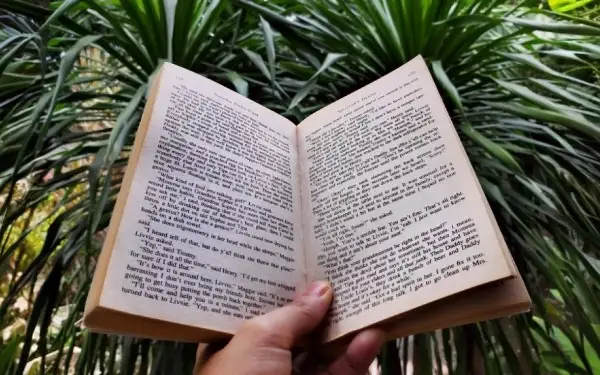
Official example input image, supplied to illustrate the tool. This is not a generated result.
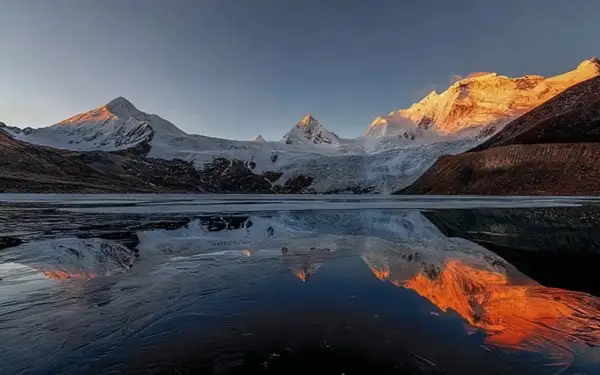
Official example input image, supplied to illustrate the tool. This is not a generated result.

WHAT YOU CAN DO
Get to know the capabilities. Find your own way to use them.
The core capability described on the page is automatic AI-driven sharpening of blurry areas in an uploaded photo. Users do not adjust settings manually; the tool processes the image and returns a clearer version.
The page states that users can go to the website and fix a blurry image without creating an account, providing an email, or making a payment.
The interface accepts images via drag and drop, and also provides an 'Upload image' action for choosing a file from a device.
The page lists JPG, PNG, and WEBP as supported formats with a stated 20MB file size limit, and also mentions support for 'other popular formats' without naming them.
The page states that the tool supports high-resolution images up to 4000x4000 pixels, in addition to the listed JPG, PNG, and WEBP formats.
For users without a blurry photo on hand, the page offers example images that can be clicked to try the tool.
Access the tool through a web browser; the official page says no download or installation is required.
The page claims that uploaded images are automatically deleted after processing and that photos and personal information are not stored.
MADE FOR YOUR WORKFLOW
The page suggests the tool can help sharpen fuzzy selfies and group photos while keeping skin looking natural, which may be useful for social media posts and profile images.
According to the page, the tool can be used to bring faded or blurred old pictures back to a clearer state, helping preserve details in personal archives.
The page positions the tool for eCommerce and printing contexts, where it can help fix blur and pixelation in product shots so they appear sharper.
The page states the tool can clean up blurry spots in documents, faded books, and handwritten notes so text appears sharper and easier to read.
The page mentions using the tool on pixelated screenshots, tutorial text, game scenes, and compressed social images to make them clearer for sharing.
The page describes using the tool to sharpen and brighten travel photos, turning ordinary scenes into clearer, more polished-looking images.
YOUR FIRST STEPS
Go to the Unblur Image Online Free page in a web browser. No account or sign-up is required according to the page.
Click 'Upload image' or drag and drop a JPG, PNG, or WEBP file from your device. The page states a 20MB limit.
The tool automatically applies AI processing to unblur the image. The page describes the result appearing in moments without manual adjustment.
Once the clearer version is generated, download the unblurred image and use it on a website or share it on social media.
PLAN YOUR NEXT STEP
Free to use; the page states no payments, no email, and no account are required, and mentions 0 credits per use with 20 free credits per day
Prices, usage limits and terms can change. Confirm the latest details on the tool's official website before subscribing.
The provider advertises free access without sign-up. The tool page also displays a daily credit allowance and zero credits per use. Check the current tool page for access and credit terms.
The official page states that the tool is free and requires no payments, email, or account. It also displays a 'Get 20 free credits per day' element and '0 credits per use', but no paid plans are described.
According to the page, the process is: visit the tool page, upload a blurry image, and receive a clear version. No software installation or learning is described.
The page lists JPG, PNG, and WEBP as supported formats with a 20MB file limit, and also mentions 'other popular formats' without naming them. It also states support for high-resolution images up to 4000x4000 pixels.
The page claims that the tool keeps the original quality while making the image sharper, so high-resolution images remain high-resolution. This is a product claim rather than an independently verified result.
The page states that most images process in seconds and that uploaded images are automatically deleted after processing, with no storage of photos or personal information. These are claims made by the official page.
The page says the tool is intended for blurry images generally, including shaky selfies, out-of-focus landscapes, compressed images, screenshots, and blurry text. It does not document specific technical limits beyond format and file size.
The page describes the tool as browser-based and usable from any device for uploading, but it does not document specific mobile operating system requirements or a dedicated mobile app.
FROM THE COMMUNITY
Sign in to share your experience and help others find the right tool.
FEATURED BADGE

YOUR NEXT DISCOVERY

Products: 【Boolpic】: Free toolkit for image editing. 【Video maker】: Page or pic into stunning promotion videos in just a click. 【Booltool 】The web light solution for AI-powered pic editing, copywriting, and video making!

Image enhancer & upscaler. Automatic AI editor to increase image resolution without losing quality. Make your photos look their best in one click

Drag Your GAN: Interactive Point-based Manipulation on the Generative Image Manifold

Accelerate Your Icon Creation Process: Harness the Power of Our AI Digital Icon Generator for Your Business Website, Applications, and Brand.
MAKE YOUR NEXT MOVE
Visit the official website to explore the latest features and get started.