

Raster and vector generation
Create photographs, illustrations, icons, and scalable SVG artwork; choose a model suited to the asset rather than treating all outputs alike.
TOOL PROFILE TOOLAI
Generate and refine brand-aware raster and vector artwork with a design workbench built for iteration.
 View full image
THE BIG PICTURE
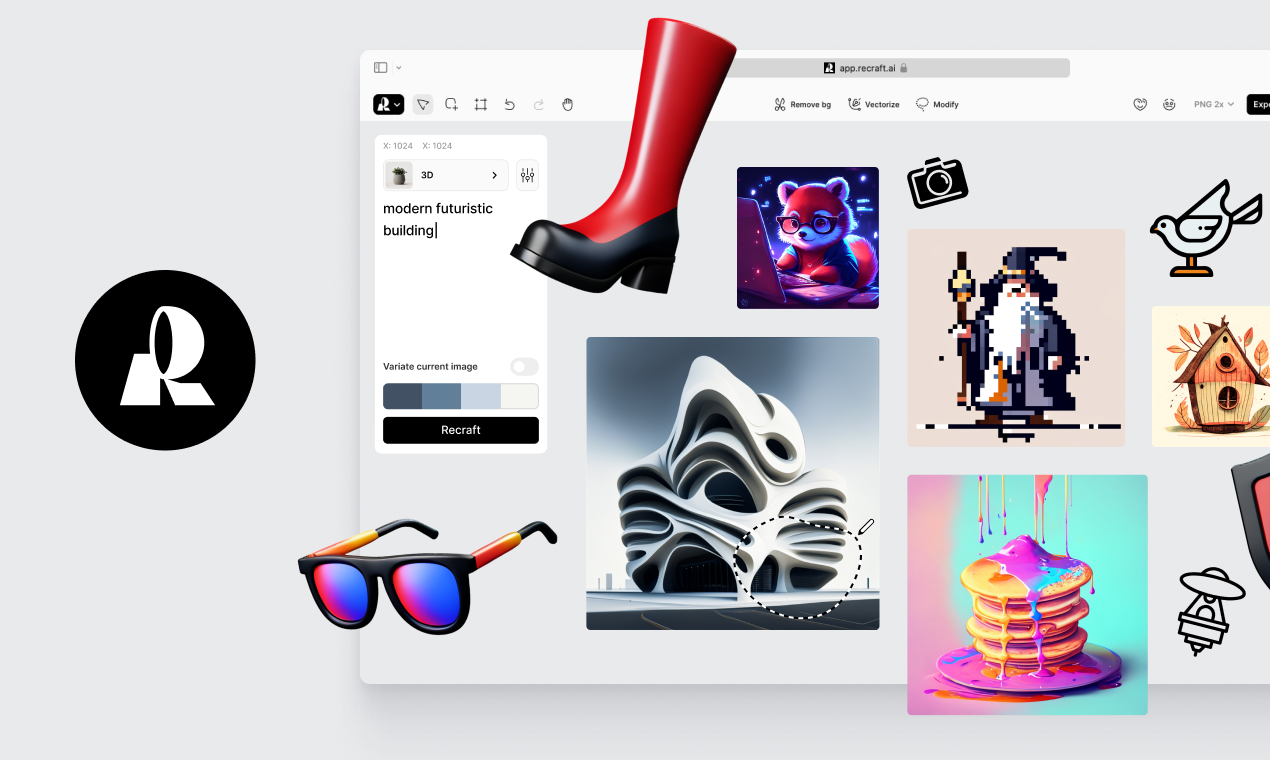
Recraft is an AI design workspace for creating and editing images, illustrations, icons, mockups, and vector artwork. Its canvas brings generation together with tools such as background removal, inpainting, outpainting, upscaling, and image vectorization. Style controls let creators explore a library, build a look from references, and reuse it across related visuals.
Recraft's stronger case is control: vector output, style consistency, and direct editing make it more useful to a designer than a prompt box that only returns a picture. Still, generated text, geometry, and brand details need inspection. Think of it as a fast visual production assistant, especially for concepts and repeatable assets, rather than an automatic substitute for final art direction.
A CLOSER LOOK
Explore product screens and published examples. Open any image for a closer look.
WHAT YOU CAN DO
Get to know the capabilities. Find your own way to use them.
Create photographs, illustrations, icons, and scalable SVG artwork; choose a model suited to the asset rather than treating all outputs alike.
Browse styles or combine reference images to build a consistent look that can be reused across a campaign or team workflow.
Guide the placement and size of elements for graphic-design tasks, then inspect generated lettering for spelling and legibility.
Refine selected areas with inpainting or outpainting, remove backgrounds, upscale assets, and iterate without changing tools.
Edit vector shapes in Studio and use the API for generation and image operations when a product workflow needs automation.
MADE FOR YOUR WORKFLOW
Create a saved visual style, generate a family of related assets, and review color, typography, and product details together.
Explore editable vector directions quickly, then refine paths and confirm trademark and brand requirements before adoption.
Place an existing design on a package or device mockup to evaluate composition before commissioning final production artwork.
YOUR FIRST STEPS
Describe the subject, intended use, aspect ratio, and visual constraints; add a reference when consistency matters.
Select raster or vector output and a style that fits the job. Check commercial-use terms for the account plan.
Compare variations, correct lettering and geometry, and use canvas tools to refine the chosen result.
Export the required format and confirm that the plan's ownership, privacy, and commercial terms fit the project.
PLAN YOUR NEXT STEP
Free starts with 30 daily credits. Paid plans add higher limits and commercial-use rights; API units are billed separately by operation.
PLAN
A way to explore Studio with 30 free daily credits; free-plan outputs are public and are not licensed for commercial use according to Recraft's pricing page.
$0
Daily credits
PLAN
Paid subscriptions provide additional credits and keep generated images private with commercial rights while subscribed; limits vary by plan.
See current pricing
Monthly or annual
PLAN
Separate API billing is based on the operation and output type; consult the developer pricing before automating a workflow.
Usage-based
Prepaid API units
Prices, usage limits and terms can change. Confirm the latest details on the tool's official website before subscribing.
Checked on 4 October 2026. Recraft says Free-plan images are public and not licensed for commercial use; paid-plan images are private and include commercial rights while subscribed. Check the current plan and rights terms before use.
Sources checked
Yes. Recraft's official pages describe AI vector generation and raster-to-vector conversion, with editable SVG output and a vector editor.
Recraft's pricing FAQ says free-plan images are public and not licensed for commercial use. Paid-plan rights differ; confirm the current terms for your account.
Recraft describes reusable styles made from its style library and reference images. Review each generation for accurate logos, colors, and typography.
The API has separate usage billing in API units. Its costs vary by operation and output type, so check the API pricing documentation.
FROM THE COMMUNITY
Sign in to share your experience and help others find the right tool.
YOUR NEXT DISCOVERY

Using Open AI's GPT-3.5 model to generate beautiful and unique color palettes from text prompts. Also, Explore, edit, and visualize palettes created by other designers.
Generate 1000 custom NFT with 1 click.
Ares creative is a text to image AI using stabble diffusion xl and others as base model. We focused on a simple and straight user interface to provide a more open AI experience to everyone even without tech skills or discord account.
DesignYay replaces unreliable freelancers and expensive agencies for one flat monthly fee, with unlimited designs and AI art work delivered so fast that it will blow your mind. Easy to sign up and easy to cancel (just like your Netflix subscription!).
MAKE YOUR NEXT MOVE
Visit the official website to explore the latest features and get started.