


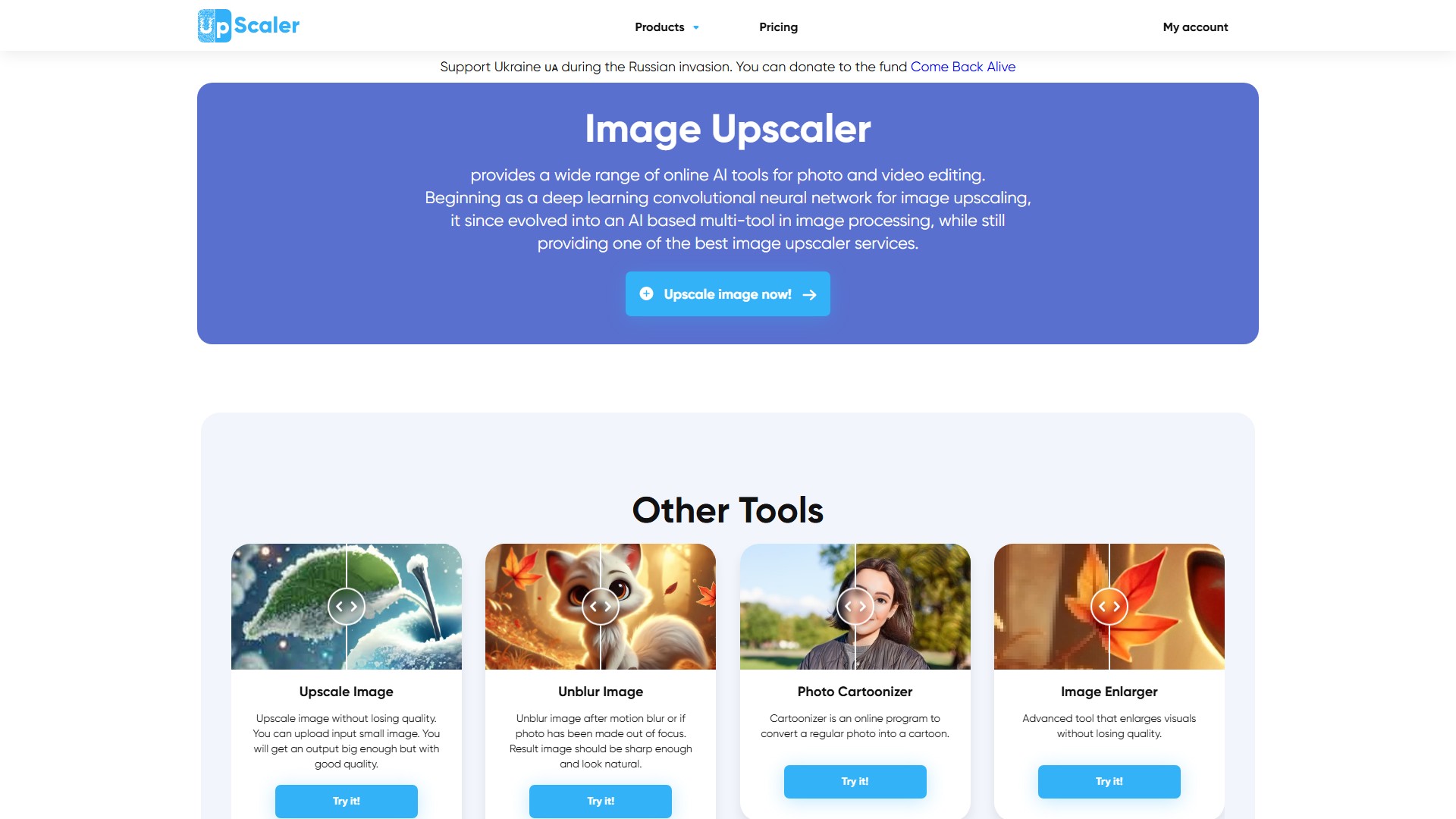
AI image upscaling
Increases image resolution by generating new pixel data rather than stretching the original. The system analyzes shapes, edges, textures, contrast, and repeating patterns to reconstruct missing details.
TOOL PROFILE TOOLAI
Browser-based AI image upscaling and enhancement toolkit
 View full image
THE BIG PICTURE
Image Upscaler is an online photo and video editing service that uses AI to enhance images. According to its homepage, it began as a deep learning convolutional neural network for image upscaling and has since grown into a multi-tool for image processing while continuing to offer upscaling. The platform is browser-based: users upload an image or video, choose a tool, and processing happens automatically on the company's servers, with no software installation required.
The core upscaling workflow lets users increase image resolution while the system analyzes shapes, edges, contrast, and repeating patterns to reconstruct details rather than simply stretching pixels. The upscale tool page states images can be enlarged up to 16K depending on the starting size, with upscaling factors of 2x, 4x, 6x, and 8x; 6x and 8x are subscription features. Processing is described as taking roughly 10-40 seconds, and multiple files can be uploaded and processed at once.
Beyond upscaling, the site lists companion tools for unblurring, enlarging, enhancing images, and removing JPEG artifacts, plus an AI image generator and video-to-cartoon conversion mentioned in the FAQ. The service offers both free and paid options, with free monthly credits for testing and subscription plans that add monthly credits and features such as priority processing and API access for business tiers.
A CLOSER LOOK
Explore product screens and published examples. Open any image for a closer look.
WHAT YOU CAN DO
Get to know the capabilities. Find your own way to use them.
Increases image resolution by generating new pixel data rather than stretching the original. The system analyzes shapes, edges, textures, contrast, and repeating patterns to reconstruct missing details.
Offers 2x and 4x upscaling to all users, with 6x and 8x available as subscription features. The final size is the original size multiplied by the chosen factor.
Includes General for typical photos, Anime/Cartoon for anime, cartoon, sketch, or vector images, and FacePro for upscaling faces in a photo (FacePro requires a subscription).
A separate tool for fixing photos affected by motion blur, focus issues, or soft details, with FacePro noted as helpful for blurred face photos.
A dedicated tool for removing JPEG artifacts from photos, listed among the platform's image-processing tools.
Additional tools for enlarging images and enhancing image quality, listed alongside upscaling and unblurring.
After upscaling, users can click Edit this image to crop, rotate or flip, fine-tune colours, apply filters, add watermarks or annotations, or set a new size by entering exact dimensions.
The interface supports uploading and processing multiple files at once, with a Download all images option for processed results.
Business plans include API access for the AI Image Generator, Image Deblurer, and Image Upscaler, with jpg, jpeg, and png image formats supported.
MADE FOR YOUR WORKFLOW
Upscale product photos for online stores and marketplaces to provide clearer views of products.
Increase resolution of graphics for print materials such as stickers, postcards, posters, banners, or product packaging, and for website design.
Use the Anime/Cartoon preset to upscale anime, cartoon, sketch, or vector images, enhancing color depth and contrast.
Upscale old family photos or prepare images for high-definition displays.
The site lists uses such as increasing resolution of security camera footage, telescope images, and medical images like X-rays, MRIs, or ultrasound scans.
YOUR FIRST STEPS
Click the Add file button and upload the image you want to upscale, or drop files into the upload area.
Select the image type (General, Anime/Cartoon, or FacePro) and the upscaling factor (2x or 4x; 6x and 8x require a subscription).
Click Start processing and wait roughly 5-40 seconds while the upscale process runs.
After processing, click Edit this image to crop, rotate or flip, fine-tune colours, apply filters, add watermarks or annotations, or set a new size by entering exact dimensions.
Check the result and save the upscaled image to your device, or use Download all images for batch results.
PLAN YOUR NEXT STEP
Free tier with monthly credits plus paid subscription plans. Individual plans: Starter (50 credits/month, $9.90/month or $69/year), Premium (500 credits/month, $25/month or $180/year), Premium Plus (1000 credits/month, $29/month or $208/year). Business plans: Business Starter (2000 credits/month, $49/month or $343/year), Business Premium (5000 credits/month, $99/month or $693/year), Business Advanced (20000 credits/month, $299/month or $1999/year).
PLAN
50 credits per month, ad-free, includes Image Upscaler, AI Image Generator, and all other tools.
9.90
monthly
PLAN
500 credits per month, ad-free, includes Image Upscaler, AI Image Generator, all other tools, and priority in the processing queue.
25
monthly
PLAN
1000 credits per month, ad-free, includes Image Upscaler, AI Image Generator, all other tools, and priority in the processing queue.
29
monthly
PLAN
2000 credits per month with API access for AI Image Generator, Image Deblurer, and Image Upscaler, supporting jpg, jpeg, and png formats.
49
monthly
PLAN
5000 credits per month with API access for AI Image Generator, Image Deblurer, and Image Upscaler, supporting jpg, jpeg, and png formats.
99
monthly
PLAN
20000 credits per month with API access for AI Image Generator, Image Deblurer, and Image Upscaler, supporting jpg, jpeg, and png formats.
299
monthly
Prices, usage limits and terms can change. Confirm the latest details on the tool's official website before subscribing.
Prices and credit allowances are taken from the official pricing page. The homepage FAQ states each user gets 3 free credits per month per software, while the upscale tool page states 5 free credits per month for registered users; free-credit details should be confirmed on the site.
Sources checked
It is an online platform for enhancing image quality using AI. It began as a deep learning convolutional neural network for image upscaling and now offers a range of tools including upscaling, unblurring, JPEG artifact removal, image enlargement, enhancement, video-to-cartoon conversion, and AI image generation.
The homepage FAQ states each user gets 3 free credits per month for each software, while the upscale tool page states registered users get 5 free credits per month. Paid subscription plans are available for users who need more credits.
Subscriptions provide additional monthly credits (from 50 to 1000 on individual plans, and up to 20000 on business plans) usable across current and upcoming software. Higher tiers add priority processing, and business plans include API access.
Supported image formats include JPEG (.jpg, .jpeg), PNG, WebP, HEIC, BMP, TIFF, AVIF, JFIF, and PDF. Supported video formats are MP4 and AVI. The upscale tool page specifically lists JPG, JPEG, PNG, WEBP, and BMP for upscaling.
The upscale tool page states images can be enlarged up to 16K depending on the initial size. Images larger than 2000 pixels are first reduced to 2000 pixels and then upscaled. The FAQ also notes a maximum of 8000x8000 pixels in one answer, so exact limits depend on the tool and input.
The FAQ states uploaded photos are processed and deleted after 30 minutes once enhancement is complete. The site describes strict data protection practices for user data and images.
No. All tools are available online and work directly in the browser. Users upload an image or video, choose a tool, and processing happens automatically on the company's servers.
FROM THE COMMUNITY
Sign in to share your experience and help others find the right tool.
YOUR NEXT DISCOVERY

Create your selfie with AI and spread the message of inclusivity and pride! 🌈❤️
Main features: AI-powered online face swap tool for videos, photos, and GIFs. Features: free unlimited swaps (video: first 5 sec, GIF: ≤2MB, image: single clear face), three-step process (upload media→upload face→generate), 5x faster speed, high quality (blur/distortion-free, realistic results), proprietary AI technology (years of R&D, cloud-powered), multi-format support (MP4/JPEG/PNG/WEBM/MOV/BMP/GIF), online playback, offline operation, automation, 1080p resolution, privacy protection, rich ecosystem (templates/API), invitation rewards, preview before swap. Target users: content creators, video editors, general users (film enthusiasts/photographers/travelers). Core advantages: 5x speed boost, 70% quality enhancement, 50% cost savings, ease of use, privacy security. Use cases: entertainment creation, video editing, personalized media production. Pricing model: freemium (free tier + paid Pro versions).
MimicPhoto is a professional AI photo editing platform that offers facial expression editing, photo-to-video conversion, text-based image editing, and various AI-powered image processing features, enabling users to easily create professional-grade photo effects.
PhotoGPT is an AI-powered image creation and editing platform designed for ecommerce sellers, brands, and marketers. It helps businesses turn ordinary product photos into professional commercial visuals, including product photography, advertising creatives, marketplace images, and branded marketing content. With AI Product Photography, PhotoGPT can generate realistic studio-quality product images with custom backgrounds, lighting styles, and lifestyle scenes. Users can create multiple variations from a single product photo, making it easier to test campaigns, improve product listings, and scale visual content production. PhotoGPT also provides AI-powered creative tools such as ad generation, product detail page visuals, virtual try-on experiences, and batch editing workflows, helping ecommerce teams create engaging content faster without traditional photography or design resources. Whether you sell on Shopify, Amazon, Etsy, or social commerce platforms, PhotoGPT enables you to create professional ecommerce images and marketing assets in minutes.
MAKE YOUR NEXT MOVE
Visit the official website to explore the latest features and get started.