
Prompt-native video planning
Describe an idea or provide a script, and Video Agent constructs a scene-by-scene plan covering story structure, visuals, narration, pacing, and flow before rendering.

TOOL PROFILE TOOLAI
Turn a single idea into an editable, publish-ready video.
 View full image
THE BIG PICTURE
HeyGen Video Agent is HeyGen’s prompt-native creative engine for building videos from an idea, script, or set of instructions. It plans the story, selects visuals, adds narration, creates avatar scenes, and designs pacing, transitions, captions, and flow without requiring a traditional editing timeline.
| Tool Name | HeyGen Video Agent |
|---|---|
| Category | Personalized videos , Video generator |
| Pricing Model | Video Agent is available on HeyGen’s Free plan with limited access. Creator is $29/month and Pro is $49/month; paid plans provide expanded or maximum access, credits, and higher export capabilities. |
| Platform & Capabilities | Web-based HeyGen workspace. |
| Listed Date | 2026-10-27 |
| Top Alternatives | Genmo , Astria Video , AI Kissing Video Generator - Supawork AI | Free & no sign-up |
A CLOSER LOOK
Explore product screens and published examples. Open any image for a closer look.
WHAT YOU CAN DO
Get to know the capabilities. Find your own way to use them.
Describe an idea or provide a script, and Video Agent constructs a scene-by-scene plan covering story structure, visuals, narration, pacing, and flow before rendering.
Use Chat Mode to review and refine the plan collaboratively, or choose Autopilot Mode to let the agent research, plan, and begin generation with minimal interaction.
After rendering, you can request changes to text, narration, visuals, scenes, pacing, tone, or style, while smaller revisions affect only the relevant content.
Select an avatar and voice for presenter-led videos. Video Agent automatically attaches the avatar’s default voice, while different voices can be selected during setup.
The agent combines presenter footage with motion graphics, visual overlays, explanatory animation, contextual B-roll, stock media, and uploaded assets in one narrative.
An optional Brand System can automatically apply brand colors, fonts, logos, and visual style across generated scenes, overlays, and motion graphics.
Choose landscape for YouTube, presentations, and desktop viewing, or portrait for TikTok, Instagram Reels, YouTube Shorts, and other vertical channels.
Send a generated project to an editable copy in AI Studio for manual control over scripts, avatar scenes, voices, media, layouts, timing, transitions, and captions.
MADE FOR YOUR WORKFLOW
Turn a product description and supporting screenshots into a structured explainer with an avatar, narration, demonstrations, branded visuals, and captions.
Create portrait videos for social channels by supplying a hook, campaign message, desired tone, and visual direction, then refine individual scenes through chat.
Build presenter-led onboarding or instructional videos from a script, internal documents, logos, and brand settings, then polish timing and captions in AI Studio.
YOUR FIRST STEPS
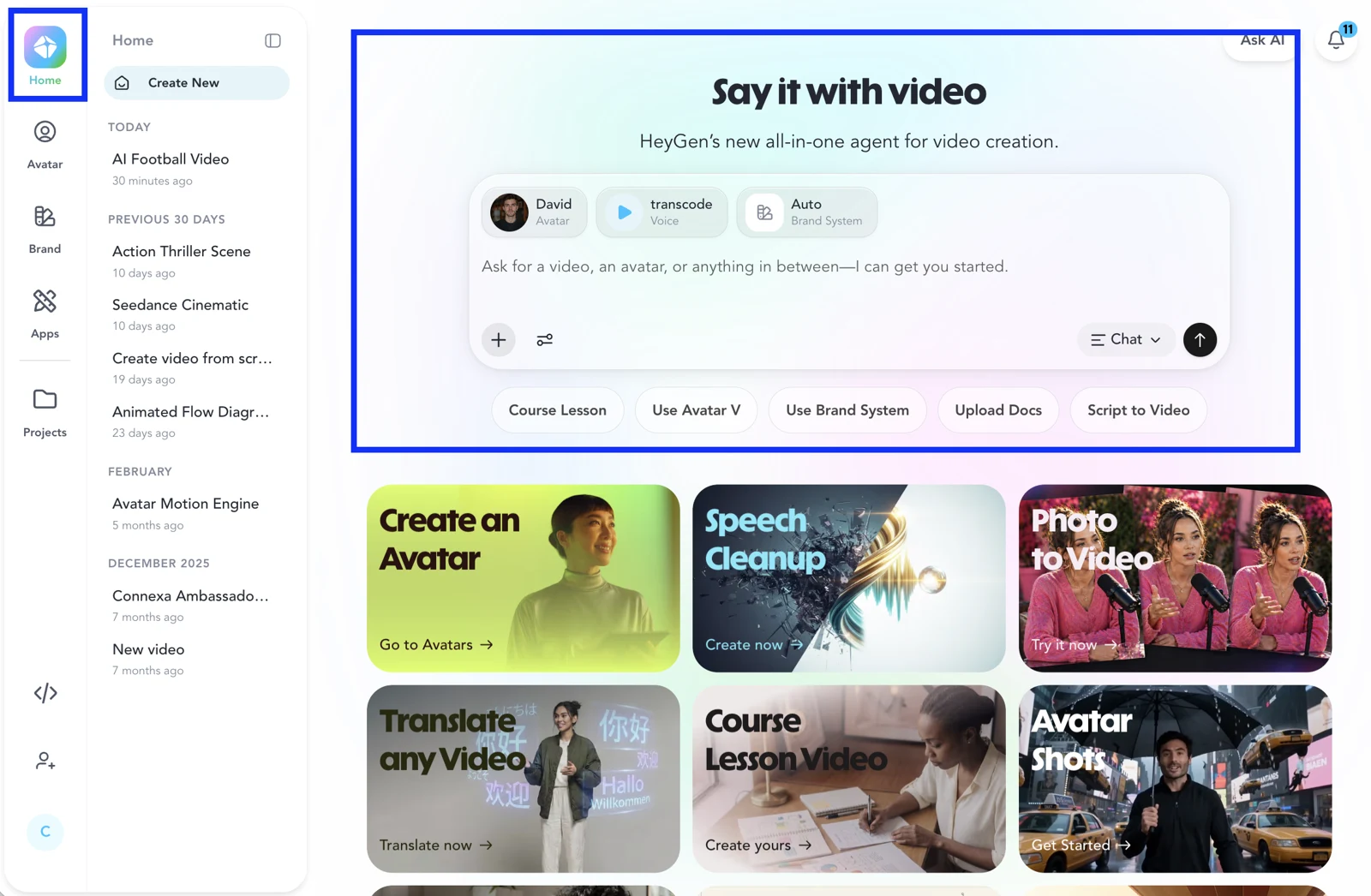
Launch Video Agent from the Home page in your HeyGen workspace.
Select an avatar and voice, optionally configure the Brand System, then choose Chat Mode or Autopilot Mode.
Set the duration and orientation, enter the exact script, and add instructions about tone, pacing, visuals, scene structure, or motion design.
Upload relevant images, videos, logos, or documents. Enable Seedance when cinematic animated visuals are preferred over primarily B-roll, stock, and uploaded media.
Generate the free video plan, provide feedback, proceed to rendering, then use Video Agent or an AI Studio copy for final revisions.
TAKE A LOOK AROUND
Explore the tool's demo or video to see its interface and workflow.
PLAN YOUR NEXT STEP
Video Agent is available on HeyGen’s Free plan with limited access. Creator is $29/month and Pro is $49/month; paid plans provide expanded or maximum access, credits, and higher export capabilities.
PLAN
For trying HeyGen. Includes three videos per month, videos up to one minute, watermarking, limited Video Agent access, Avatar IV access, one custom video avatar, and 30+ languages.
$0
per month
PLAN
For publishing video with expanded Video Agent access, 600 credits, 1080p export, watermark removal, a custom video avatar, and 175+ languages and dialects.
$29
per month
PLAN
For higher-volume creation, with maximum Video Agent access, 1,000 credits, 4K export, videos up to 30 minutes, and access to Seedance 2.5.
$49
per month
Prices, usage limits and terms can change. Confirm the latest details on the tool's official website before subscribing.
It is HeyGen’s prompt-native creative engine, constructing a video from an idea or script by planning the story, selecting visuals, adding narration, and creating edits and transitions.
Yes. Video Agent first generates a video plan that you can review and refine through conversation before confirming full video generation.
Yes. You can upload images, videos, logos, and documents for the agent to incorporate into the project.
Seedance uses AI-generated cinematic animated visuals matched to the script. When disabled, the workflow relies primarily on B-roll, stock footage, and uploaded media.
Yes. Edit a copy in AI Studio to manually adjust scripts, avatar scenes, voices, audio, media, layout, timing, transitions, and captions.
Credit use depends on generation mode, duration, settings, and generated content such as AI B-roll, images, video assets, and motion design. HeyGen shows an estimated cost before generation.
FROM THE COMMUNITY
Sign in to share your experience and help others find the right tool.
FEATURED BADGE

YOUR NEXT DISCOVERY

Create videos from text with AI

Use Astria Video to create video art and video clips from text combined with fine-tuning. Create fine-tuned AI model with your training images, then use prompt text like `frame: text` to transition between images

A free AI kissing video generator by Supawork AI that requires no sign-up, capable of transforming static photos into realistic French kiss animation videos.

A revolutionary AI tool that converts speech and audio into videos with professional-grade human animation and cinema-quality. It offers advanced dynamic consistency and motion control, designed for filmmakers, content creators, and developers.
MAKE YOUR NEXT MOVE
Visit the official website to explore the latest features and get started.