

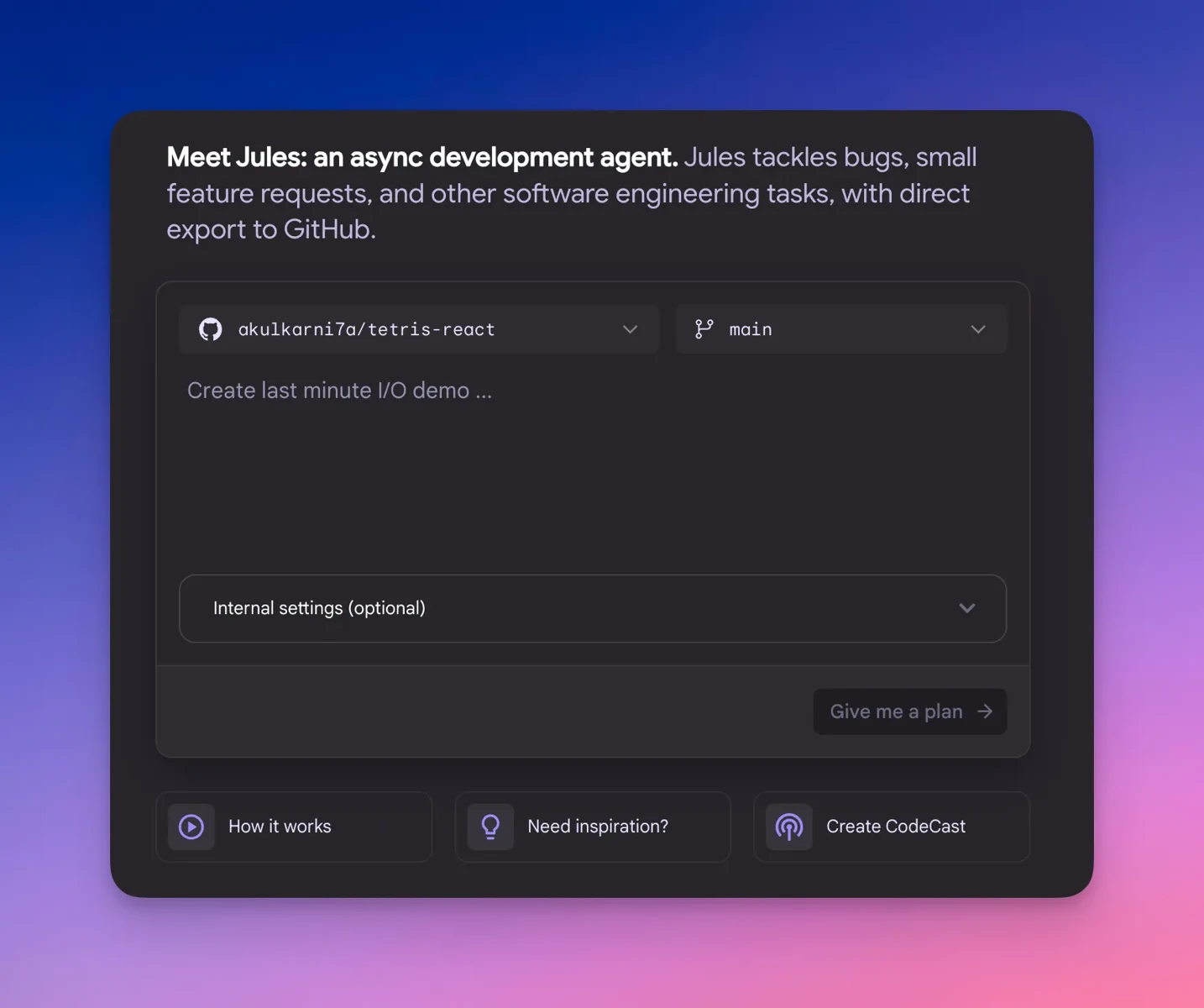
GitHub repository integration
Connect a GitHub account, choose all or specific repositories, select a repository and branch, then give Jules a task through its web interface.
TOOL PROFILE TOOLAI
An autonomous coding agent for GitHub repositories
 View full image
THE BIG PICTURE
Google Jules is an experimental coding agent that handles repository tasks such as bug fixing, version updates, tests, documentation, and feature development. It integrates with GitHub, understands a connected codebase, and works autonomously while you move on to other work.
Jules clones the selected repository and branch into a cloud virtual machine, installs dependencies, and develops a task plan using Gemini models. You can review and approve the plan, inspect the resulting diff, and have Jules create a pull request for review, merging, and publication through GitHub.
A CLOSER LOOK
Explore product screens and published examples. Open any image for a closer look.
WHAT YOU CAN DO
Get to know the capabilities. Find your own way to use them.
Connect a GitHub account, choose all or specific repositories, select a repository and branch, then give Jules a task through its web interface.
Jules works autonomously after submission, cloning the repository, installing dependencies, modifying files, and continuing while you are away from the active session.
Before editing code, Jules generates a task plan that you can review and approve, giving you an opportunity to provide feedback before implementation begins.
Each task runs in a cloud virtual machine where Jules clones the project, installs dependencies, and performs development work against the selected branch.
After completing work, Jules presents a diff of the changes so you can browse the proposed edits and assess them before accepting the result.
Jules can create a GitHub pull request from its changes, allowing you to review, approve, merge, and publish the work through GitHub.
Jules automatically looks for AGENTS.md at the repository root and uses its project guidance, tool descriptions, and input or output conventions.
A GitHub issue can assign work directly to Jules using the “jules” label, providing an alternative to submitting every task from the web interface.
MADE FOR YOUR WORKFLOW
Ask Jules to update a project dependency, adjust related code, and prepare a pull request so the changes can be reviewed before merging.
Give Jules a specific failing behavior or function and request a fix with accompanying tests, then inspect the plan, diff, and pull request.
Use a detailed prompt to add repository documentation or implement a bounded feature while Jules handles the initial code changes in an isolated task environment.
YOUR FIRST STEPS
Visit jules.google.com, sign in with a Google account, and accept the one-time privacy notice.
Connect a GitHub account and grant Jules access to all repositories or only the specific repositories it should use.
Select a repository and branch, then write a clear, specific prompt describing the desired code change.
Submit the task with “Give me a plan,” inspect Jules’s proposed approach, and approve it before code changes are made.
Inspect the resulting diff and pull request, then approve, merge, and publish the changes through GitHub when they meet your requirements.
TAKE A LOOK AROUND
Explore the tool's demo or video to see its interface and workflow.
PLAN YOUR NEXT STEP
Jules offers free access and higher-limit access through Google AI Pro and Ultra.
PLAN
Entry access for real coding tasks, with 15 tasks per day, 3 concurrent tasks, and Gemini 2.5 Pro.
PLAN
Higher-throughput access for developers who ship daily, with 100 tasks per day, 15 concurrent tasks, and higher access to the latest models starting with Gemini 3 Pro.
PLAN
The highest listed access option, with 300 tasks per day, 60 concurrent tasks, and priority access to the latest models starting with Gemini 3 Pro.
Prices, usage limits and terms can change. Confirm the latest details on the tool's official website before subscribing.
Sources checked
Jules is an experimental autonomous coding agent that works with GitHub repositories to fix bugs, add documentation, build features, update versions, and create tests.
No. Jules first generates a plan for review and approval. After implementation, it provides a diff for inspecting the proposed file changes.
Jules runs tasks in a cloud virtual machine where it clones the repository, installs dependencies, and modifies project files.
Yes. Jules creates a pull request from completed changes, which you can review, approve, merge, and publish through GitHub.
Jules automatically checks for an AGENTS.md file at the repository root. That file can describe tools, interactions, and input or output conventions.
Yes. Browser notifications can be enabled during setup or later through Settings and notifications, including alerts when a task completes or needs input.
FROM THE COMMUNITY
Sign in to share your experience and help others find the right tool.
YOUR NEXT DISCOVERY

DeskDay is a unified next-gen IT support platform future-proofed for MSPs and MSSPs to perform their daily tasks effectively & easily.

LAION, as a non-profit organization, provides datasets, tools and models to liberate machine learning research. They encourage open public education and a more environment-friendly use of resources by reusing existing datasets and models.

🚀 Meet CodableAI: Your personal AI programming assistant! Tackle coding challenges, manage GitHub repos, get instant coding solutions, and transform your workflow. From writing code to debugging - all powered by AI. Make coding smarter with CodableAI. 💡

KushoAI is an AI-driven test automation tool for developers and QAs. It transforms user inputs into comprehensive, ready-to-run test suites for testing both web interfaces and backend APIs, completing test writing in minutes.
MAKE YOUR NEXT MOVE
Visit the official website to explore the latest features and get started.