TOOL PROFILE TOOLAI

Creen AI

Browser-based multi-model AI studio for generating video, images and audio from text or reference images

creen.aiPRODUCT PREVIEW
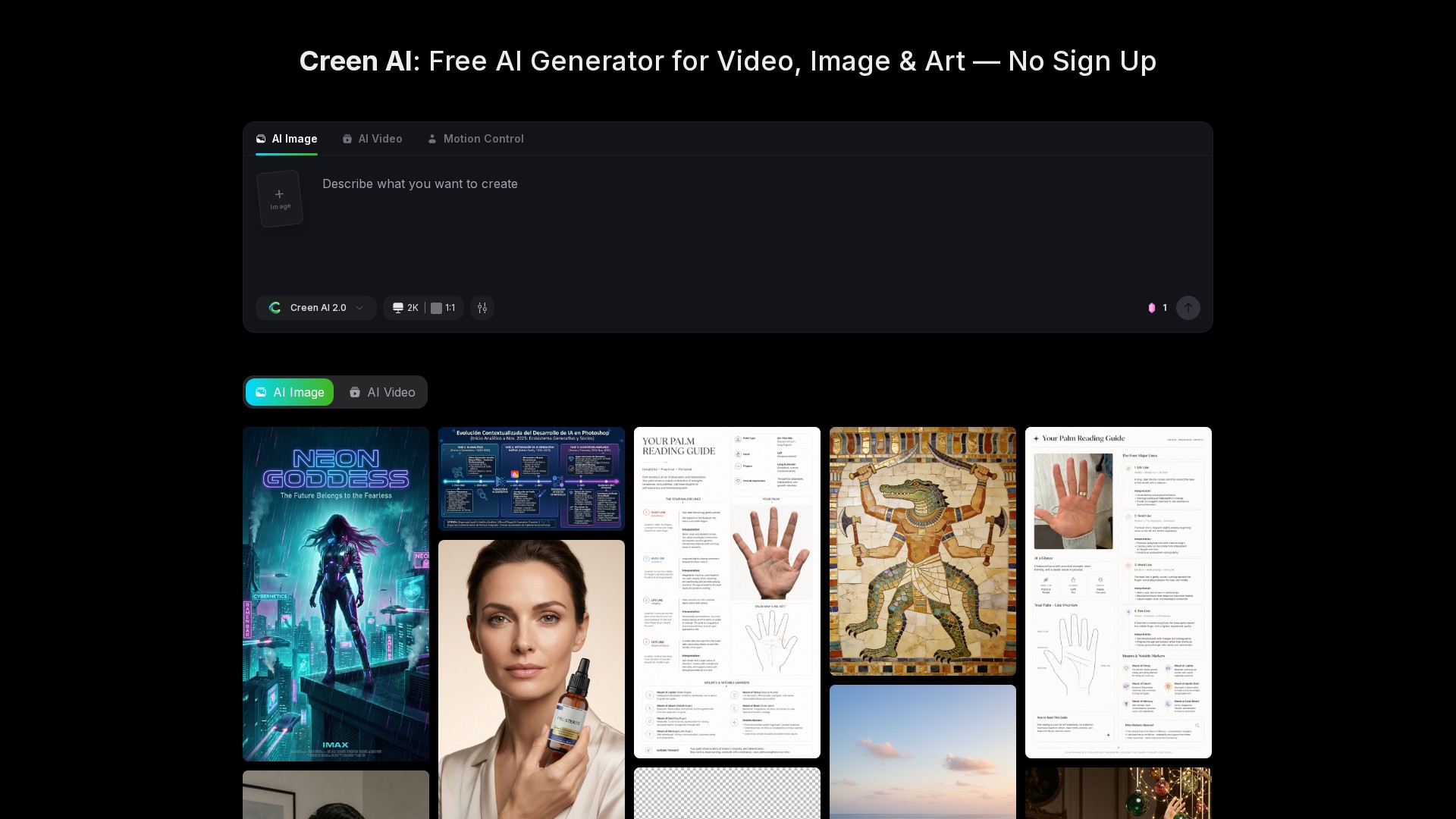
Creen AI — product preview View full image
Interface and results previewImages: 1

THE BIG PICTURE

About Creen AI

Creen AI is a browser-based creative studio that combines video, image and audio generation in a single workspace. According to its official pages, the platform brings together a large roster of generative models — described as 28 video models, 11 image models and 7 audio models — behind one interface, so users can switch engines without moving between separate subscriptions or tools. The site presents the product as an all-in-one generator where the same prompt can be routed to different engines to compare results.

The platform emphasises low-friction access. The official pages state that no sign-up or login is required to start creating, and that a free daily quota applies to select models, with premium frontier models consuming credits when users opt into them. Output specifications listed on the site include images up to 4K (3840 × 2160) and video clips up to 1080p at 24fps with a maximum length of about 10 seconds. The site also states that each generation exposes a seed value so a composition can be reproduced.

Beyond generation, the feature pages list a broad set of editing and utility tools, including image-to-video animation, video enhancement and upscaling, background removal for images and video, lip sync, talking-photo animation, motion control, outfit and character swapping, and audio tools such as text to speech and sound effects. The site describes the workspace as handling text-to-image, image-to-image, text-to-video and image-to-video flows from the same page.


WHAT YOU CAN DO

A toolkit worth exploring

Get to know the capabilities. Find your own way to use them.

Multi-model generation workspace

The platform routes prompts to a large roster of engines in one interface, described as 28 video models, 11 image models and 7 audio models. Users can switch engines to compare output styles without leaving the workspace.

Text-to-image and image-to-image

Users can generate images from a text prompt or upload a photo and describe changes to rebuild it. The image-to-image flow accepts batch uploads and multiple reference images, and output can reach 4K resolution.

Text-to-video and image-to-video

A written prompt or a still image can be turned into a short video clip. The site describes clips of up to about 10 seconds at 1080p and 24fps, with image-to-video animation typically completing in 20-40 seconds on fast models.

Seed control and prompt steering

Each generation exposes its seed value so the same prompt can reproduce the same composition. The site also documents prompt weighting and negative prompts for steering output.

Image and video editing utilities

The tools section lists an image enhancer, background remover, text remover, video enhancer with upscaling, video background remover, video editor and video extender, all within the same browser workspace.

Character, outfit and motion tools

Documented tools include outfit swap, gender swap, character swap for video, AI motion control driven by a reference image and video, lip sync, talking photo and a dance video generator that animates still images.

Audio generation

Audio tools cover sound effects from a text prompt, text to speech with a stated library of 100+ voices across 20+ languages, and an AI song generator that produces songs with vocals.

Style presets and filters

The feature list includes a Studio Ghibli style filter, an anime generator that also supports comic pages, photo-to-caricature, AI hairstyle, AI headshot generation and a passport photo maker.

MADE FOR YOUR WORKFLOW

Where it fits into your day

USE CASE 01

Short-form social content

Creators can generate still concepts, animate a chosen image into a short clip and export vertical video for Reels, Shorts or TikTok. The site describes this as a fast loop for daily posting.

USE CASE 02

Product and lifestyle imagery

Sellers can upload a flat product shot and restage it in lifestyle scenes using image-to-image, which the site presents as a way to produce catalog imagery without a studio shoot.

USE CASE 03

Real-estate and travel recaps

Property photos or vacation images can be animated into short walk-through or recap clips by combining image-to-video with a motion prompt and a music bed added in an editor.

USE CASE 04

Storyboarding and concept art

Illustrators, indie developers and pre-visualisation artists can generate scene stills and animate them to check camera moves before committing to production.

USE CASE 05

Educational explainers

Teachers and tutors can turn a curriculum paragraph into a short illustrated video using text-to-video templates, as described in the site's workflow examples.

YOUR FIRST STEPS

From first click to first result

Try it on the official website
  1. Open the studio

    Navigate to the Creen AI site; the studio loads in the browser and the site states no sign-up or email gate is required to begin.

  2. Choose a modality

    Select the relevant route — image generation, video generation, image-to-video, text-to-video or an editing tool — from the workspace navigation.

  3. Write a prompt or add references

    Type a natural-language prompt, or upload one or more reference images for image-to-image flows, or a still image for image-to-video.

  4. Pick a model

    Use the model picker to switch between the available video, image or audio engines; the site notes each engine produces a different look or motion feel.

  5. Generate, refine and export

    Run the generation, optionally reuse the exposed seed or adjust weighting and negative prompts to refine the result, then download the output or send a still onward to image-to-video or an editing tool.

PLAN YOUR NEXT STEP

A plan for the way you work

Free tier with a daily quota on select models; paid monthly or annual plans (Pro cited at $29/month monthly or about $14.5/month billed annually at $174/year) plus a separate auto-renewing Credits Pack starting at $10/month for 3,000 credits.

Subscribe on the tool's website

PLAN

Pro (monthly)

Monthly Pro subscription cited on the official pricing FAQ; includes a monthly credit allowance (8,000 credits referenced in the pricing examples).

29

per month

View plan on website

PLAN

Pro (annual)

Annual Pro billing described as about $14.5 per month, billed yearly, saving roughly 40% versus monthly.

174

per year

View plan on website

PLAN

Credits Pack (base tier)

Auto-renewing credit subscription separate from plans, providing 3,000 credits per month at the base rate; larger tiers add bonus credits and Pack credits never expire.

10

per month

View plan on website

Prices, usage limits and terms can change. Confirm the latest details on the tool's official website before subscribing.

The provider advertises monthly and annual billing, plus credit packs. Check the official pricing page for current tiers, credit allowances, included features and billing terms.

Sources checked

A FEW MORE THINGS

Good questions. Useful answers.

More on the official website

Is Creen AI free to use?

The official pages state that the core experience — text-to-image, image-to-image and image-to-video — includes free daily generations on select models, and that premium frontier models may consume credits when users opt into them.

Do I need an account to start?

No. The site states that no sign-up or login is required to start creating, and that creating an account allows users to save projects and manage creations.

Which models are available?

The site lists 28 video models (including Sora 2 Pro, VEO 3.1, Seedance 2.0, Wan 2.7, Kling V3, Hailuo 02, Vidu Q3 and Grok Imagine Video), 11 image models (including Z-Image Turbo, Seedream 4.5, Nano Banana Pro and GPT Image 2) and 7 audio models (including MiniMax Speech variants and Gemini TTS).

What output quality and length can I expect?

The site states images can be generated up to 4K (3840 × 2160) and video clips up to 1080p at 24fps with a maximum length of about 10 seconds.

How long does generation take?

According to the site, images typically complete in 5-15 seconds depending on the model, and video in roughly 20-40 seconds on fast models, with premium models potentially taking longer at peak demand.

Can I use the output commercially?

The FAQ states that generated outputs can be used for personal and commercial work, subject to the platform's content policy and local rules on AI-generated material.

Is adult or NSFW content allowed?

No. The site states that adult, NSFW and pornographic content is strictly prohibited and moderated, and that identity-impersonation prompts, deepfakes and non-consensual likeness use are blocked.

How do credits and cancellation work?

Plan subscription credits refresh each cycle and do not roll over; after cancellation, access continues to the end of the current billing period, and unused plan credits reset to zero when the plan expires. Credits Pack credits accumulate and never expire. Cancellation is managed from the subscriptions page, and the site advises cancelling at least five days before renewal.

FROM THE COMMUNITY

What has your experience been?

YOUR NEXT DISCOVERY

More tools to explore

Explore all tools

MAKE YOUR NEXT MOVE

Ready to explore Creen AI?

Visit the official website to explore the latest features and get started.

Visit official website
Creen AIcreen.ai
Visit website

GALLERY

PASS IT ALONG

Share Creen AI