


AI text humanization
Paste an AI-written draft and the tool refines repetitive phrasing, sentence structure, tone and readability while preserving the original meaning. The site describes this as polishing rather than rewriting.
TOOL PROFILE TOOLAI
Free AI humanizer that improves tone, sentence structure, clarity and readability in AI-assisted drafts
 View full image
THE BIG PICTURE
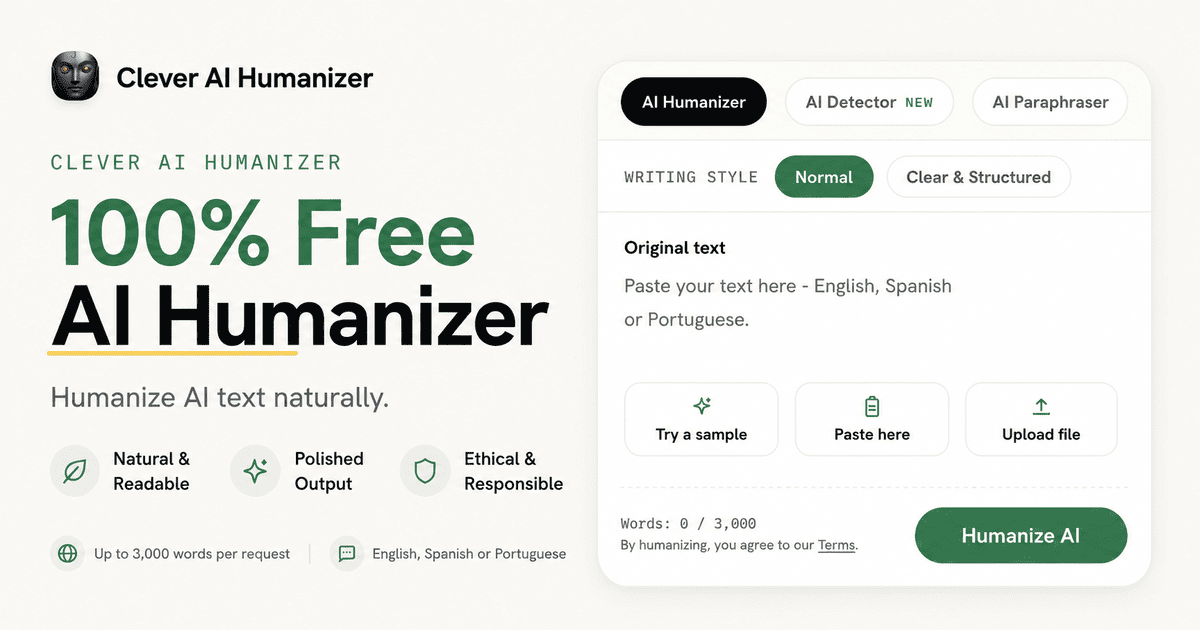
Clever AI Humanizer is a browser-based writing editor from CleverFiles that refines AI-generated drafts so they read more naturally. According to the official site, it improves repetitive phrasing, sentence variety, tone and readability while preserving the original meaning, rather than swapping words randomly or introducing grammatical errors. The company describes the approach as refinement rather than rewriting: the idea stays the same while the voice changes.
The tool is positioned as completely free, with no ads and no paywall, and no fixed monthly word allowance. Each request can process up to 3,000 words, subject to service availability. The site states that the current model was trained on a large corpus of human-written texts rather than being a prompt wrapper, and that a previous 200,000-words-per-month limitation was removed. Supported languages for the humanizer are English, Spanish and Portuguese, with more languages planned.
Clever AI Humanizer sits alongside other free Clever AI Tools, including an AI Detector, an AI Paraphraser and a Grammar Checker. The humanizer offers two writing styles, Normal and Clear & Structured, and signed-in users can keep a content history of their humanized texts. The site includes a responsible-use statement noting that users remain responsible for complying with institutional, employer and platform rules, and that results vary by text and should always be reviewed for accuracy, tone and meaning.
A CLOSER LOOK
Explore product screens and published examples. Open any image for a closer look.
WHAT YOU CAN DO
Get to know the capabilities. Find your own way to use them.
Paste an AI-written draft and the tool refines repetitive phrasing, sentence structure, tone and readability while preserving the original meaning. The site describes this as polishing rather than rewriting.
Two styles are offered. Normal suits blog posts, social media posts and product descriptions that need to be simple and friendly. Clear & Structured suits reports, summaries and other structured writing where a clean structure matters more than impressive vocabulary.
Each humanization request can process up to 3,000 words, and the site states there is no fixed monthly word allowance, subject to service availability.
Creating a free account stores every humanized text so users can return and reuse earlier results. Humanizing itself remains free with or without an account.
The result panel includes a Show changes option, letting users compare the humanized output against the original text.
A linked Clever AI Detector estimates how likely a text was written by AI, returning a probability score with sentence-level signals and confidence indicators, up to 10,000 words per check.
The humanizer accepts English, Spanish and Portuguese text, and the site states that additional languages are planned.
Alongside pasting text, the interface provides an Upload file option for supplying the draft to be humanized.
MADE FOR YOUR WORKFLOW
Writers and bloggers can run drafts that contain repeated phrases and uniform sentence structures through the humanizer to make them read more naturally before publishing.
Marketing and social media professionals can use it when AI-generated copy lacks a distinct voice and reads as if it could sell anything to anybody.
Business professionals can refine emails and structured documents that contain the right information but lack a personal touch, using the Clear & Structured style for reports and summaries.
SEO writers can improve heavily automated text while keeping keywords and structure intact, since the tool changes style and phrasing rather than meaning.
Job seekers and freelancers can edit AI-assisted cover letters so they stand out from the many similar AI-generated applications recruiters receive.
YOUR FIRST STEPS
Visit https://cleverhumanizer.ai in your browser.
Paste the text into the input box, or use the Upload file option. The field accepts English, Spanish or Portuguese text up to 3,000 words.
Choose Normal for simple, friendly content or Clear & Structured for reports and structured writing.
Start the process. The site notes it may take a while.
Read the humanized output, optionally use Show changes to compare, then copy the text. Signed-in users can also find it later in their content history.
PLAN YOUR NEXT STEP
Free; no ads, no paywall, no fixed monthly word allowance, up to 3,000 words per request
Prices, usage limits and terms can change. Confirm the latest details on the tool's official website before subscribing.
The provider describes the humanizer as free, without ads or a paywall, and without a fixed monthly word allowance. Check the official site for any changes to access or usage terms.
Sources checked
It is a writing editor that makes AI-written content read more naturally by improving repetitive phrasing, sentence structure, tone and readability while preserving the original meaning. The site states the current model was trained on a large corpus of human-written texts rather than being a prompt wrapper.
Yes. The site lists the price as $0 with no ads and no paywall, and states there is no fixed monthly word allowance. It notes that CleverFiles as a company often launches products for free and may introduce paid premium features after one to two years.
Up to 3,000 words can be processed per request, and there is no fixed monthly word allowance, subject to service availability. The site states a previous 200,000-words-per-month limitation was removed.
The humanizer currently supports English, Spanish and Portuguese. The site states that additional languages are planned for the near future.
Yes. The site states the same technique applies to text from ChatGPT, Gemini, Claude and other AI bots, because their output shares similar traits that a humanizer can improve.
According to the site, humanizing concerns tonality and fluency and changes word choice until the text stops being mechanical; paraphrasing expresses the same thought in other words; rewriting goes further and can change both word choice and how an idea is expressed.
Signed-in users can keep a content history so every humanized text is stored in their account and can be reused later. Humanizing remains free with or without an account.
No. The site states that a humanizer will not help with poorly composed content, because neither lack of coherence nor inaccurate facts can be corrected with tone. Results vary by text and should always be reviewed for accuracy, tone and meaning.
FROM THE COMMUNITY
Sign in to share your experience and help others find the right tool.
YOUR NEXT DISCOVERY

Welcome to AutoGPT on mobile! AutoGPT is one of the first examples of GPT-4 running autonomously, pushing the boundaries of what is possible with AI. It can do tasks for you, learn and adapt - completely by itself!

This extension adds a list of curated prompt templates for SEOs to ChatGPT. You get one-click access to: ✔️ Competitor Article Rewrite ✔️ Keyword intent ✔️ Clustering ✔️ Link Building ✔️ Content generation ✔️ FAQs & more!

Turn your ideas into blog posts in a flash with Sentencefy! Publish them in one click and boost your SEO in no time. All in multiple languages for a global audience. 🚀

Unlock your best writing
MAKE YOUR NEXT MOVE
Visit the official website to explore the latest features and get started.