

Multi-database workspace
Connect to MySQL, PostgreSQL, SQL Server, Oracle, MongoDB, Redis, and many other supported systems from one client.
TOOL PROFILE TOOLAI
Explore and manage databases from one client, with AI assistance for writing and understanding SQL.
 View full image
THE BIG PICTURE
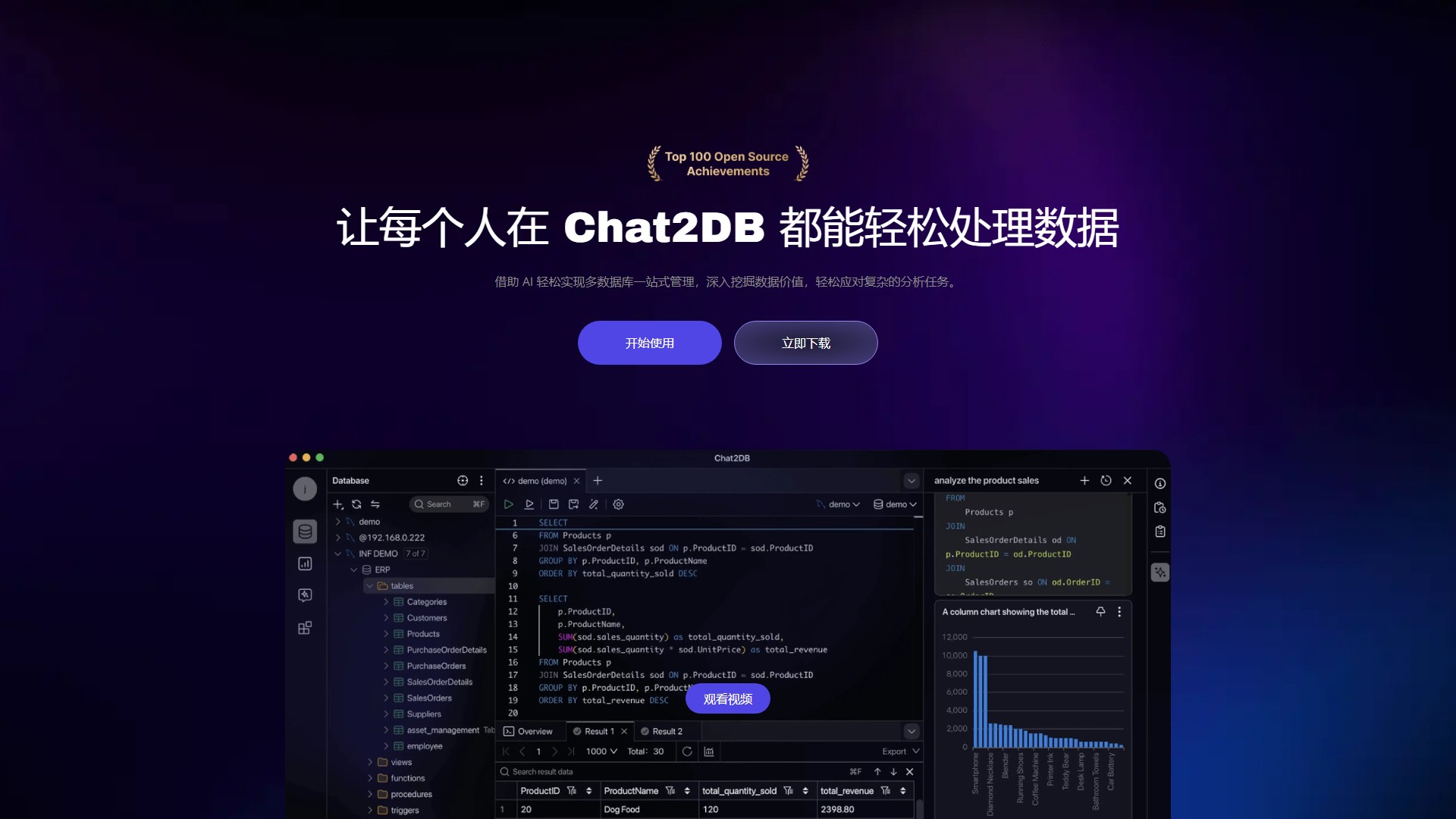
Chat2DB is a database client and development workspace for connecting to SQL and NoSQL systems. Its desktop editions run on Windows, macOS, and Linux; the product also provides a web experience. Core work includes browsing schemas, editing tables, running SQL, importing and exporting data, and moving between database types. Paid editions add AI-assisted Text2SQL, query completion and optimization, dashboards, and team features.
The practical promise is less context switching: connect databases and work with SQL and data tools from one workspace. AI-generated SQL is a suggestion, not a safety mechanism. Read the query plan, check the target database and affected rows, and use least-privilege credentials before executing changes. If a prompt includes schema or sample data, review where that content is processed under the selected edition and AI configuration.
A CLOSER LOOK
Explore product screens and published examples. Open any image for a closer look.
WHAT YOU CAN DO
Get to know the capabilities. Find your own way to use them.
Connect to MySQL, PostgreSQL, SQL Server, Oracle, MongoDB, Redis, and many other supported systems from one client.
Browse structures, edit tables, format and run SQL, and keep query records in the database workspace.
Eligible editions offer Text2SQL, completion, optimization, schema generation, and analysis features when AI is configured or available.
Use import/export and migration tools; paid features include dashboards and additional data-analysis workflows.
Choose a free community client, a local license, a Pro account, or an enterprise deployment based on connectivity and collaboration needs.
MADE FOR YOUR WORKFLOW
Ask for a first SQL draft from a schema description, then verify joins, filters, permissions, and expected rows before execution.
Keep development and analysis connections in one client while checking the target before each write operation.
Use eligible team tools to collaborate on SQL or reports, keeping access permissions and approval steps explicit.
YOUR FIRST STEPS
Compare Community, Local, Pro, and Enterprise against your database, offline, AI, and collaboration requirements.
Connect to a development database first and use credentials that cannot modify data unnecessarily.
Use the editor or AI suggestion, then read the full query and inspect its target and execution plan.
Test read-only queries first, confirm write effects, and save reviewed SQL or migration notes for the team.
PLAN YOUR NEXT STEP
Chat2DB lists Community, Local, Pro, and Enterprise editions. Community is open-source; paid rates and included AI features depend on edition and billing period.
PLAN
Free open-source client for everyday database management; AI and advanced capabilities depend on configuration and edition.
Free
Open-source edition
PLAN
Local is positioned for offline or individual use; Pro adds account and online AI features, cross-device usage, and data-management capabilities.
See current pricing
License or subscription; check checkout
PLAN
Enterprise options are aimed at organizations needing private deployment, SSO, unlimited users, support, and tailored security terms.
Custom
Contact sales
Prices, usage limits and terms can change. Confirm the latest details on the tool's official website before subscribing.
Checked on 4 October 2026. The pricing page exposes plan comparisons and monthly/annual selection but not a stable amount in the retrieved page. Confirm current price, AI configuration, and deployment terms before purchase.
Sources checked
Its official download page lists MySQL, PostgreSQL, Oracle, SQL Server, MongoDB, Redis, and more than 20 database types; access differs by edition.
No. AI may require configuration or a paid edition; the Local plan supports AI only while connected, according to current product documentation.
Chat2DB Local supports offline use after license activation, but the documentation says AI functions are unavailable in a network-free session.
Treat it as an unreviewed draft. Verify the database, permissions, query effects, and backup or transaction plan before executing writes.
FROM THE COMMUNITY
Sign in to share your experience and help others find the right tool.
YOUR NEXT DISCOVERY

A tool for email writing assistant.

A new AI email writing app for the iPhone that leverages Apple Mail to make writing emails a breeze. With MAILE, there's no need to sign in to your email account - simply provide a prompt and you'll get an email ready to send.
Main features: building custom AI agents, offering agent consulting services, providing AgentOps (agent observability platform), and a marketplace of 400+ production-ready AI agents. Use cases: enterprise workflow automation (implemented in weeks), cost reduction, revenue boost, and process streamlining. Target users: startups and Fortune 500 companies. Core advantages: rapid prototyping & productionization (safe/reliable), positive ROI, 24/7/365 operation. Pricing: free consultation, custom services require contact for pricing.
Generator Directory is a comprehensive AI tools and generators directory platform that helps users discover the most powerful generators and AI tools to enhance work and life. The platform covers tools across multiple fields from text writing, image generation, video production to code development.
MAKE YOUR NEXT MOVE
Visit the official website to explore the latest features and get started.