TOOL PROFILE TOOLAI

AI Inspo AI Creation Platform

All-in-one AI platform for generating video, images, music and creative effects from prompts and uploaded media.

ai-inspo.comPRODUCT PREVIEW
AI Inspo AI Creation Platform — product preview View full image
Interface and results previewImages: 1

THE BIG PICTURE

About AI Inspo AI Creation Platform

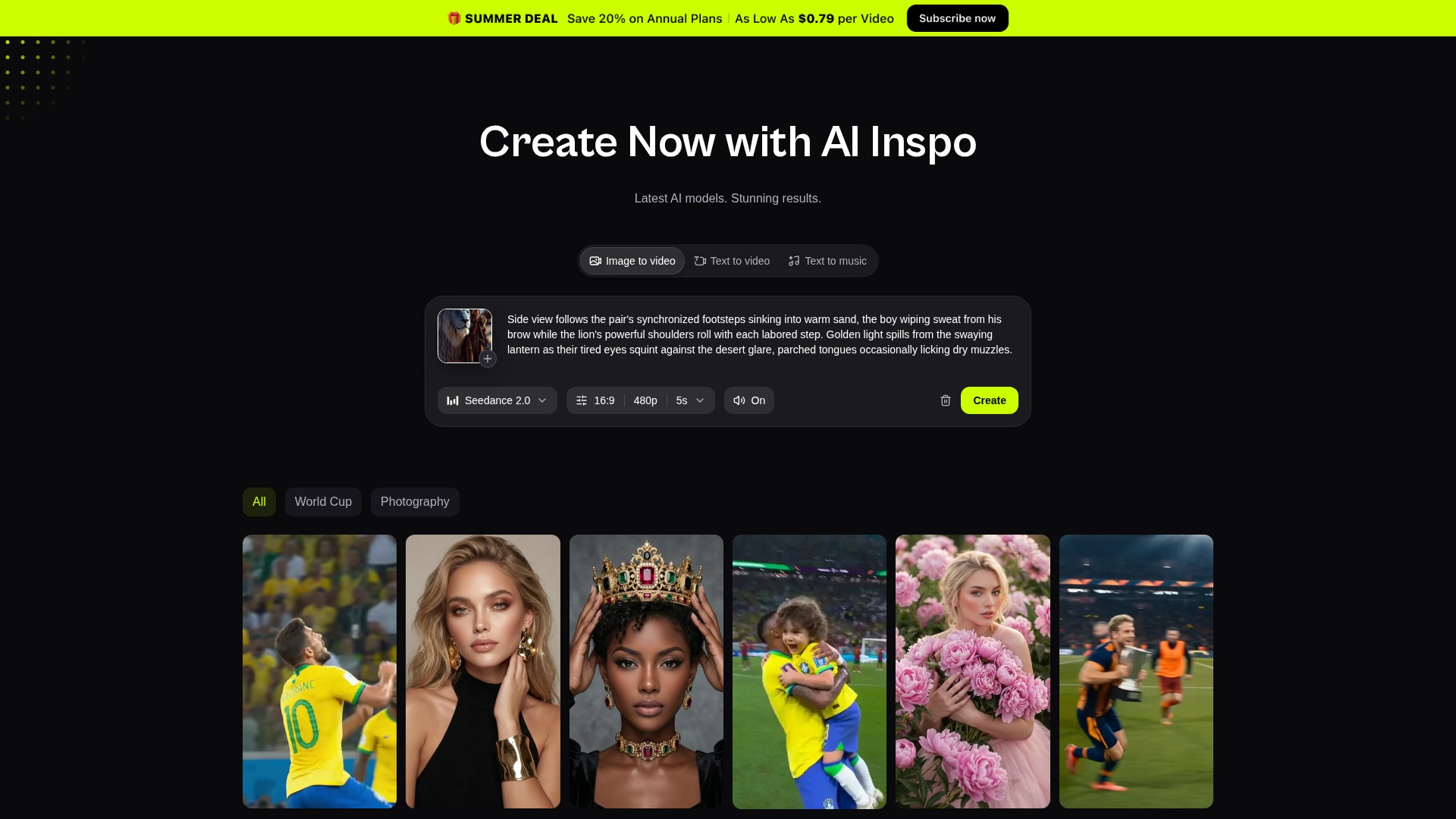
AI Inspo is a browser-based creative platform that bundles several generative AI tools into a single workflow. According to its homepage, it covers AI video (text to video and image to video), AI image (text to image and image to image), AI music (song, cover and image-to-song), plus a set of enhancement and editing utilities such as AI Motion, AI Pose, video and image enhancers, upscalers and background removal. The stated goal is to let creators produce videos, images, music and effects without switching between separate applications.

The platform presents a catalogue of named video and image models it exposes to users, including Seedance 2.5, Seedance 2.0, Veo 3, Kling 3.0 and Kling 3.0 Omni, Wan 2.5 and Wan 3.0, Vidu Q3 Pro, Hailuo 2.3, MiniMax H3, GPT Image 2, Nano Banana 2 Pro and Seedream 5. Users pick a tool or template, supply a prompt or reference media, and generate output; the site describes the tools as running on high-performance AI models behind a simple interface. The homepage also advertises a large library of templates and effects aimed at short-form social content.

Access is subscription-based with a credit allowance that resets monthly, and the pricing page documents four paid tiers plus a free starting point. The site markets itself to a broad creator audience — social media creators, marketers, illustrators, game designers and solo entrepreneurs — and emphasises speed and a low learning curve. Some claims on the site, such as creator counts, ratings and testimonials, are promotional and are not independently verified here.


WHAT YOU CAN DO

A toolkit worth exploring

Get to know the capabilities. Find your own way to use them.

AI Video Generation

Text-to-video and image-to-video tools turn a written prompt or a still image into a video with scenes, motion and cinematic effects. The homepage describes typing what you want and receiving a complete video, and separately animating an uploaded image into dynamic footage.

AI Image Generation and Editing

Text-to-image creates high-resolution images from prompts with selectable styles, while image-to-image lets users upload a reference photo and apply prompts to produce variations. The homepage lists illustrations, mockups, concept art and anime among the intended outputs.

AI Music, Song and Cover Tools

The platform includes a song generator that produces tracks from a described idea, mood or genre, an image-to-song tool that analyses an uploaded image's mood, colours and subject to generate a soundtrack, and an AI cover generator that reworks songs into different vocal styles and moods.

AI Pose Generator

A dedicated tool for creating character poses. Users upload a clear front-facing portrait (one JPG, JPEG or PNG up to 20MB) or describe a pose, then generate results with natural posture, body balance and composition. The page states it is built for character design, animation poses and concept art.

AI Motion and Effects Templates

AI Motion adds realistic motion and animation to videos or images, and the platform offers a large template and effects library aimed at short-form formats such as TikTok, Reels and YouTube Shorts, including trending effect templates users can apply to their own footage.

Enhancement and Utility Tools

The tool list includes video enhancer, image enhancer, video upscale, image upscale and background removal, allowing users to improve or prepare generated and uploaded media within the same platform.

Named Model Catalogue

AI Inspo lists a catalogue of video and image models it exposes to users, including Seedance 2.5 and 2.0, Veo 3, Kling 3.0 and Kling 3.0 Omni, Wan 2.5 and 3.0, Vidu Q3 Pro, Hailuo 2.3, MiniMax H3, GPT Image 2, Nano Banana 2 Pro and Seedream 5. Which models are available, discounted or unlimited depends on the subscription tier.

Credits and Concurrent Generation

Paid plans allocate monthly credits that reset each month, with the pricing page quoting $0.008 per credit and rough output estimates per tier. Plans also differ in the number of concurrent generations allowed, from 3 on Lite up to unlimited on Ultra.

MADE FOR YOUR WORKFLOW

Where it fits into your day

USE CASE 01

Short-Form Social Video

Creators can generate or animate clips and apply trending effect templates for TikTok, Reels, YouTube Shorts and similar platforms, then export watermark-free on paid tiers.

USE CASE 02

Character and Concept Art

Illustrators and game designers can use the AI Pose tool and image generators to explore character poses, body positioning and composition without drawing or 3D modelling skills.

USE CASE 03

Music for Content and Projects

The song, image-to-song and cover tools can help produce background tracks, mood-based soundtracks or reimagined covers for videos, podcasts, games and social posts.

USE CASE 04

Marketing and Ad Creative

Marketers can produce image and video assets from prompts or product photos for ads, presentations and campaign visuals, using the enhancement and upscaling tools to prepare final media.

YOUR FIRST STEPS

From first click to first result

Try it on the official website
  1. Create an account and sign in

    Open the AI Inspo site and log in; the homepage and tool pages present a Login entry point before generation features are used.

  2. Choose a tool or template

    Select from the navigation or tool list — for example Text to Video, Image to Video, Text to Image, AI Pose, AI Song or AI Cover — or pick a template from the effects library.

  3. Provide input

    Enter a text prompt, upload an image (AI Pose accepts one JPG, JPEG or PNG up to 20MB), or upload/select audio for a cover, depending on the chosen tool.

  4. Configure and generate

    Adjust available options such as style, pose, voice or mood, then start generation. The pricing page indicates the number of concurrent generations depends on your plan.

  5. Preview and download

    Review the generated result, refine settings if needed, and download the output. Watermark-free export is listed as a paid-plan benefit.

PLAN YOUR NEXT STEP

A plan for the way you work

Subscription plans with monthly credit allowances: Lite at $7.9/month (1000 credits), Pro at $23.9/month (3000 credits), Premium at $39.9/month (5000 credits) and Ultra at $79.9/month (10000 credits), with a yearly option advertised at 20% off. A free starting point with a 1-day free trial is advertised on the homepage.

Subscribe on the tool's website

PLAN

Lite

1000 credits per month, roughly 30 videos or 150 images, 3 concurrent generations, access to Seedance models, 1000+ templates and effects, watermark-free export.

7.9

monthly

  • 1000 credits / month
  • ~30 videos, 150 images
  • 3 concurrent generations
  • Access to Seedance models
  • 1000+ templates & effects
  • Watermark-free export
View plan on website

PLAN

Pro

3000 credits per month, roughly 90 videos or 450 images, 5 concurrent generations, full access to Seedance 2.5 and 2.0, discounted Seedance 2.5 and MiniMax H3.

23.9

monthly

  • 3000 credits / month
  • ~90 videos, 450 images
  • 5 concurrent generations
  • Full access to Seedance 2.5 and 2.0
  • 1000+ templates & effects
  • Watermark-free export
View plan on website

PLAN

Premium

5000 credits per month, roughly 180 videos or 900 images, 8 concurrent generations, 9 unlimited and free models, 1080p Seedance access, and a 1-day free trial.

39.9

monthly

  • 5000 credits / month
  • ~180 videos, 900 images
  • 8 concurrent generations
  • 9 unlimited & free models
  • Seedance 2.5 and 2.0 at 1080p
  • 1 Day Free Trial
View plan on website

PLAN

Ultra

10000 credits per month, roughly 360 videos or 1800 images, unlimited concurrent generations, 10 unlimited and free models, 1080p Seedance access, and a 1-day free trial.

79.9

monthly

  • 10000 credits / month
  • ~360 videos, 1800 images
  • Unlimited concurrent generations
  • 10 unlimited & free models
  • Seedance 2.5 and 2.0 at 1080p
  • 1 Day Free Trial
View plan on website

Prices, usage limits and terms can change. Confirm the latest details on the tool's official website before subscribing.

Prices above are the discounted monthly rates shown on the official pricing page; the page also lists higher original monthly prices ($9.9, $29.9, $49.9, $99.9) and a yearly toggle with 20% off. Credit-to-output estimates and model access differ by tier, so confirm current terms on the official pricing page before subscribing.

Sources checked

A FEW MORE THINGS

Good questions. Useful answers.

More on the official website

What is AI Inspo?

AI Inspo is an all-in-one AI creation platform that combines video, image and music generation with creative effects and enhancement tools in a single browser-based workflow, according to its homepage.

What can I create with AI Inspo?

The platform lists text-to-video, image-to-video, text-to-image, image-to-image, AI motion, AI pose, AI song, image-to-song and AI cover generation, plus video and image enhancement, upscaling and background removal.

Is AI Inspo free to use?

The homepage advertises starting for $0 with a 1-day free trial and unlimited access to top-tier models, and the pricing page shows a '$0 to start' banner. Ongoing use is subscription-based, with paid tiers from Lite to Ultra.

How does the credit system work?

Paid plans include a monthly credit allowance that resets each month, quoted at $0.008 per credit on the pricing page. The page gives rough output estimates per tier, such as about 30 videos and 150 images for 1000 credits.

Which AI models are available?

The site lists video models including Seedance 2.5, Seedance 2.0, Veo 3, Kling 3.0, Kling 3.0 Omni, Wan 2.5, Wan 3.0, Vidu Q3 Pro, Hailuo 2.3 and MiniMax H3, and image models including GPT Image 2, Nano Banana 2 Pro and Seedream 5. Access and unlimited allowances vary by plan.

What are the input requirements for the AI Pose tool?

The AI Pose page states it accepts one JPG, JPEG or PNG image up to 20MB, and recommends a clear front-facing image with visible body structure for better accuracy. Users can also describe or select a pose.

Can I use AI-generated content commercially?

Review the current Subscription Agreement and Terms and Conditions before commercial use. Confirm that the license covers your chosen model, output and intended use.

FROM THE COMMUNITY

What has your experience been?

YOUR NEXT DISCOVERY

More tools to explore

Explore all tools

MAKE YOUR NEXT MOVE

Ready to explore AI Inspo AI Creation Platform?

Visit the official website to explore the latest features and get started.

Visit official website
AI Inspo AI Creation Platformai-inspo.com
Visit website

GALLERY

PASS IT ALONG

Share AI Inspo AI Creation Platform